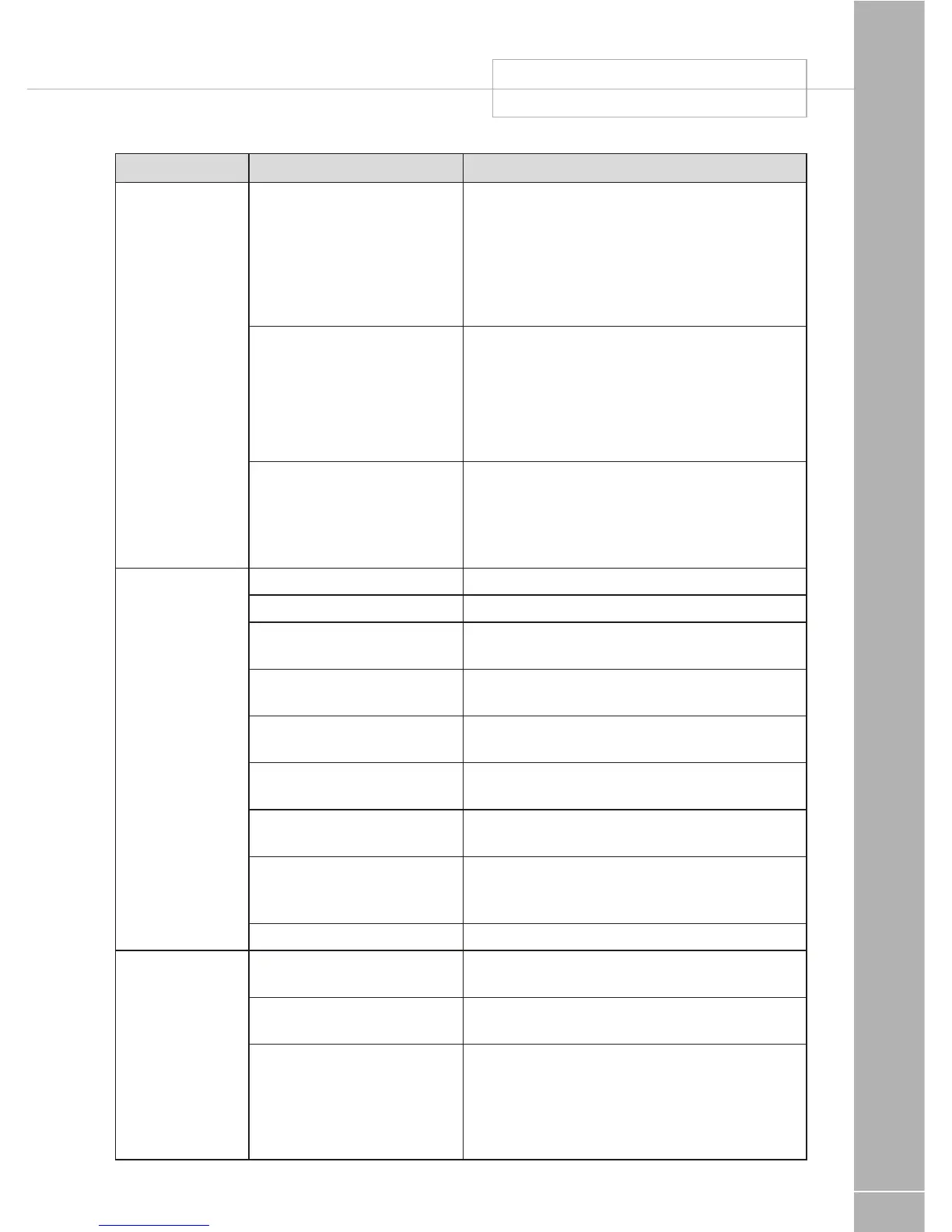
Fault Possible Cause Proposed Fix
Control Panel
Problems
Control Panel has no display Check batteries and fuses, turn PSU isolate
switch and charger switch on and ensure
mains supply is connected.
Check control panel connecting lead at PSU
and behind Control Panel
Contact your Dealer
12v Power turns off Battery protect feature has operated to protect
the Vehicle battery and or the Leisure battery.
See 3.4C
Engine has been started, all equipment has
been disconnected to meet EMC requirements.
See 2.6
Control Panel locked /
erratic function
Observe control panel handling instructions
Control panel software may have crashed.
Reboot control panel by turning off the PSU
shutdown switch. Wait 30 seconds then turn
the switch back on.
No12volt
output from PSU
No230vsupply Check all above
Charger not switched on Turn charger switch on, switch will illuminate
Battery not connected and /
or charged
Install charged battery as per 3.4
Power button on control
panel not switched to on
Turn power on at control panel
Battery flat / Battery fuse
blown
Recharge battery, check fuses, check charging
voltage is present at battery
Fuse blown Check all fuses are intact and the correct value
fuse is installed as per fuse table
Equipment switched off /
unplugged
Check equipment is switched on and
connected to the 12v supply
PSU overheated / auto
shutdown operated
Reduce load on system. Allow PSU to cool
down. PSU will automatically restart when
cool.
Other fault Contact your Dealer
Pump not
working
Fuse blown Replace fuse with correct value as per fuse
table.
Pump turned off Turn pump on by pressing the pump button at
the control panel.
Setting incorrect Both the internal and external pump feeds are
controlled from the control panel. To alter the
setting of the pump switch see section 3.8
Ensure the setting matches your desired
requirement.



 To Next Page