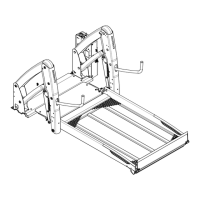
6.2 SETTINGS
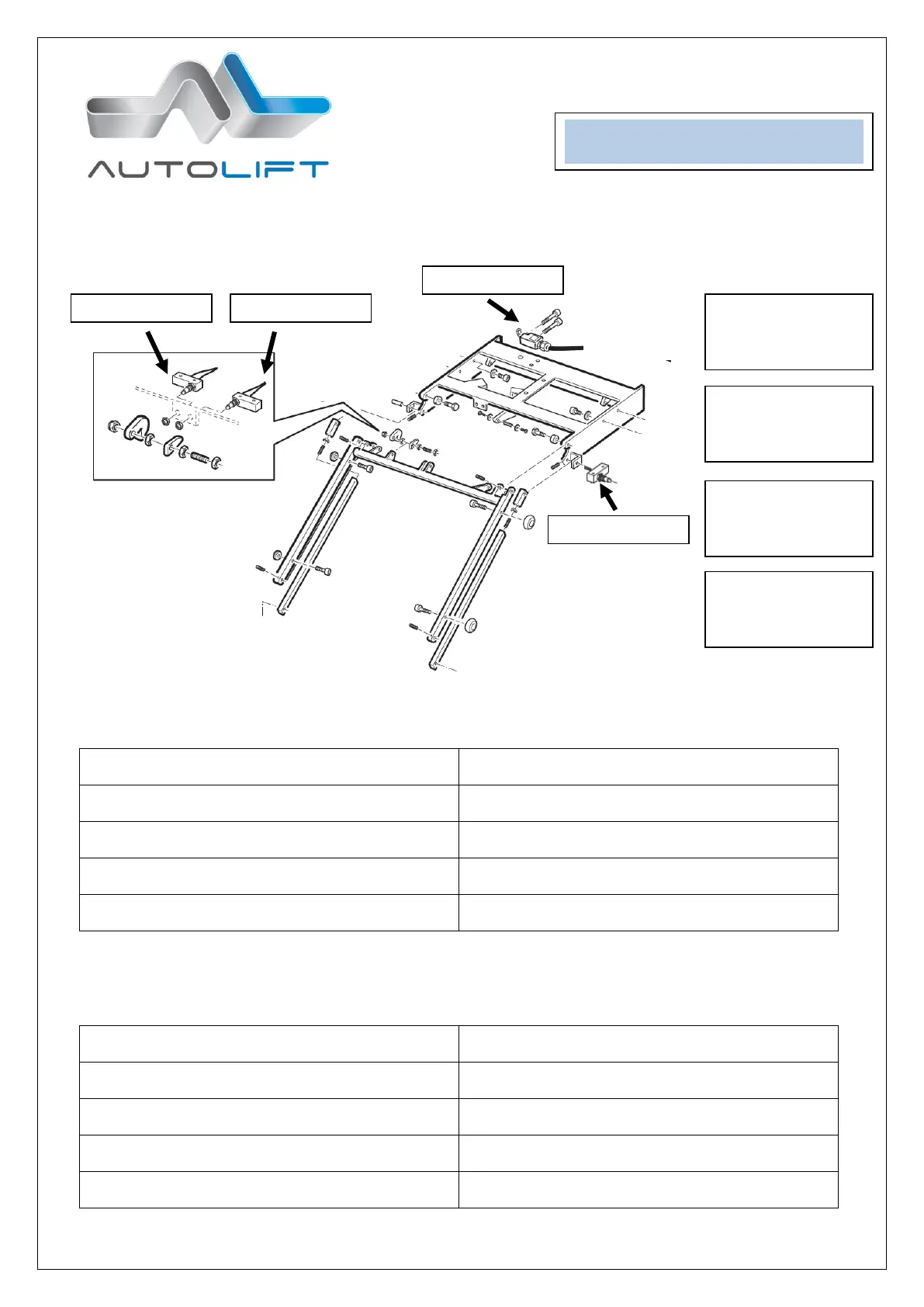
By changing the position of the cams it is possible to re-set the central position level and the upper position
(vehicle floor level)
CENTRAL POSITION – Microswitch A
A.Drive platform out of box
A. Drive platform out of box
C.Knock lightly the Cam A from the top (max 1mm)
C. Knock lightly the Cam A from the bottom (max
1mm)
D.Stow the lift back in the box (lift over central
position an than push button “in”
D. Stow the lift back in the box (push button “in”)
UPPER POSITION – Microswitch B
A.Drive platform out of box
A. Drive platform out of box
C.Knock lightly the Cam Bfrom the top (max 1mm)
C. Knock lightly the Cam B from the bottom (max
1mm)
D.Stow the lift back in the box (lift over central
position an than push button “in”
D. Stow the lift back in the box (push button “in”)
MICROSWITCH A
regulate the central
position level
MICROSWITCH B
regulates the upper
position level
MICROSWITCH C
gives signal of lift
completely “stowed”
MICROSWITCH D
gives signal of lift
completely “out”



 To Next Page