GDO-9 Enduro
TM
GEN2 Home Owners Manual10
8. Coding Transmitters
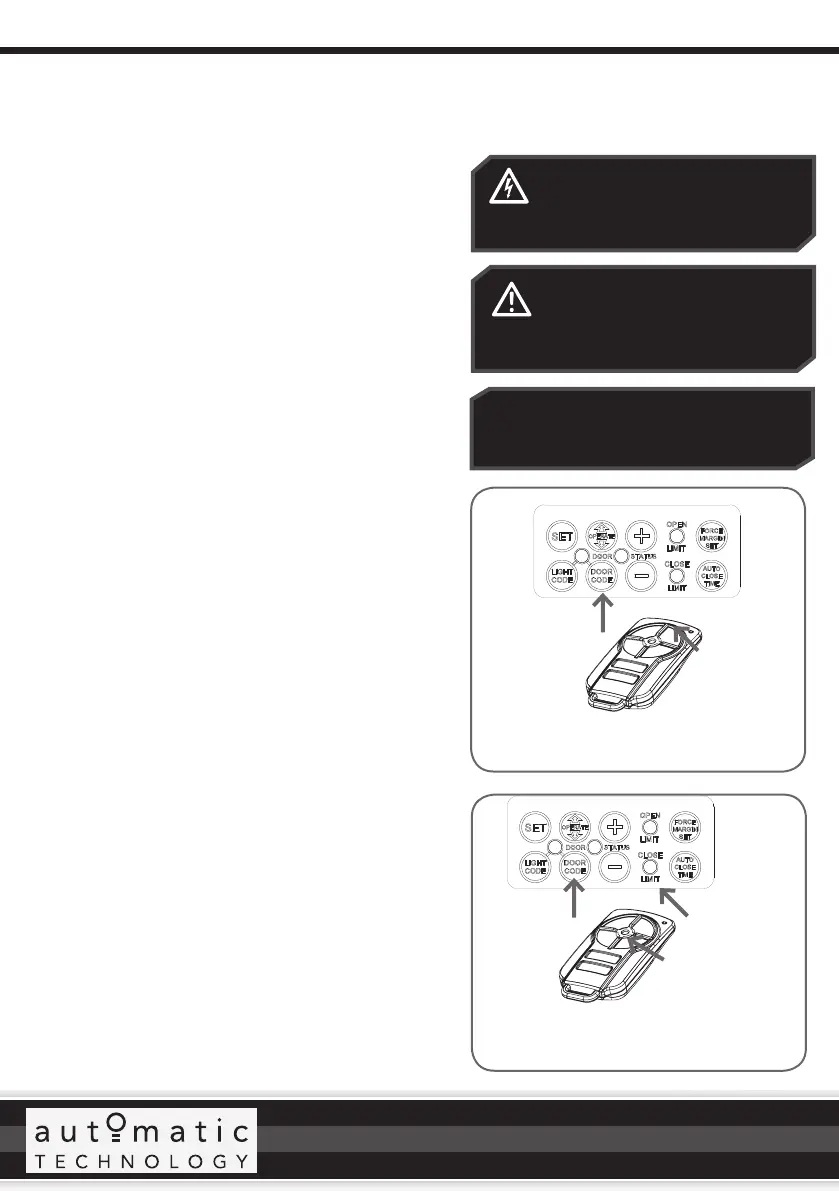
Press DOOR
CODE button
twice.
Select one of the
four buttons (not
programmed yet )
you wish to use to
control the Vacation
Mode
ELECTROCUTION! The button
cover is the only cover that should
be removed. All other covers must
remain in place.
CAUTION: Be careful not to press
the operate button while removing
the button cover as the door will
start to move.
Press and hold
DOOR CODE
button
Select one of the
four buttons you
wish to use to
control the door
Fig. 8.1
Fig. 8.2
IMPORTANT NOTE: Only TrioCode
TM
128
Technology Transmitters are compatible
with this GDO-9 GEN2 product.
8.1 Setting the Transmitter to Operate the Door
The opener can only operate from transmitters that have
been programmed into its receiver. The receiver needs to
learn the codes of any transmitter that will be used with the
operator. Up to sixty four (64) codes can be stored in the
receiver’s memory.
a. Ensure the button cover has been removed (see
Electrocution caution) and the opener is turned on.
b. Press and hold the DOOR CODE button. The DOOR
CODE LED will illuminate and beep to indicate the
opener is in Code Learn mode (Fig. 8.1).
c. Press and hold the transmitter button that you want to
control the door for two (2) seconds, pause for two (2)
seconds, then press the same button again for two (2)
seconds and release.
d. Release the DOOR CODE button.
e. Press the transmitter button to test.
8.2 Setting the Transmitter to Operate
Vacation Mode
The opener can be programmed into a “Vacation Mode”
where the opener will not respond to any transmitter
except one preprogrammed unit.
f. Briefly press the DOOR CODE button once, then press
it again and hold (will beep two times on second press
(Fig. 8.2).
g. Press one of the four (4) buttons on the transmitter for
two (2) seconds, pause for two (2) seconds, then press
the same button again for two (2) seconds.
h. Release DOOR CODE button.
i. Press and hold the transmitter button for six (6)
seconds to set Vacation Mode. The door code LED
will stay lit while Vacation Mode is active.
To reset Vacation Mode, press the same transmitter
button for two seconds.
8.3 Setting the Transmitter to Operate
PET (Pedestrian) Mode
a. Briefly press the DOOR CODE button three (3) times,
then press it again and hold (the opener will beep four
times on the fourth press.
b. Choose a transmitter button not already coded into
the receiver. Press and hold this button for two (2)
seconds, pause for two (2) seconds, then press the
same button again for two (2) seconds and release.
c. Release the DOOR CODE button.
d. Press the transmitter button to test.








 To Next Page