Installation Instructions & Owner’s Manual SecuraLift® Rhino 19
28
Fig
29
Fig
Please take care when testing the Safety Obstruction
Force. Excessive force may cause SERIOUS
PERSONAL INJURY and/or PROPERTY DAMAGE can
result from failure to follow this warning.
Step 16.1 - Testing Close Cycle
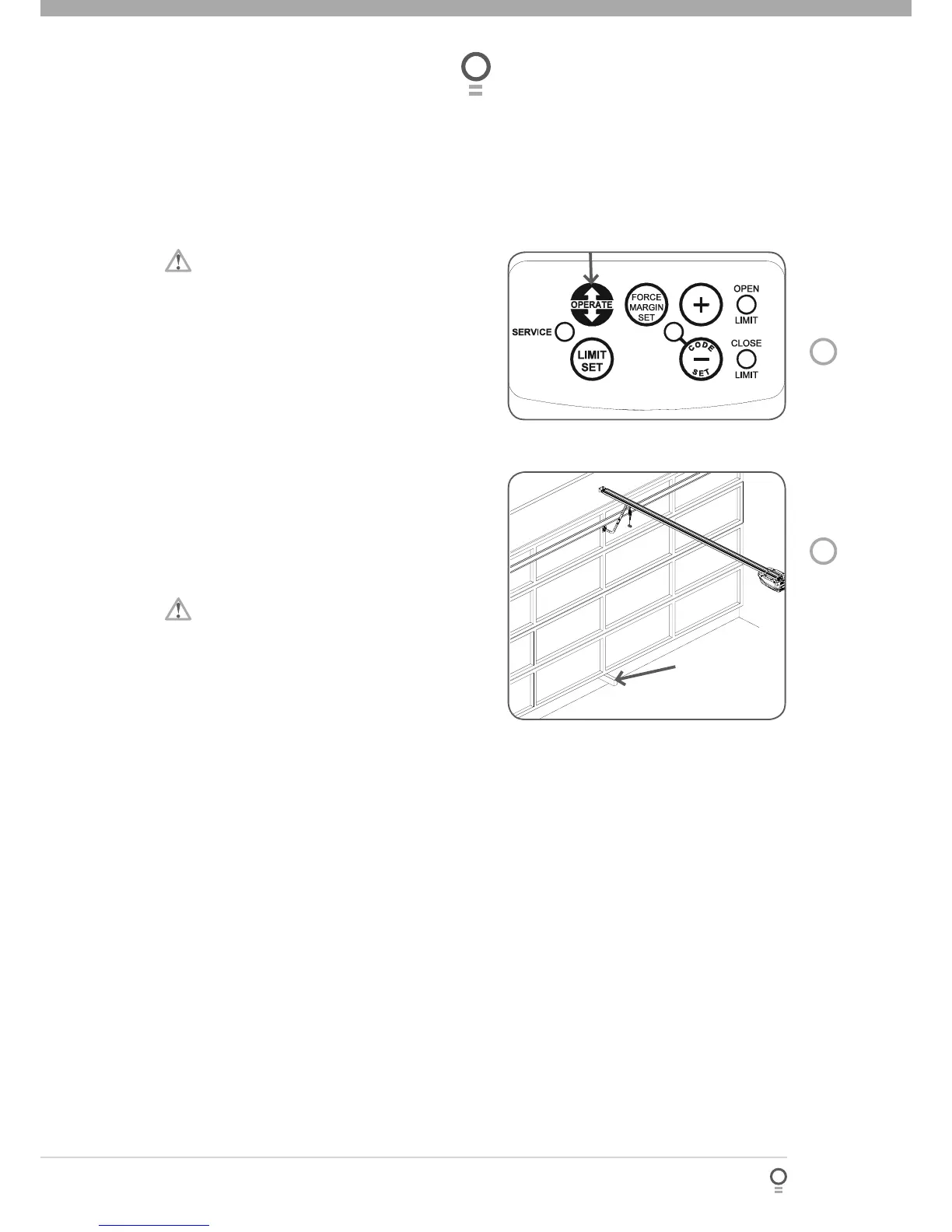
Press the OPERATE button to open the door (Fig.
28).
Place a piece of timber approximately 50mm high on
the fl oor directly under the door (Fig. 29).
Press the OPERATE button to close door. The door
should strike the object and start to re-open.
Step 16.2 - Testing Open Cycle
Press the OPERATE button to close the door (Fig.
28).
Press again to open the door. When the door reaches
the half open point, grab the bottom rail of the door
fi rmly and the door should stop.
If the door does not reverse readily when closing, or
stop when opening, the force may be excessive and
need adjusting, refer to STEP 16.4.
IMPORTANT WARNING: If the door is closing and
is unable to re-open when obstructed, discontinue
use. Do not use a door with faulty obstruction sensing.
Repair fault and re-test before using.
a.
b.
c.
a.
b.
c.
Safety Obstruction Force Test
Wood (50mm high)





 To Next Page