877. 250.7729 | feeder-robot.com877. 250.7729 | feeder-robot.com
14 15
Plug It In
1. Plug the small end of the Power Supply into the socket
underneath the Hopper (see page 9 for location).
2. Then plug the AC adapter into a wall outlet.
Note: Plug in the Feeder-Robot BEFORE adding food to the Hopper.
Add Food
1. Remove the Hopper Lid by squeezing the Hopper Release in the
center of the Lid (see page 8 for location).
2. Determine if you want to use the included Hopper Insert. If you
have large, square, and/or oddly-shaped pet food kibble, the
Hopper Insert will help the food flow freely through the
Feeder-Robot. If you have small, round-shaped kibble, the
Hopper Insert may not be required.
3. Add food: With the Hopper Insert, you can add up to 25 cups
of kibble. Without the Insert, you can add 30-32 cups of kibble.
Make sure food is level.
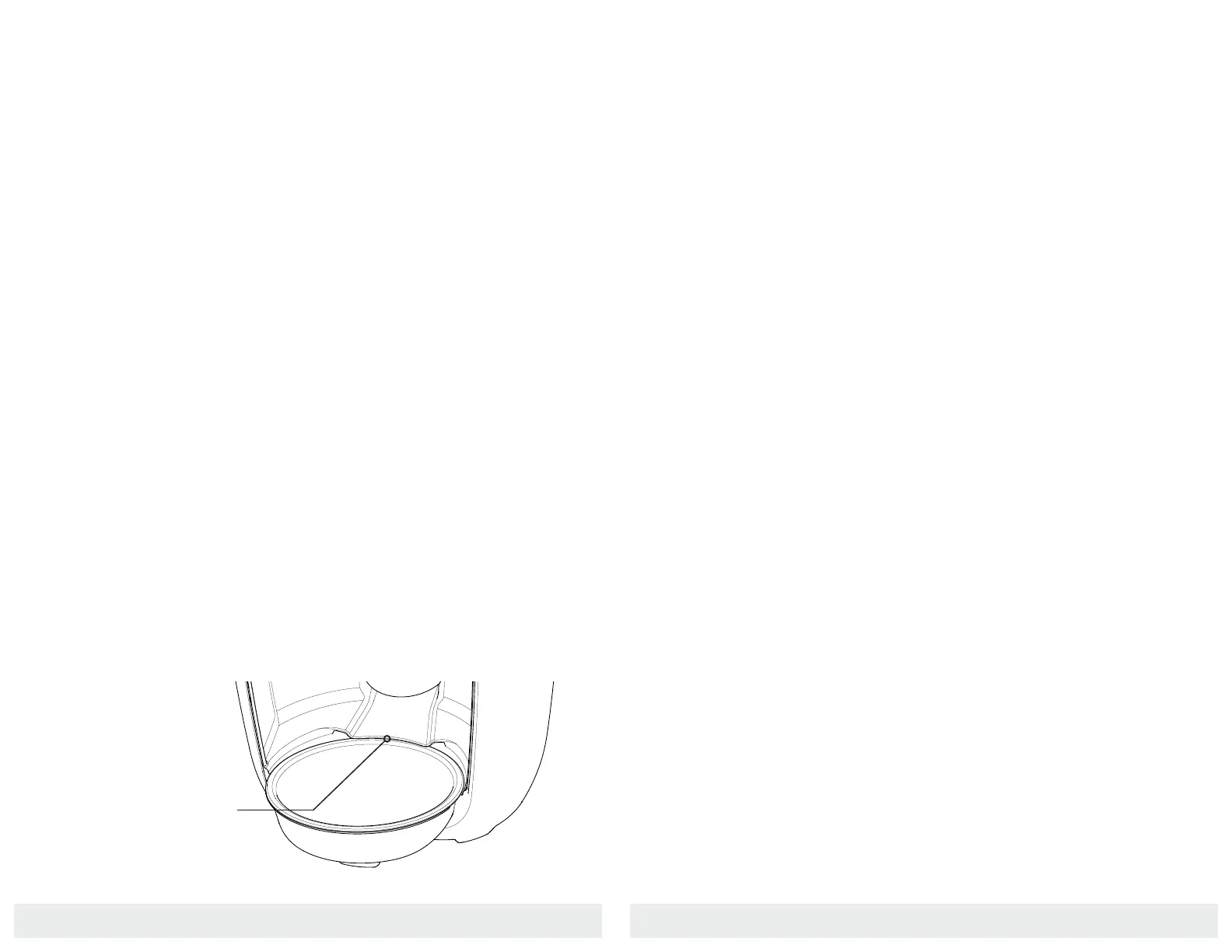
Situate The Bowl
Important: The Bowl design is shaped like a wedge. Make sure the
lower ridge of the wedge of the Bowl is placed under the Bowl Lip
(see illustration below). If the Bowl is not aligned in this way, the
dispensed food may catch along the edge of the Bowl, preventing it
from filling properly.
Place Bowl Under Bowl Lip
Feeding Modes
Gravity Feed Mode
An automatic feeding option that refills the Bowl every 60 minutes.
Snack or Manual Feed
A non-automatic option to dispense a 1/4-cup feeding, or snack,
separate from programmed scheduled meals.
Automatic Feeding
An automatic feeding schedule can be programmed, via the Control
Panel or app, to dispense food in 1/4 cup increments at a selected
daily frequency.
Programmed via Control Panel
● Maximum daily feeding available is 4 cups per day.
● See page 16 for instructions.
Programmed via App
● Maximum daily feeding available is 16 cups per day.
● See page 24 for instructions.


 To Next Page