877. 250.7729 | feeder-robot.com877. 250.7729 | feeder-robot.com
16 17
Determine Feeding Schedule
Before you start, make note of how
many cups of food per day you want
to feed your pet. For reference,
standard veterinary guidelines suggest:
Cats
● Two 1/4-cup meals per day per
cat.
Dogs
● Two 1/2-cup meals per day per
15-pound dog.
● Dogs that weigh 30 pounds or
more may require 2-4 cups of
food per day.
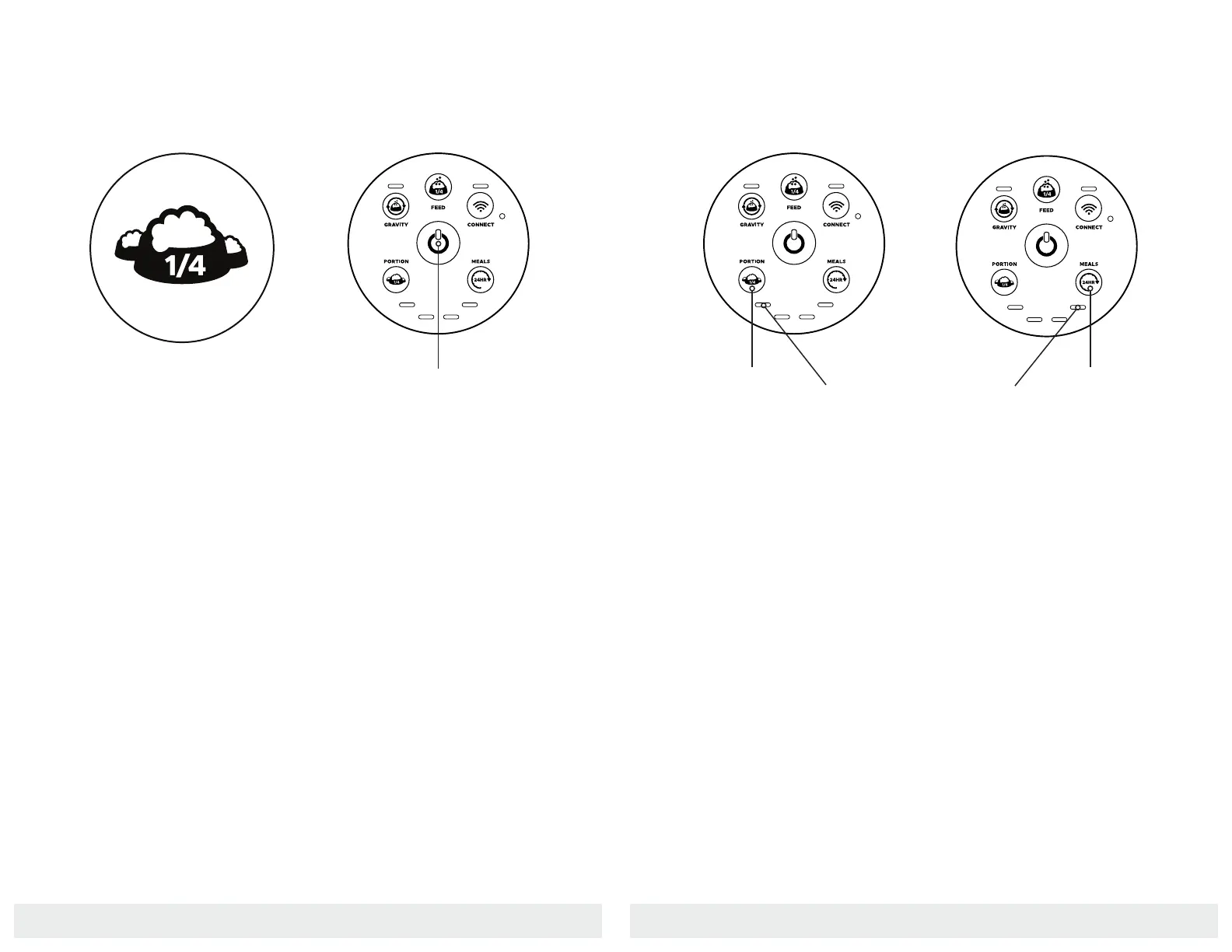
Power On
Make sure the unit is plugged into the
wall. Press the Power button to turn
the Feeder-Robot on.
Once a schedule is set from the Con-
trol Panel, you can adjust the portion
without affecting the timing of the
scheduled meal or dispensing a meal.
If the number of meals is changed,
then the scheduled timing will be
restarted and the first programmed
meal will be dispensed immediately.
Setting either portion or meals back to
zero (all four Quantity Indicator Lights
blinking) will turn the schedule off.
Setting an Automatic Feeding Schedule
via Control Panel
Set Portion
1. Press the Portion button to set
the desired amount of food
dispensed per meal in 1/4-cup
increments
2. Press the Portion button once to
dispense 1/4-cup per meal, twice
to dispense 1/2-cup per meal, and
so on.
3. The maximum dispensed per
meal is 1 cup. You will see the
Quantity Indicator Lights (see
image above) between the
Portion and Meals buttons
correspond to how many
1/4-cup increments will
dispense per meal.
Set Feeding Frequency
1. Press the Meals button to set
the desired number of meals
per day.
2. Press the Meals button once
to dispense food once per day,
twice to dispense twice per
day, and so on.
3. The maximum number of meals
dispensed per day is 4. You
will see the Quantity Indicator
Lights between the Portion and
Meals buttons correspond to
how many meals will dispense
per day.
Portion
Power Button
Quantity Indicator
Meals
Quantity Indicator
Note: The maximum daily feeding
amount you can set up via the Control
Panel is 4 cups per day.
Note: The unit will start the feeding
schedule immediately after both
portion and meals are initially entered,
and the first meal will be dispensed.
Note: All four Quantity Indicator
Lights will flash upon initial press
of the Portion or Meals buttons to
indicate no schedule has been set.


 To Next Page