Page 49
Before You Start
• Your vehicle must be scanned before clearing trouble codes. If
DATA is pressed, and the vehicle has not been scanned, the
Code Reader will display Press the Scan key to Scan
New Data. Refer to “Scanning the Vehicle” on page 47.
Viewing Trouble Codes
1. If the Code Reader is not ON, press POWER to display the
opening screen, press data key.
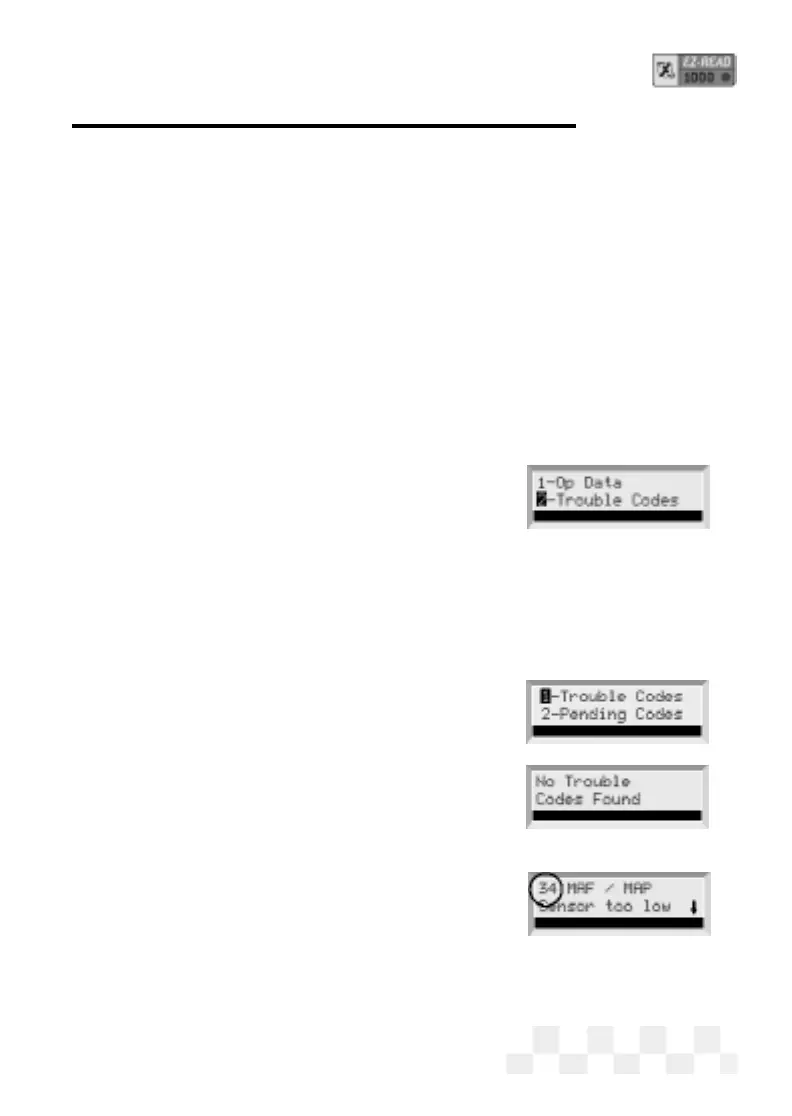
2. [OBD-II] Use the pand qarrow keys until 3-Trouble
Codes
is highlighted, then press ENTER.
3. [OBD-II] OBD-II vehicles read both
Pending Codes (codes that have only been
detected once by the vehicle
computer) and Trouble Codes (codes that
have been detected multiple times). Press
ENTER to select either 1-Trouble
Codes or 2-Pending Codes
.
4. If no Trouble Codes are in the vehicle’s
computer,
No Trouble Codes
Found
will be displayed.
If a Trouble Code is detected, the fault
and its description will be displayed on
the scanner screen. The fault code
number will be displayed in the upper
left corner of the screen.
• A down arrow on the screen
indicates more information. Use the
p
and qarrow keys to view the addition-
al text.
• Use the
tand uarrow keys to view any other
Trouble Codes.
VIEW THE TROUBLE CODES - OBD-II


 To Next Page