9. Then, the UNIT PRICE window shows “Urt.CFt” (communicaon format), the TOTAL PRICE window shows
communicaon format xxx. Use the numerical keys 0, 2 to select the communicaon format:
0—Non communicaon
2—When the scale becomes stable, the data will be output aer pressing PRINT key, the format when
“232.out” is set to “0-HOST” is as follows. The format when “232.out” is set to “1- Prtd40”, “2- Prtd60”, “3-
PrtNd4” or “4- PrtNd6” can refer to “Print out format when OS-2130D printer is connected” on page 7.
<LF>ID: xxxxxx<CR><EXT>
<LF>Date: YY-MM-DD<CR><EXT>
<LF>Time: hh:mm<CR><EXT>
<LF>Gross: xxx.xxx kg(or lb or oz)<CR> <EXT>
<LF>Tare: xxx.xxx kg(or lb or oz)<CR> <EXT>
<LF>Net: xxx.xxx kg(or lb or oz)<CR> <EXT>
<LF>Unit price: xxxxxx.xx $/kg(or $/lb or $/oz)<CR><EXT>
<LF>Total price: xxxxxx.xx $<CR> <EXT>
NOTE: The ID informaon can only be printed out aer seng. Press ENTER key to confirm the input and
go to the next step, or use ON/OFF key to exit this mode.
10. RS-232 connects between scale and host:
SCALE (Indicator) -----CABLE (9 pins) -----------------------------------HOST
DB9 (Female) ------------DB9 (Male) -------DB9 (Female) ------------DB9(Male)
PIN2 TXD-----------------------2 --------------------2 --------------------PIN2 RXD
PIN3 RXD ----------------------3 --------------------3 --------------------PIN3 TXD
PIN5 GND ----------------------5 --------------------5 --------------------PIN5 GND
PIN4 DSR -----------------------4 --------------------4 --------------------PIN4 DTR
PIN6 DTR -----------------------6 --------------------6 --------------------PIN6 DSR
PIN7 CTS -----------------------7 --------------------7 --------------------PIN7 RTS
PIN8 RTS -----------------------8 --------------------8 --------------------PIN8 CTS
PIN1 NC ------------------------1 --------------------1 --------------------PIN1 NC
PIN9 NC ------------------------9 --------------------9 --------------------PIN9 NC
Note: PIN4 and PIN6, PIN7 and PIN8 are shorted in the scale!
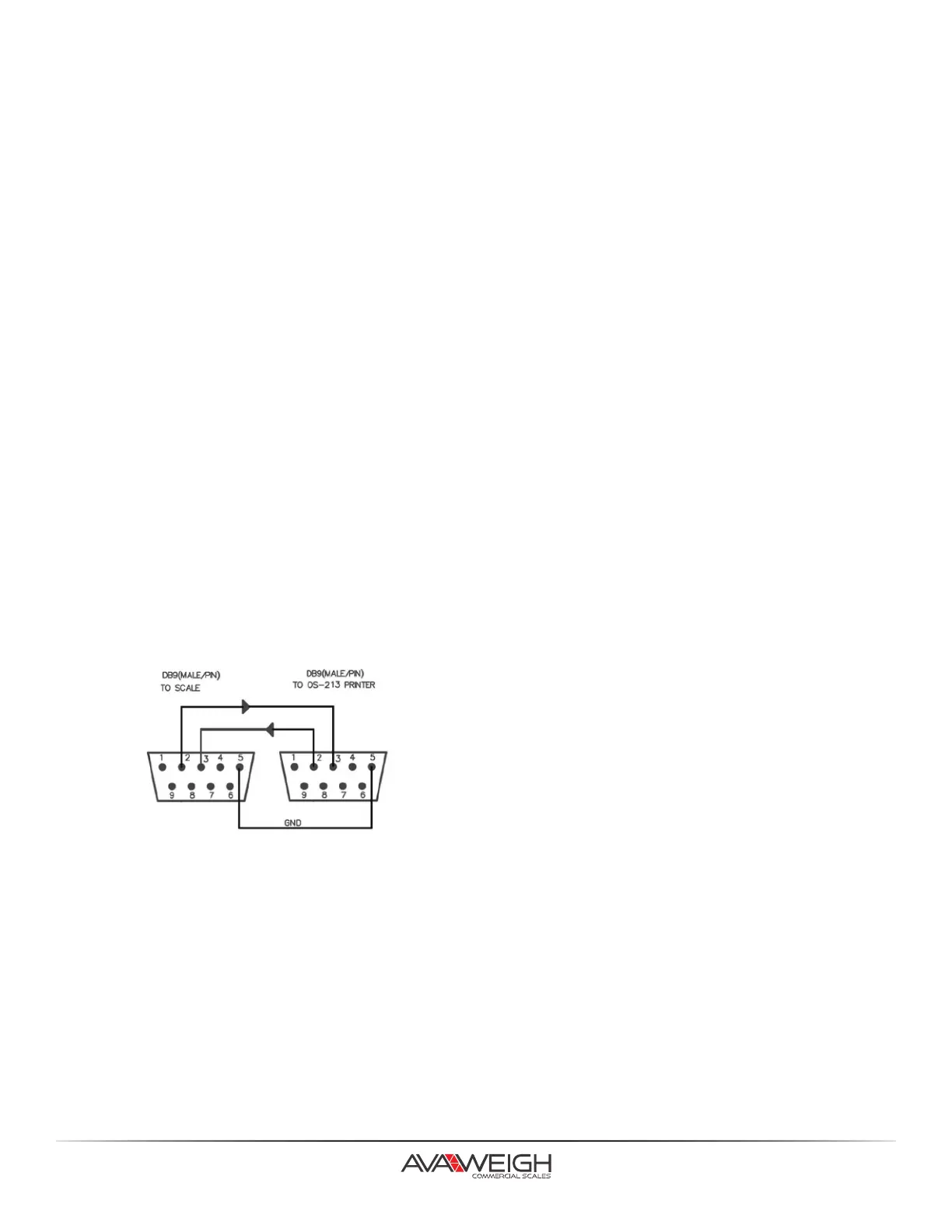
11. RS-232 cable connects between scale and OS-2130D:
13.



 To Next Page