Install Media Modules
16 Quick Start for Hardware Installation: Avaya G430 Media Gateway
Avaya - Proprietary. Use pursuant to the terms of your signed agreement or Avaya policy.
DRAFT - January 25, 2009 - 1:38 PM
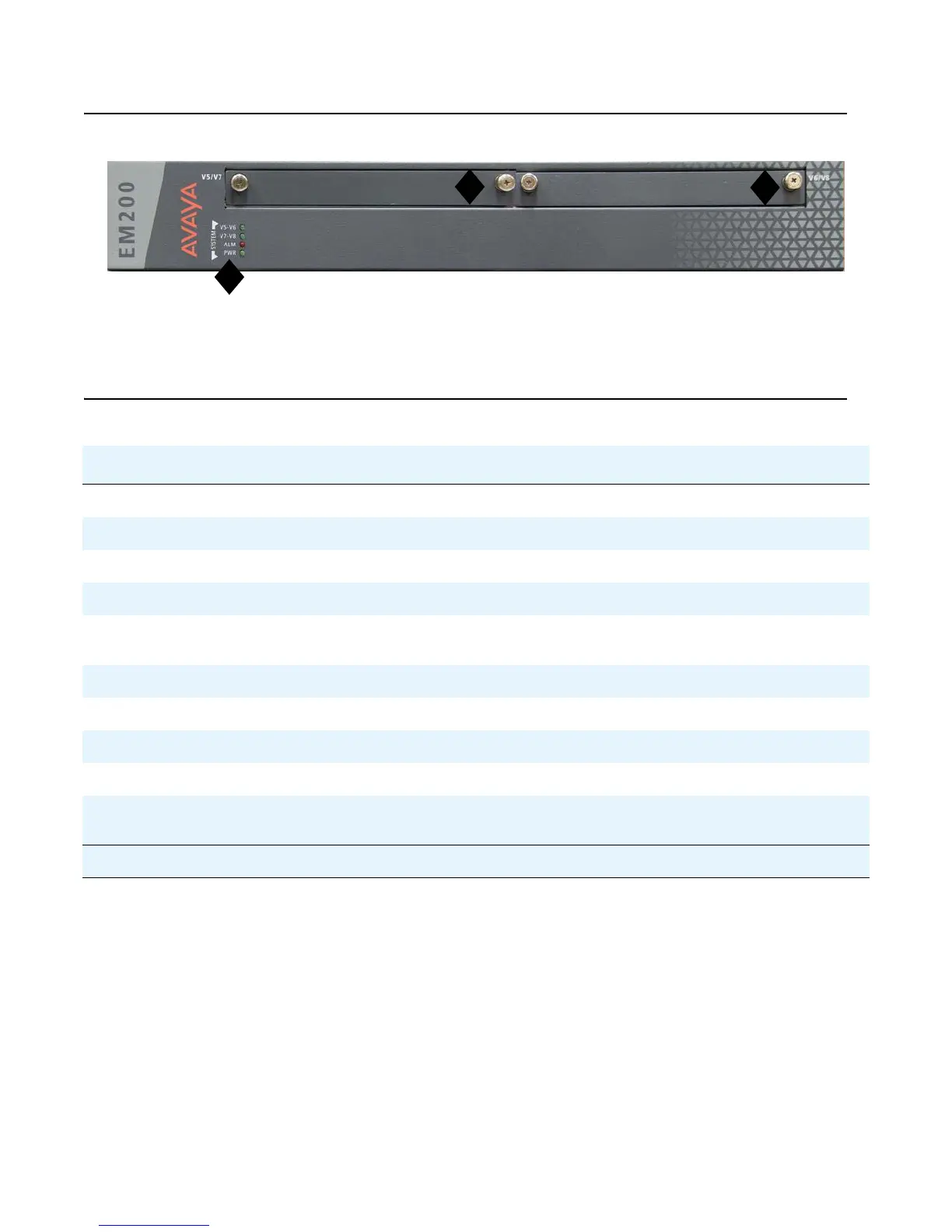
Figure 7: The EM200 front panel slots
Figure notes:
1. System LEDs 2. V5/V7 — slot for standard media module
3. V6/V8 — slot for standard media module
Table 2: Permitted slots for G430 and EM200 media modules
Media module Permitted slots Description
MM710 V1-V3, V4-V8 1 T1/E1 ISDN PRI trunk port
MM711 V1-V3, V4-V8 8 universal analog ports
MM712 V1-V3, V4-V8 8 DCP telephone ports
MM714 V1-V3, V4-V8 4 analog telephone ports and 4 analog trunk ports
MM714B V1-V3, V4-V8 4 analog telephone ports, 4 analog trunk ports, and an
emergency transfer relay
MM716 V1-V3, V4-V8 24 analog ports
MM717 V1-V3, V4-V8 24 DCP telephone ports
MM720 V1-V3, V4-V8 8 ISDN BRI trunk or endpoint (telephone or data) ports
MM722 V1-V3, V4-V8 2 ISDN BRI trunk ports
S8300C or
S8300D
V1 CM server
1
2
3


 To Next Page