Advanced programming of messages
This function allows to customise some alarm events to be combined to a vocal or a sms message.
Proceed as follows:
After storing the vocal or the sms message according to the procedure previously described, VOCAL EVENT or
SMS EVENT will be displayed on the control panel display.
Select the combination of the message to the related event by using keys , (the possible events are shown
in the table below);
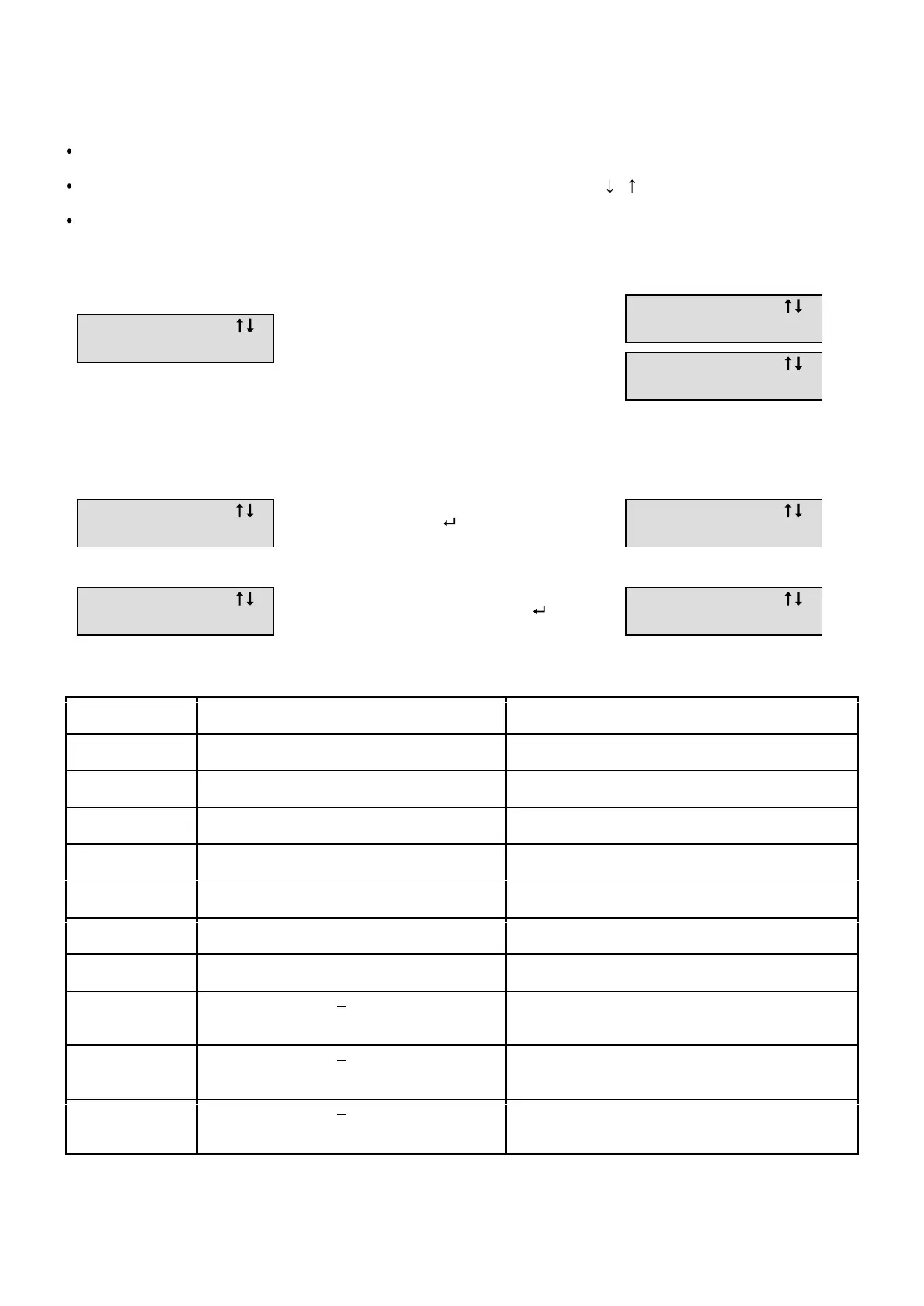
The following will be displayed on the control panel display:
AL. ZONE A B C: this event can be customised by pressing keys 1 2 3 that will exclude from the event zone A B
C
Example:
_ _ _ _ _ _ , _ _ _ _: this event function can be fully customised and allows to send the related message following
up any single event.
Example: the vocal message 1 is to be sent when the A03 position detector is in alarm
NO EVENT: By combining this event to a message, any type of transmission will not occur.
Event Position / Label Function
ALL A03 , B12 , C01 ...
Alarm of one detector
OPEN A03 , B12 , C01 ...
Door of one detector open
F ALL A03 , B12 , C01 ...
End of the alarm of one detector
SUPERV A03 , B12 , ... , CONTROL PANEL
Supervision alarm
MANOM A03 , B12 , ... , CONTROL PANEL
Tampering
BATT A03 , B12 , ... , CONTROL PANEL
Low battery
SCAN CENTRALE
Scanner alarm
INSER
CONTROL PANEL
REMOTE CONTROL
- CODE
Control panel ON
DISINS
CONTROL PANEL
REMOTE CONTROL
- CODE
Control panel OFF
IN A / IN B / IN C
CONTROL PANEL
REMOTE CONTROL
- CODE
Activated Zone
Note: The vocal message is automatically associated to the related wire input.
AL. ZONE A B C
AL. ZONE _ B C
AL. ZONE _ B _
AL ___ ,_ ___ __
INSERT THE AL EVENT ( SEE TABLE )
AND CONFIRM WITH
AL ___ ,A 03_ __
INSERT THE A03 POSITION OF THE
DETECTOR AND CONFIRM WITH



 To Next Page