EasyManua.ls Logo

Avermedia C281 - Page 48

Avermedia C281
116 pages
Print Icon
To Next Page IconTo Next Page
To Previous Page IconTo Previous Page
Loading...
English-40
Disk Management
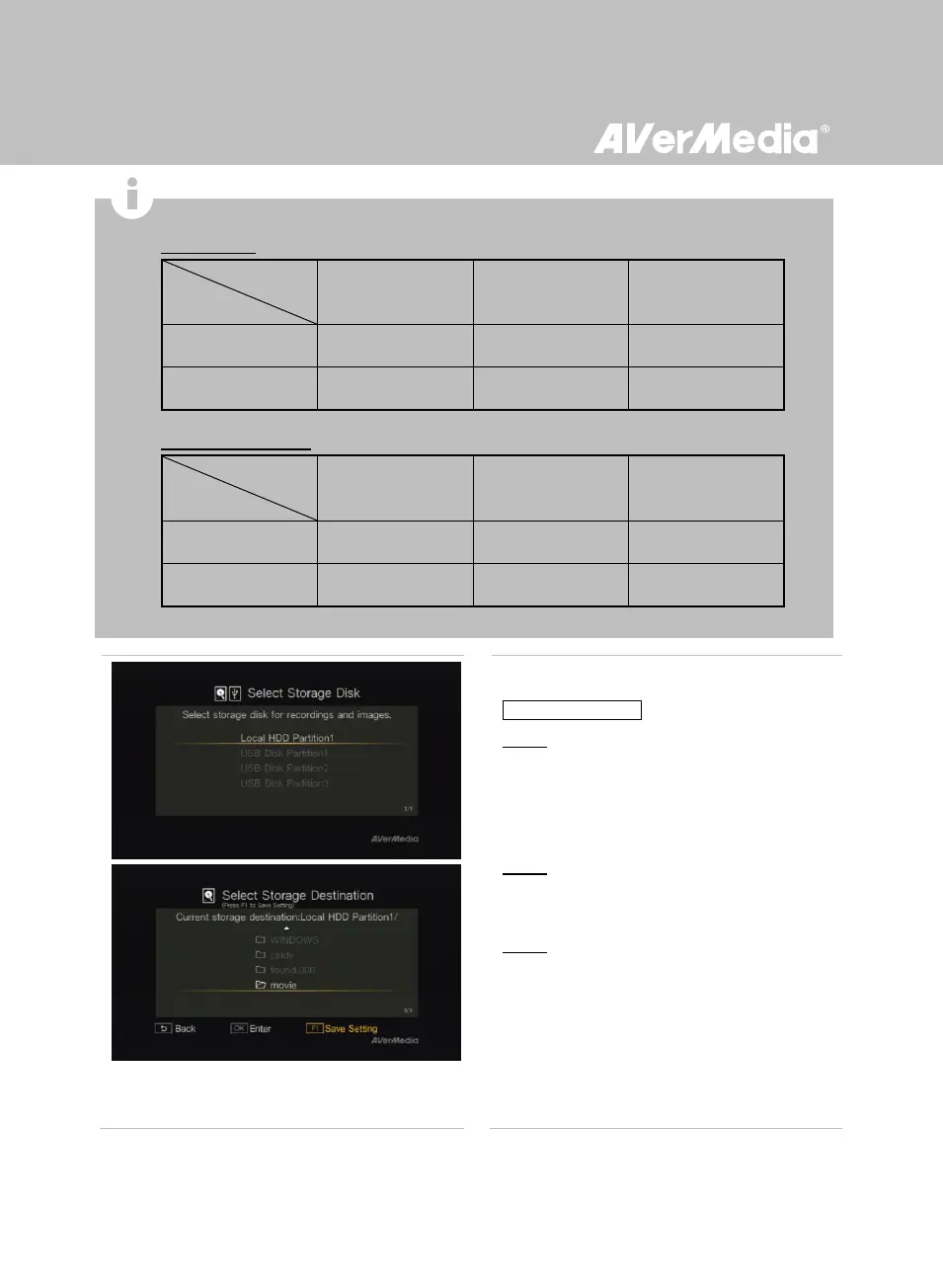
Storage Destination
Step 1:
Use / to select desired default storage disk
for both recorded files and snapshots. Press
OK to select a disk.
Step 2:
Use / to select a folder and press OK to
confirm.
Step 3:
Press F1 to save the setting.
Estimated recording duration for different video quality settings:
HD (1080i/720p)
Optimal
(10 Mbps)
Good
(7.5 Mbps)
Maximum Recording
Length (5 Mbps)
1TB
200 hrs
250 hrs
400 hrs
2TB
400 hrs
500 hrs
800 hrs
SD 480i(576i)/480P(576P)
Optimal
(7.5 Mbps)
Good
(5 Mbps)
Maximum Recording
Length (3 Mbps)
1TB
250 hrs
400 hrs
650 hrs
2TB
500 hrs
800 hrs
1300 hrs
*Recordings with higher video quality take up more disk space.
Video Quality
Storage Capacity
Storage Capacity
Video Quality

Related product manuals