Chapter 6: MIDI Controller Numbers 33
Chapter 6: MIDI Controller Numbers
If you do not have a Pro Tools Control Surface,
you can use a third-party MIDI control surface to
control PRE in Pro Tools.
The following information assumes you have a fa-
miliarity with MIDI protocol.
For more information on reprogramming your
control surface, refer to its documentation, or con-
tact the manufacturer.
PRE MIDI Data
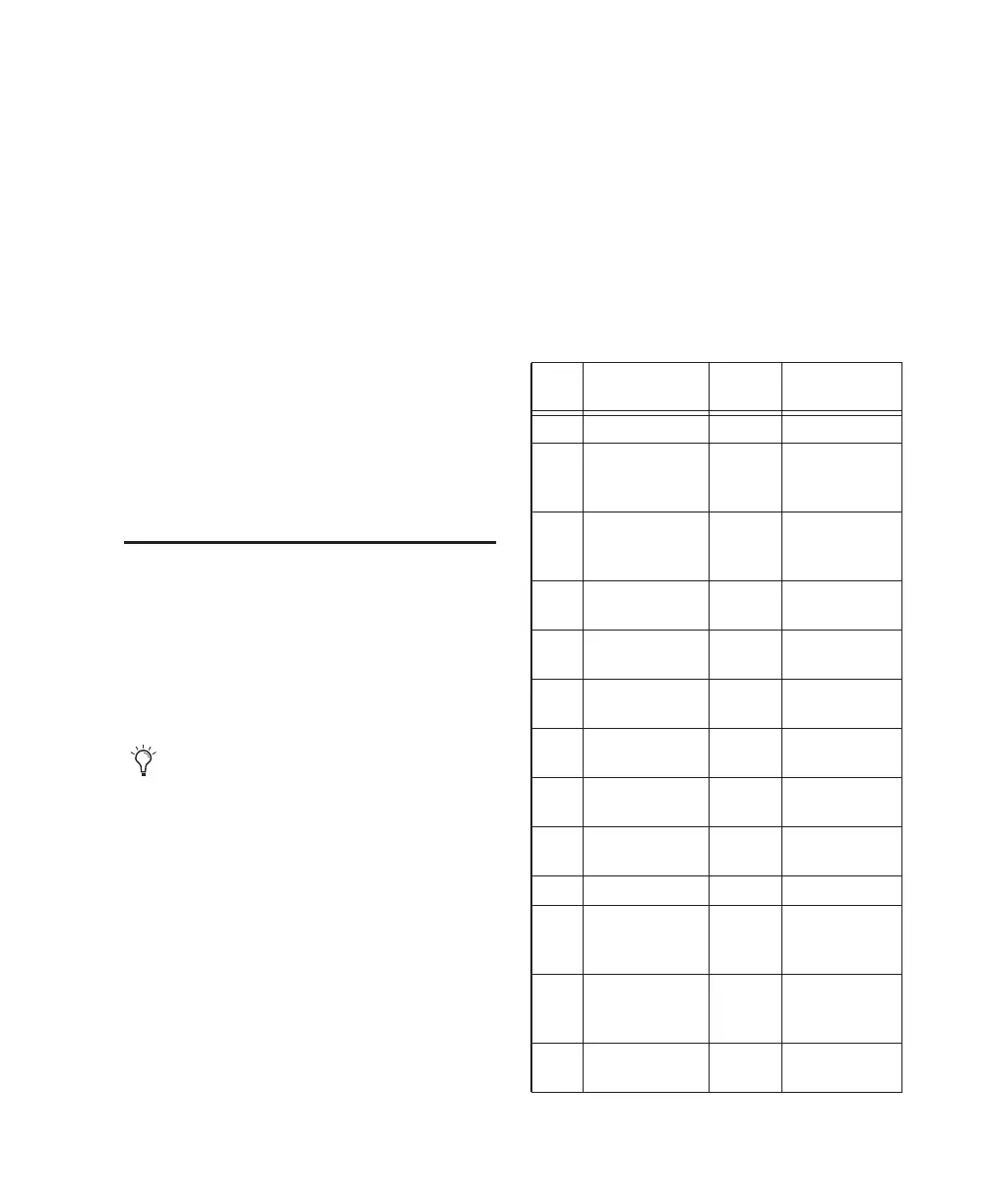
These messages are all of the form:
BXh cc vv
In this case, X means zero-based MIDI channel
(1–16), cc means controller number, and vv means
value.
All values are in hexadecimal format and may need
to be converted to decimal for some MIDI devices.
X indicates the PRE’s MIDI channel minus
one (for example, for PRE MIDI channel 1, X
= 0).
Table 7. PRE MIDI Implementation
cc Name PRE
Channel
vv
0Eh Reset to Default N/A N/A
00h Input Source 1 00h=mic,
01h=line,
02h=inst
01h Input Imped-
ance
1 00h=1.5k,
01h=15k,
02h=1.5M
02h Pad 1 00h=out,
7Fh=in
03h Insert 1 00h=out,
7Fh=in
04h 48V 1 00h=off,
7Fh=on
05h Phase 1 00h=off,
7Fh=on
06h High-Pass Filter 1 00h=out,
7Fh=in
07h Mute 1 00h=off,
7Fh=on
09h Input Gain 1 See Table 2
10h Input Source 2 00h=mic,
01h=line,
02h=inst
11h Input Imped-
ance
2 00h=1.5k,
01h=15k,
02h=1.5M
12h Pad 2 00h=out,
7Fh=in


 To Next Page