Chapter 6: MIDI Controller Numbers 35
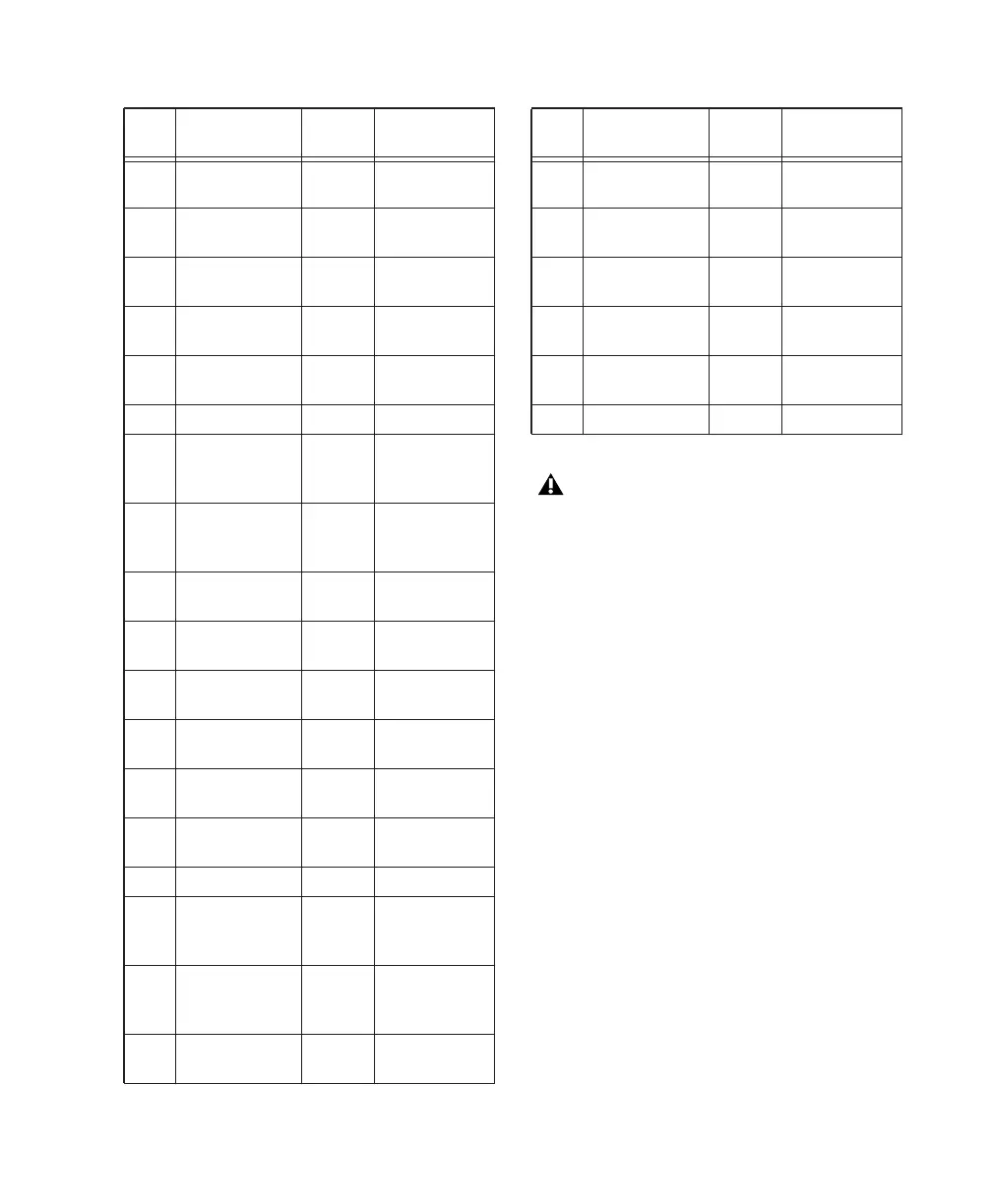
53h Insert 6 00h=out,
7Fh=in
54h 48V 6 00h=off,
7Fh=on
55h Phase 6 00h=off,
7Fh=on
56h High-Pass Filter 6 00h=out,
7Fh=in
57h Mute 6 00h=off,
7Fh=on
59h Input Gain 6 See Table 2
60h Input Source 7 00h=mic,
01h=line,
02h=inst
61h Input Imped-
ance
7 00h=1.5k,
01h=15k,
02h=1.5M
62h Pad 7 00h=out,
7Fh=in
63h Insert 7 00h=ofut
7Fh=in
64h 48V 7 00h=off,
7Fh=on
65h Phase 7 00h=off,
7Fh=on
66h High-Pass Filter 7 00h=out,
7Fh=in
67h Mute 7 00h=off,
7Fh=on
69h Input Gain 7 See Table 2
70h Input Source 8 00h=mic,
01h=line,
02h=inst
71h Input Imped-
ance
8 00h=1.5k,
01h=15k,
02h=1.5M
72h Pad 8 00h=out,
7Fh=in
Table 7. PRE MIDI Implementation
cc Name PRE
Channel
vv
73h Insert 8 00h=out,
7Fh=in
74h 48V 8 00h=off,
7Fh=on
75h Phase 8 00h=off,
7Fh=on
76h High-Pass Filter 8 00h=out,
7Fh=in
77h Mute 8 00h=off,
7Fh=on
79h Input Gain 8 See Table 2
Note that for certain switches, such as the
Mute switches, each “on” message toggles
the state of the switch on or off.
Table 7. PRE MIDI Implementation
cc Name PRE
Channel
vv


 To Next Page