User’s Manual
147
7.4.6 The Security Page
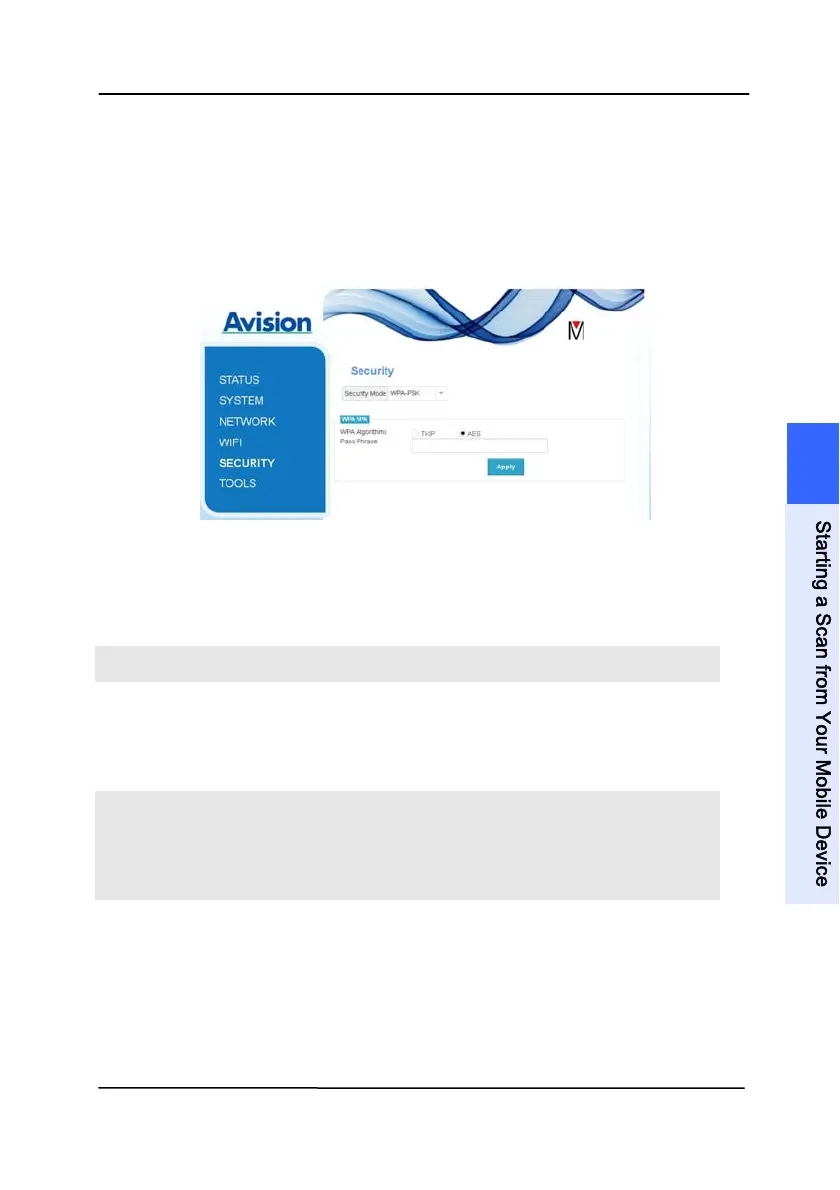
The [Security] page provi
des the following authentication mode
(security protocol) Choice: Disable, WEP, WPA-PSK, WPA2-PSK.
Choice for the encryption protocols includes TKIP, AES.
A
UTHENTICATION
(SECURITY) METHOD
E
NCRYPTION METHOD
Disable None
WEP WEP
Up to four WEP key can be set.
Type your WEP in the field and
then click [Apply] to complete.
WPA-PSK Choice: TKIP/AES
Type your desired pass phrase in
the [Pass Phrase] field and then
click [Apply] to complete.
WPA2-PSK Choice: TKIP/AES
(Pass Phrase: 12345678)
You may change your [Pass
Phrase] by entering the new pass
phrase in the field and then click
[Apply] to complete.
7
S
t
a
r
t
i
n
g
a
S
c
a
n
f
r
o
m
Y
o
u
r
M
o
b
i
l
e
D
e
v
i
c
e


 To Next Page