SmartEdge Industrial IoT Gateway
User Guide
http://www.element14.com/gateway Page 20
3.4. IOTCONNECT CLOUD ENROLLMENT
A 30-day trial of IoTConnect cloud service is provided. Perform the following steps to enroll your Gateway.
After mobile app sign-up is complete, you can login to the IoTConnect Web Portal: https://avnet.iotconnect.io using
the same credentials as the mobile app.
For more information, see the IOTCONNECT DETAILS section of this document (Section 5).
ENROLLMENT STEPS
Follow this installation process to connect your Avnet SmartEdge IIoT Gateway to the cloud.
1. Connect your SmartEdge Gateway to your Ethernet network, if available, by using one of the two Ethernet Ports. If
using wireless, this will be set up in a later step using the mobile App.
2. Insert the correctly wired power supply plug to start the unit. IMPORTANT! Make sure to install into the 12-24VDC
power input shown above and not the CAN port!
3. Other hardware connections can optionally be made at this time. See section 0 for more information
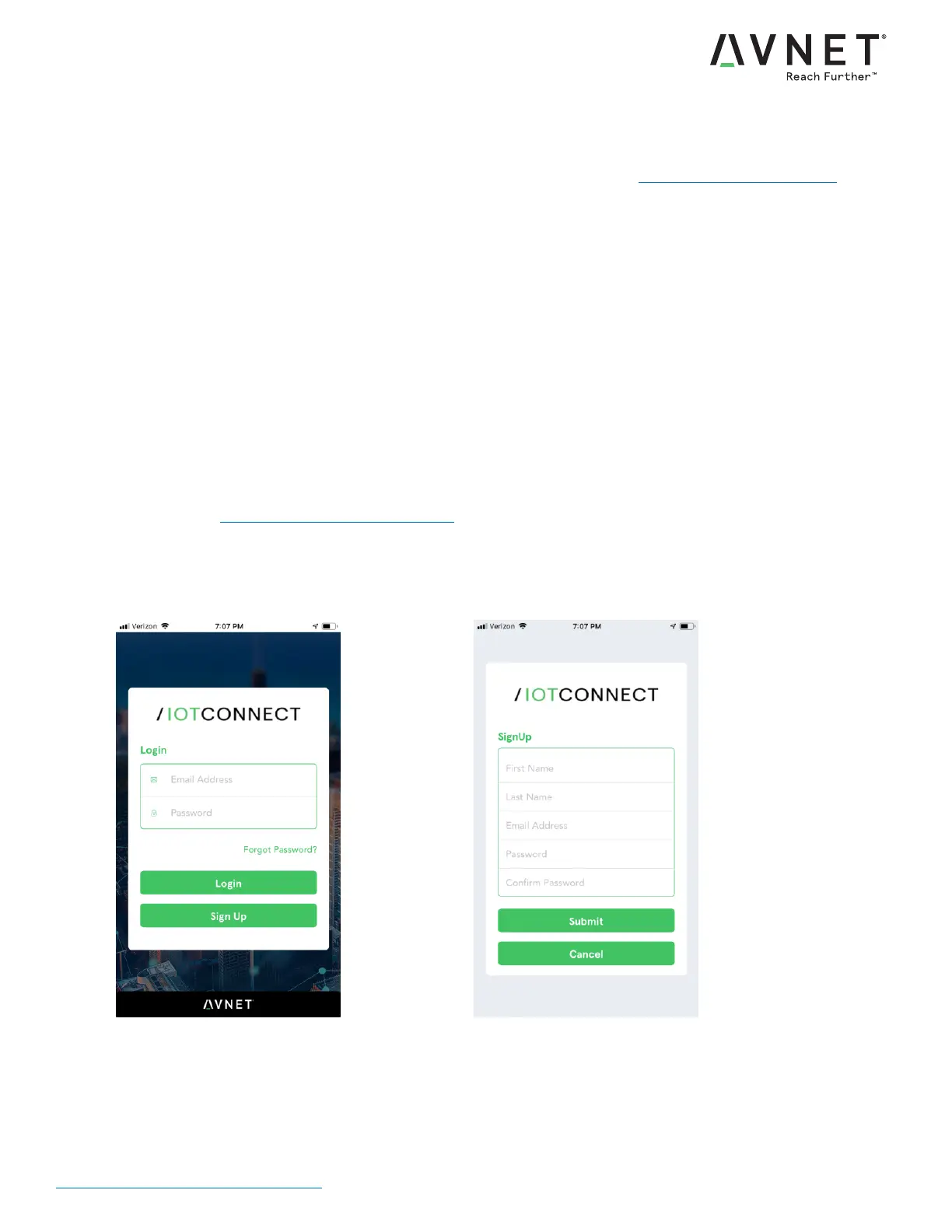
4. Download the Avnet IoTConnect mobile application to register your SmartEdge Gateway with the IoT Connect
cloud. Refer to the web portal below for App Store links.
Web Portal: https://element14.com/gateway
5. Launch the App and enter your Login email
and password, or press Sign Up
6. Sign Up for a new account by entering your
details


 To Next Page