- 20 -
IST0570V3.1
Working mode “Calibration”
VERTICAL
ADJUSTER
HORIZONTAL
ADJUSTER
REFLECTOR
DX
SX
UP
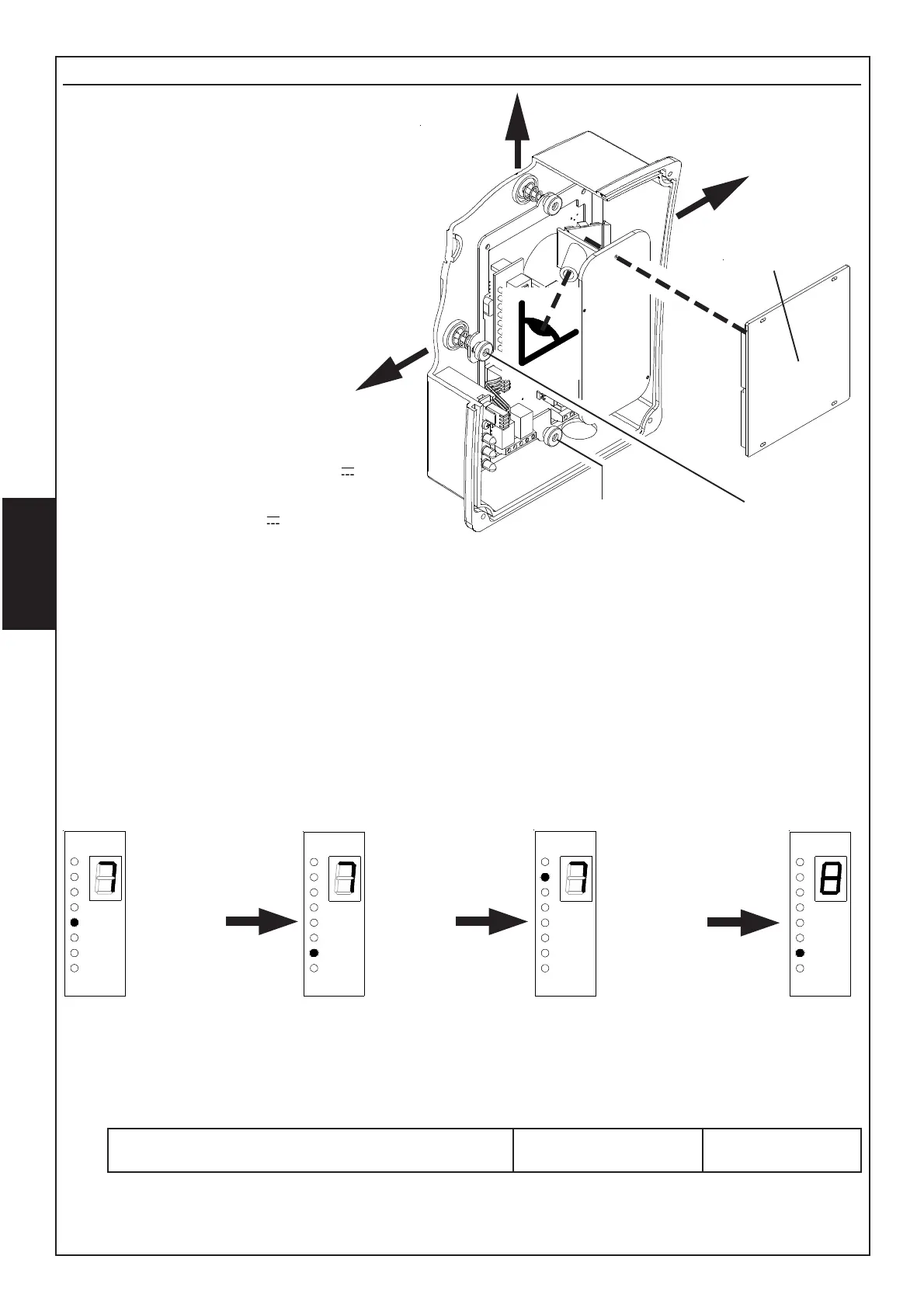
- In order to make a first rough alignement, use
optical view-finder, visualizing the centre of the
concerned reflector in the centre of the framed
area. In order to move orientation towards
right, rotate the horizontal adjuster
clockwise, in order to move orientation
towards left, rotate the horizontal
adjuster counter-clockwise.
To move orientation upwards rotate
the vertical adjuster counter-
clockwise, to move it
downwards rotate the
adjuster clockwise.
- Before supplying the beam
check jumper S6 condition:
• keep it closed for 12V
supplying
• cut it for 24 V
- Set S5 according to distance between beam
and reflector:
• cut jumper for distance from 5 to 35 meters.
• keep jumper closed for distance from 35 to 100 meters.
- At firs supplying, the beam is blocked for about 30 seconds. Wait before following step
- Move DIP3 in ON to have the beam in “Calibration” mode:
• yellow Led will flash and fault relay will be activated.
• Led/display module will visualize the value of signal received.
- Act again on the adjusters in order to obtain max signal value visualized by Led/display module.
- Minimum signal is 2 (display) and 5 (Led).
- Once reached the best signal, move DIP3 again in OFF position (NORMAL working), checking
that there are no obstacles between beam and reflector.
- After few seconds, the fault relay is deactivated and yellow Led will be off.
- We suggest you to take note of the signal shown on display in order to compare it to the
values which will be read during future maintenances.
This is in order to check whether the beam visualizes a lower value on display, with calibration
at regular intervals.
If this occurs, it will mean that it is necessary to remove dust and dirty.
Lower value,
invert
adjusting
direction
to increase signal
Initial value, rotate
the
adjusters
to
optimize the signal
Continue until
reaching
the max
possible signal
VALUE AT FIRST CALIBRATION
DISPLAY ........... LED .............


 To Next Page