57
GENERALPROBLEMSFORALLWINDOWSVERSIONS
1.Whentheturntableisconnected,youcannothearanysoundifyou
needtolistentovideoormusic.Itisbecausethedefaultplaybackdevice
hasbeenchangedtoUSBAudioCODEConcetheturntableconnectsto
thePC.
Solution1:RemovetheUSBcablefromthePC.
Solution2:Click"Start"andgototheControlPanel.Findandclick
“Sound”icon.Clickthe"Playback"tabandchangetheplaybackdevice.
Clickok.Thensoundcomesout.Please notethatyouneedtochange
thesettingmanuallywhenyouconnecttheUSBcablewiththePC.
z For more
information on Windows system sound requires reset,
pleasegoto
http://wiki.audacityteam.org/index.php?title=USB_turntables#Set_up_A
udacity_to_record_from_the_turntable
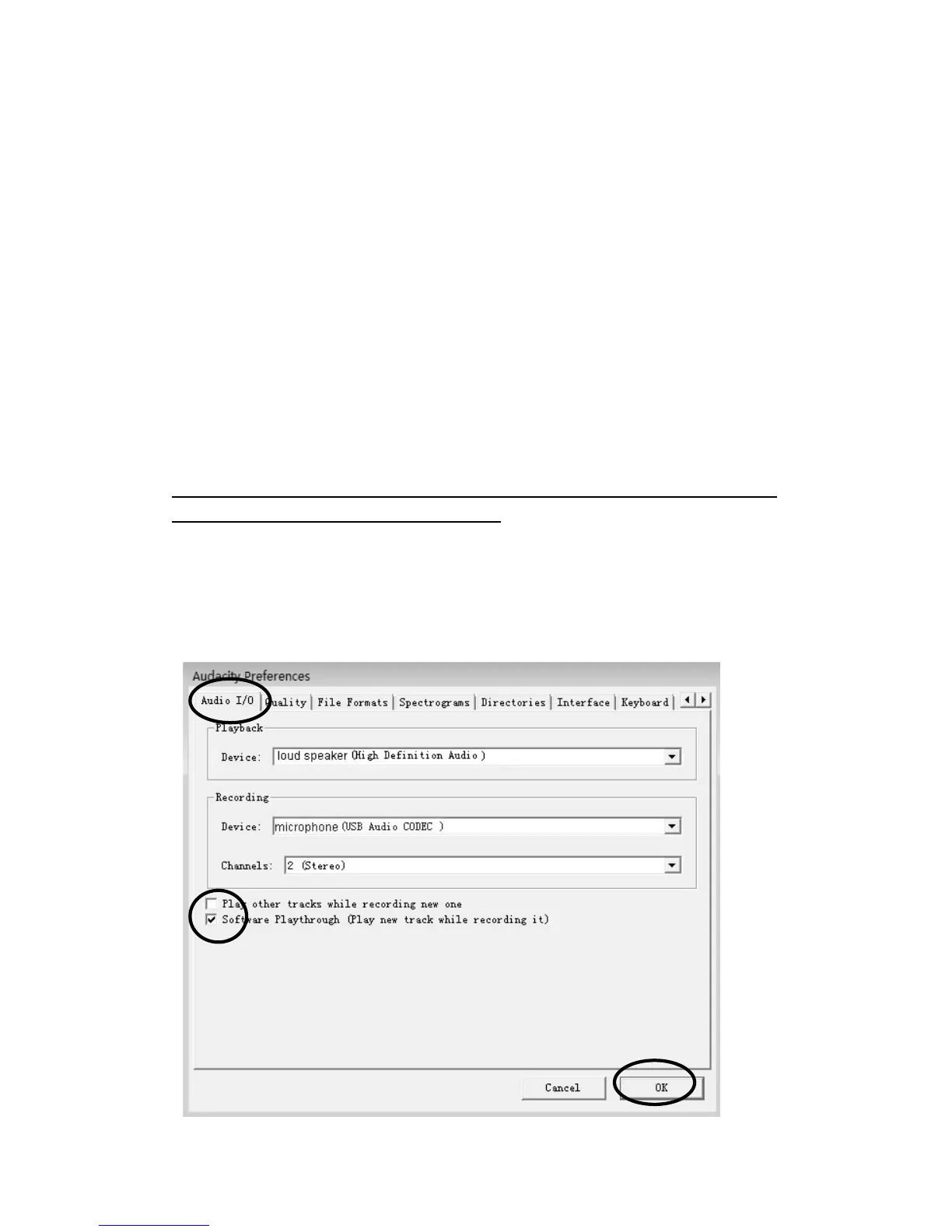
2.Ifyouwanttohearthemusicwhiledownloadingtothecomputer,go
totheAudacityinterface.ClickEditandselect“Preference”.Thenclick
“AudioI/O”tab.Andfollowthefollowingsetting.Followthesetting
below.Click“OK”toconfirm.



 To Next Page