88
TROUBLESHOOTINGGUIDE(USB‐PCRECORDING)
Ifyouhaveanytroublewiththeunit,pleaselookthroughproblems
belowandseeifyoucansolvethembyyourselfbeforecallingyour
dealer.
NOSOUND:
•Ifyouarenotgettinganysoundintothesoftwareapplication,goback
tothepreferencesasshownonpreviouspages
andmakesureyouhave
selectedtheUSBinputfortherecordingdevice.
•PowerCycle:CloseAudacity,turnofftheturntable,unplugtheUSB
Cable.ThenplugintheUSBCable,turnontheturntable,andreopen
Audacity.
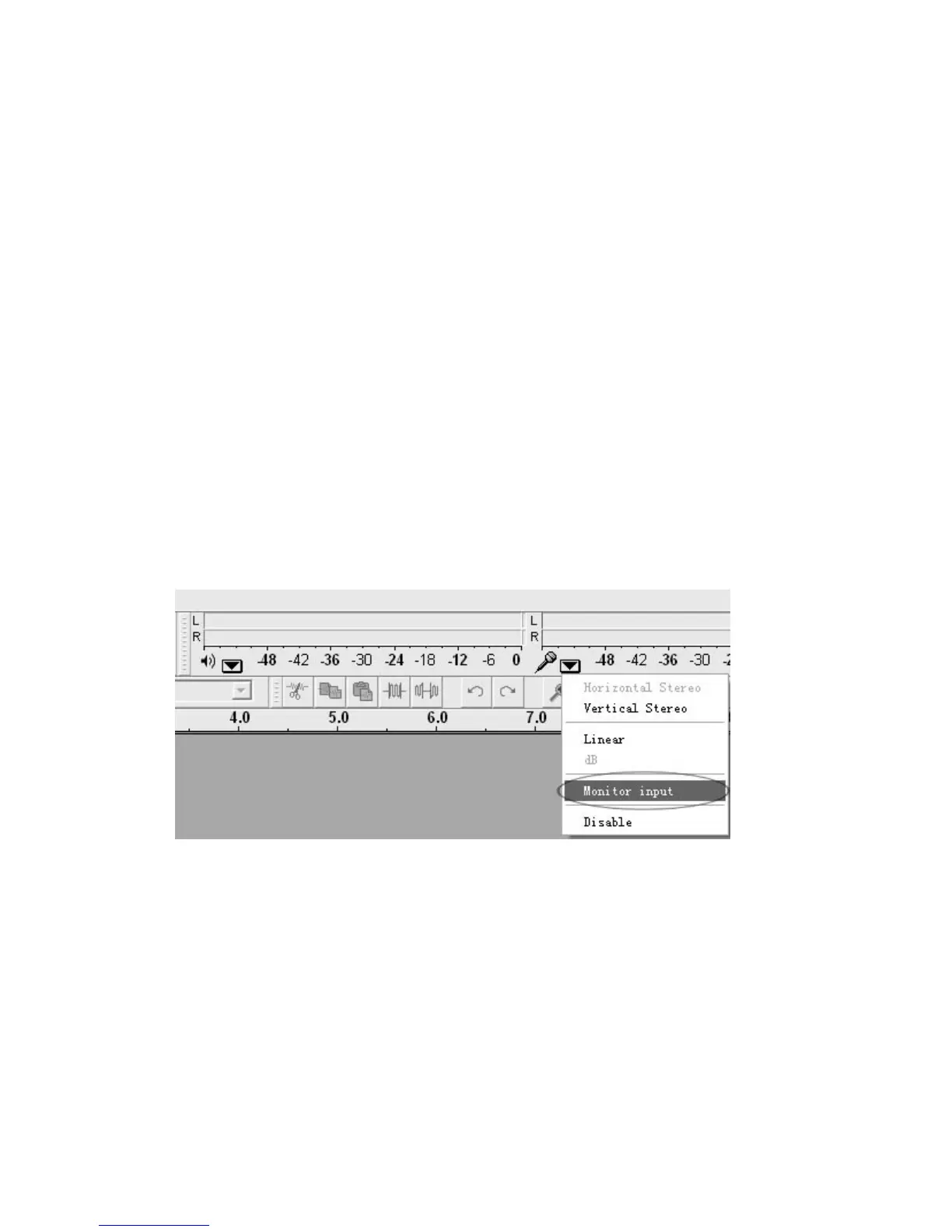
•Ifyouarenotabletohearanyaudio
asyouplaytherecord,pleaseclick
onthemicrophonedrop‐downarrowandselectMonitorInput.This
willenableyoutoheartheaudiofromtheturntable,evenifyouhave
notrecord‐enabledtheAudacityapplication.
•Ifyouarenotseeingthemicrophoneslider,
pleasegotothe
Prefe rencesmenuinAudacity,clickontheInterfacetabandmakesure
thattheEnableMixerToolbarandEnableMeterToolbaroptionsare
checked.Iftheyarenot,pleasecheckthemandthenpressOK.



 To Next Page