6
How to Test Run (Continued)
1b. If the Awoco Split Hood Unit or the Control Unit is NOT purchased
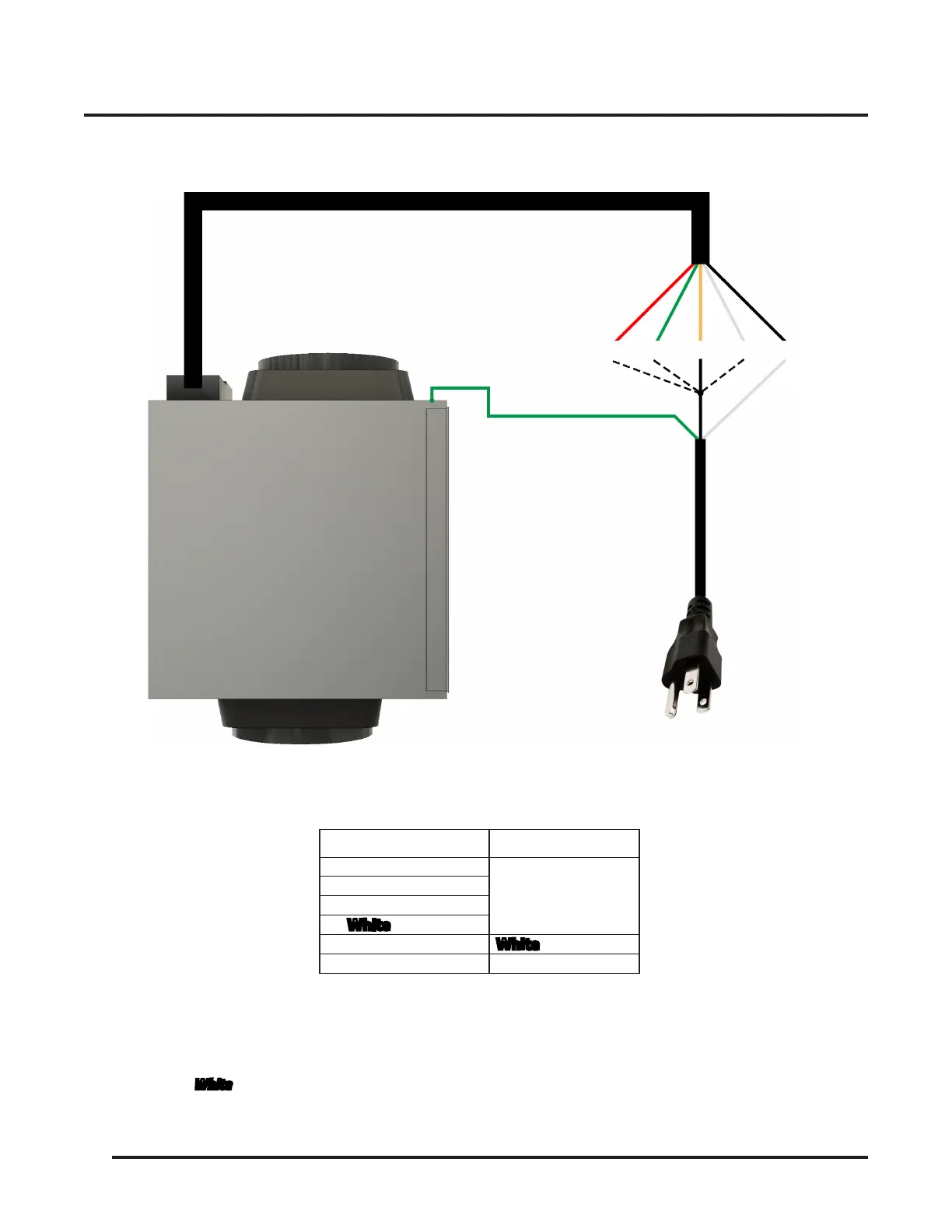
• Connect the wires from the Blower Unit with the wires from the Power Cord as shown below:
Note
• This is a 1-speed connection. Switching between different speeds will not be possible. If you prefer to run the Blower
Unit at different speeds, please purchase and install a Control Unit.
• The
Green
Wire from the
Power Cord
should connect to the
Chassis Screw
on the
Blower Unit
.
• The
White
wire from the
Power Cord
should connect to the
Black
Wire from the
Blower Unit
.
• Make sure to connect the wires correctly according to the diagram and table above. Failure to do so will result in a
burnt motor
which is
NOT covered
in the warranty.
Wires from the
Blower Unit
Wires from the
Power Cord
Red
- Speed 3
Black
- Hot
Connect to either 1 of 4 speeds
Green
- Speed 2
Orange
- Speed 1
White
- Speed Q
Black
- Neutral
White
- Neutral
Chassis Screw
Green
- Ground
Speed
3
Speed
2
Speed
1
Speed
Q
Neutral
Ground
Hot
Neutral
Connect to Chassis Screw
Connecting the Blower Unit directly to a Power Cord
Wire Connection Table


 To Next Page