9
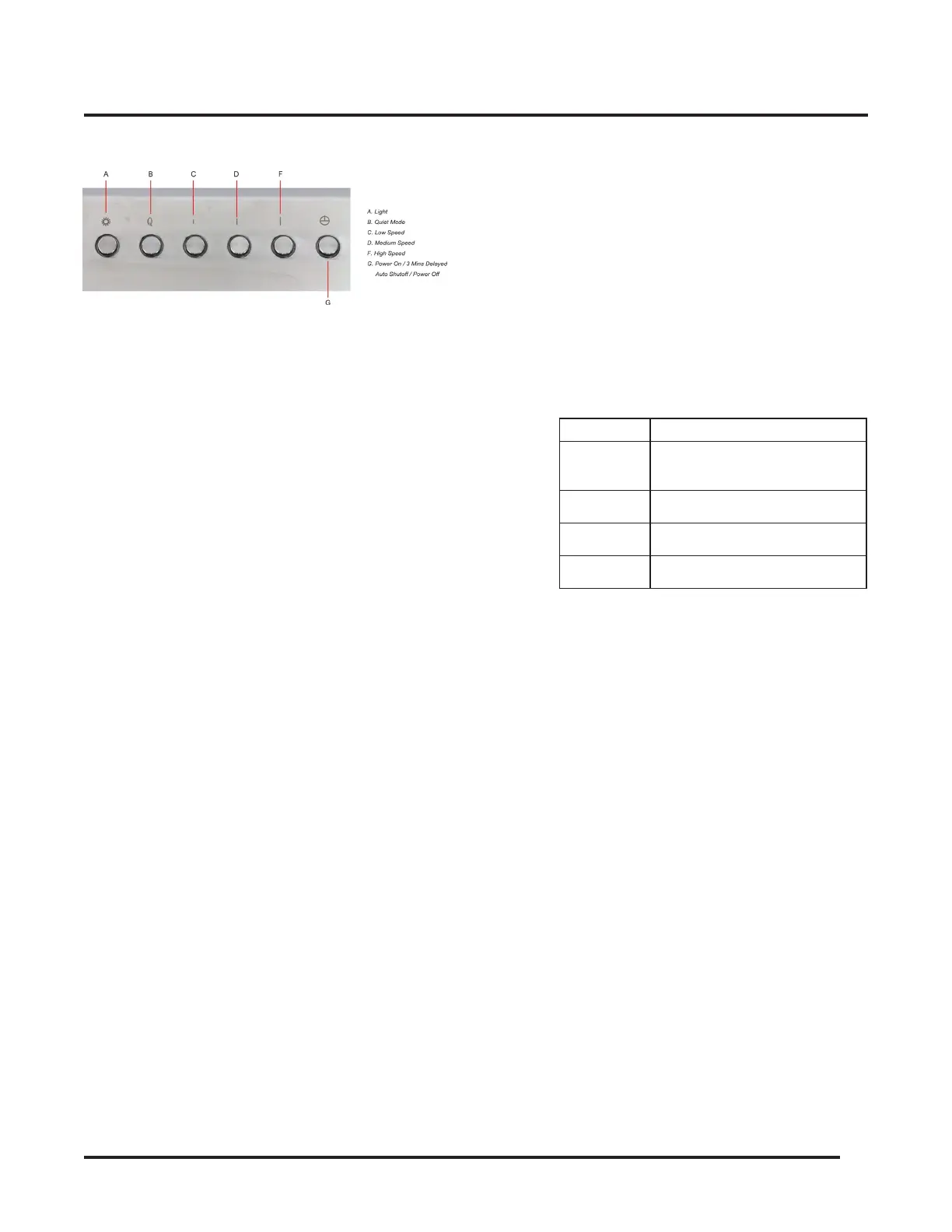
Control Unit Buttons & Functions
• Light
• Press the Light button once and the lamps will
turn on.
• Press the Light button again and the lamps will
turn off.
• The Light button operates independently from
the Power button. It works even when the
range hood is not turned on.
• Always turn off the Lights before powering off
the range hood.
• Power
• Press the Power button once and the Awoco
Split Hood Unit or the Control Unit will be
activated in standby mode, then press one
of the Speed buttons to set the speed of the
Blower Unit.
• Press the Power button again will activate the
Delayed Auto Shutoff function.
• Press the Power button the 3rd time will
shutoff the range hood immediately.
Delayed Auto Shutoff Function
• When the hood is operating in any speed, press
the Power button once will activate the Delayed
Auto Shutoff function. The range hood will
shutoff automatically in 3 minutes.
• While the Delayed Auto Shutoff function is
activated, press the Power button again and
the hood will shutoff immediately.
• Speed Control
Note
The Power button must be pressed once before
any speed mode can be selected.
• There are 4 speed modes you can choose
from: Quiet, Low Speed, Medium Speed and
High Speed.
• Pressing any of the speed buttons will set
the Blower Unit to the speed the button
designates.
Button Mode
Q
Quiet -
Generate less noise, perfect
for light cookings.
I Low Speed
II Medium Speed
III High Speed
WARNING
Read all instrutions and warnings in the Range Hood User
Manual before using the hood.
• DO NOT use the hood when there are no safety
grills and filters.
• NEVER dispose cigarette ashes, ignitable
substances, or any foreign objects into blowers.
• NEVER leave the cooking appliances unattended.
When frying, the oil in the pan can easily overheat
and catch on fire. The risk of self-combustion is
higher when the oil has been used several times.
• NEVER cook on “open” flames under the range
hood. Check deep-fryers during use: Superheated
oil may be flammable.
Control Unit Buttons & Functions (Continued)


 To Next Page