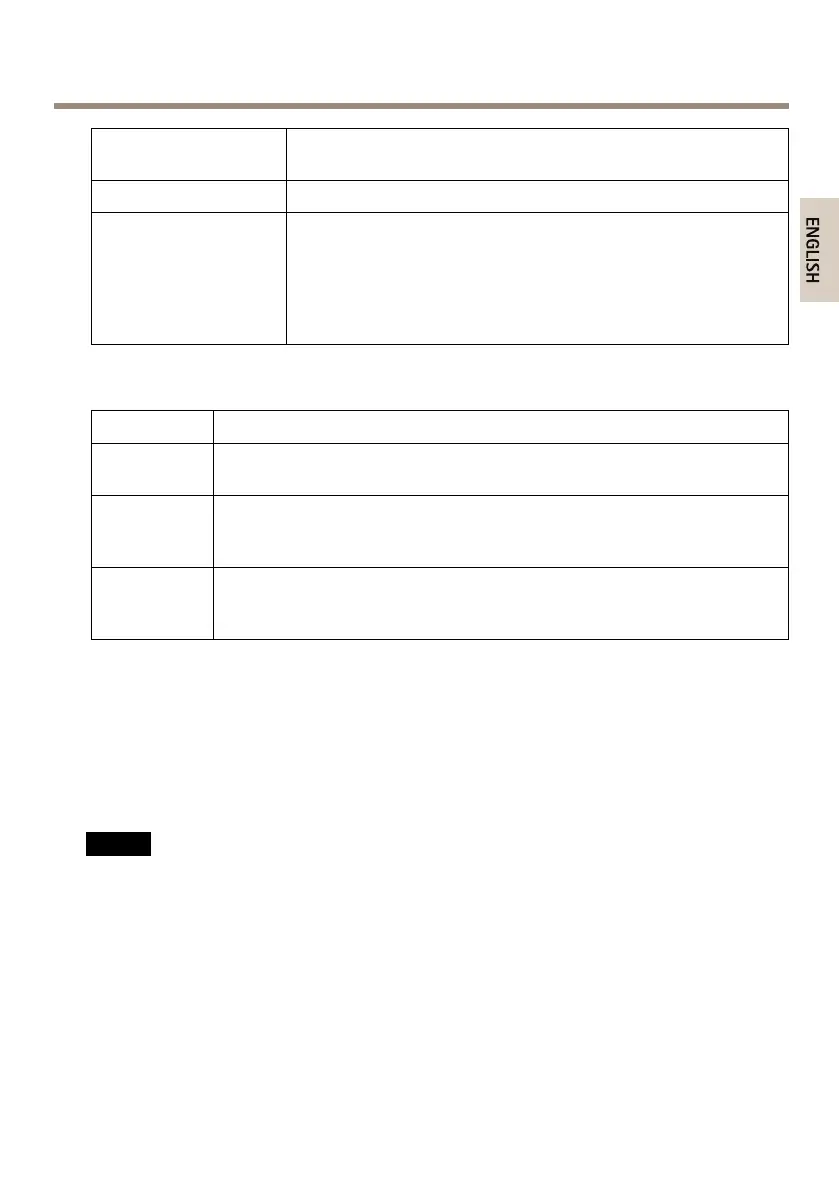
AXISP13-ESeries
HousingLED
(fanandheater)
Indication
Green
Normaloperation.
Flashinggreen
Singleash:Heatererror
Doubleash:Fanerror
Tripleash:Generalerror
Alarmeventswillbetriggeredthroughthecamera’sinputport.
ContactyourAxisresellerforinformationaboutsparepartsand
troubleshooting.
StatusLEDBehaviorforFocusAssistant
Color
Indication
Green
FocusAssistantisenabled
Thelensisoptimallyadjusted
AmberThecamerahasbeenmoved,oranobjecthasbeenplacedinfrontofthelens.
ExitandrestarttheFocusAssistant.
Thelensislessoptimallyadjusted.
RedThecamerahasbeenmoved,oranobjecthasbeenplacedinfrontofthelens.
ExitandrestarttheFocusAssistant.
Thelensispoorlyadjusted.
ConnectorsandButtons
Forspecicationsandoperatingconditions,seepage15.
NetworkConnector
RJ45EthernetconnectorwithPoweroverEthernet(PoE).
NO NO
NO
TICE TICE
TICE
Theproductshallbeconnectedusingashieldednetworkcable(STP).Allcablesconnecting
theproducttothenetworkshallbeintendedfortheirspecicuse.Makesurethatthe
networkdevicesareinstalledinaccordancewiththemanufacturer’sinstructions.For
informationaboutregulatoryrequirements,seeElectromagneticCompatibility(EMC)on
page2.
I/OConnector
Usewithexternaldevicesincombinationwith,forexample,tamperingalarms,motiondetection,
eventtriggering,timelapserecordingandalarmnotications.Inadditiontothe0VDCreference
pointandpower(DCoutput),theI/Oconnectorprovidestheinterfaceto:
13



 To Next Page