AXISP13-ESeries
1.Usethesupplieddrilltemplatetoprepareawallorpoleforinstallationofthewall
bracket.
2.Routethenetworkcablethroughthewallbracket,andthroughthebracketadapter.
Leaveapproximately30cm(11.8in)ofcableforconnectingtothecamera.
3.Installthewallbracketonawall,ceiling,orpoleusingscrewsandplugsappropriatefor
thematerial(e.g.wood,metal,sheetrock,stone).
RoutetheNetworkCableThroughtheCableHole
NO NO
NO
TICE TICE
TICE
Usinganyotherthantheprovidedcableglandmaycausewatertoseepinanddamage
theproduct.Cablesmusthaveadiameterof4.0–5.5mm.
Note
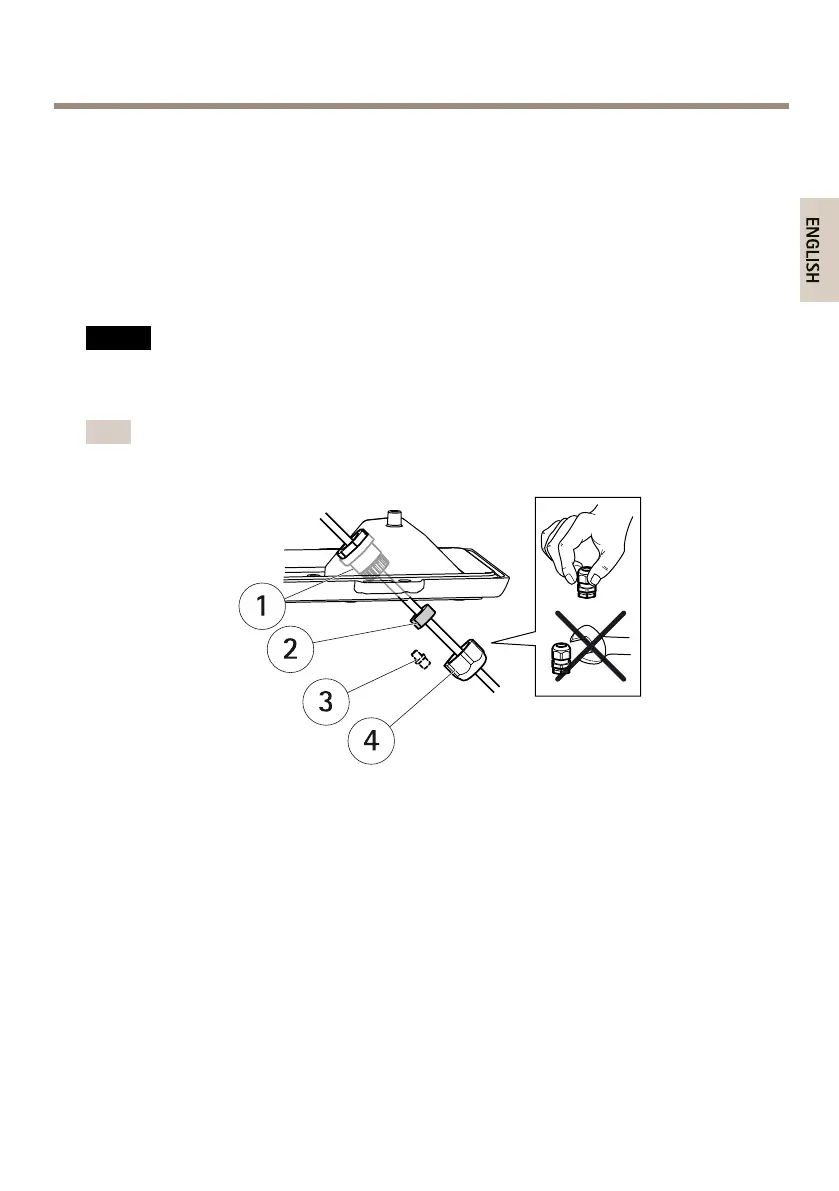
Checkagainstthehardwareoverviewimage(seepage10)whilefollowingthestepsbelow.
1
Cablegland
2
Gasket
3
Plug(discard)
4
Cap
1.Loosenthecablecoverscrews;detachthecablecoverfromthebottomcover.
2.Removethecap,theplugandthegasketfromthecablegland.
3.Routethenetworkcablethroughthecap.
4.Slidethenetworkcablethroughtheslitonthegaskettoattachthegaskettothenetwork
cable.SeeConnectorsonpage16forinformationonnetworkcablerequirements.
5.Routethenetworkcablethroughthecablegland.
6.Pressthegasketintothecableglandandscrewthecaponrmly.
19



 To Next Page