AXISP13-ESeries
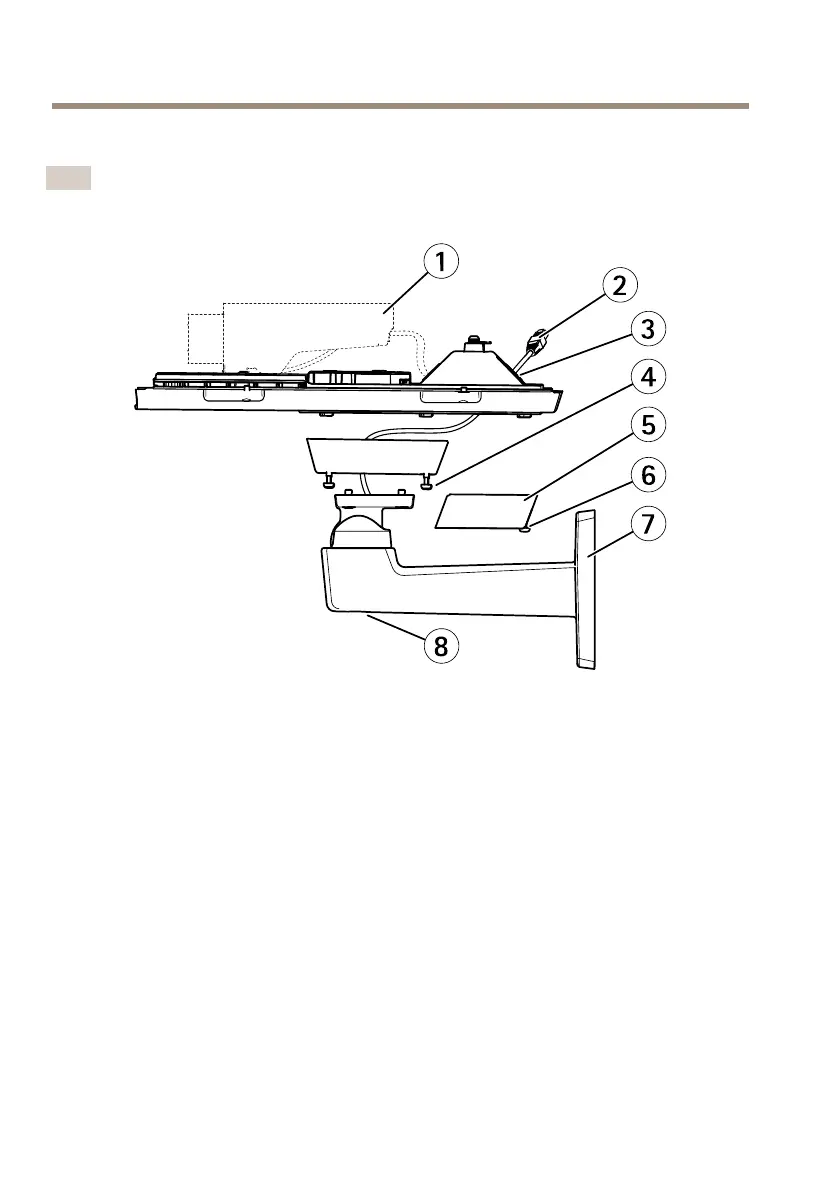
InstalltheCameraontheBracket
Note
TolocatethedifferentcomponentsseeillustrationsunderHardwareOverviewonpage10.
1
Axisnetworkcamera
2
Networkcable(routethroughwallbracket)
3
Cableholes
4
Bracketscrew(4x)
5
Cablecover
6
Cablecoverscrew(2x)
7
Wallbracket
8
Bracketadjustmentscrew
1.Installthecamerawiththebottomcoveronthebracketandtightenthebracketscrews.
2.Removethegasketfromoneoftheholesinthebottomcover.
3.Routethenetworkcablethroughtheholeandplugthecablegaskettothehole.
4.Connectthecables,seeConnecttheCables.
5.Takethetopcoverandattachthesafetywiretothetabonthebottomcover.
6.Loosenthebracketadjustmentscrewtopointthecameraintherightdirection.See
page22forinformationonhowtoviewthevideostream.
Adjustthefocus,seepage23.
20



 To Next Page