AXISP55NetworkCameraSeries
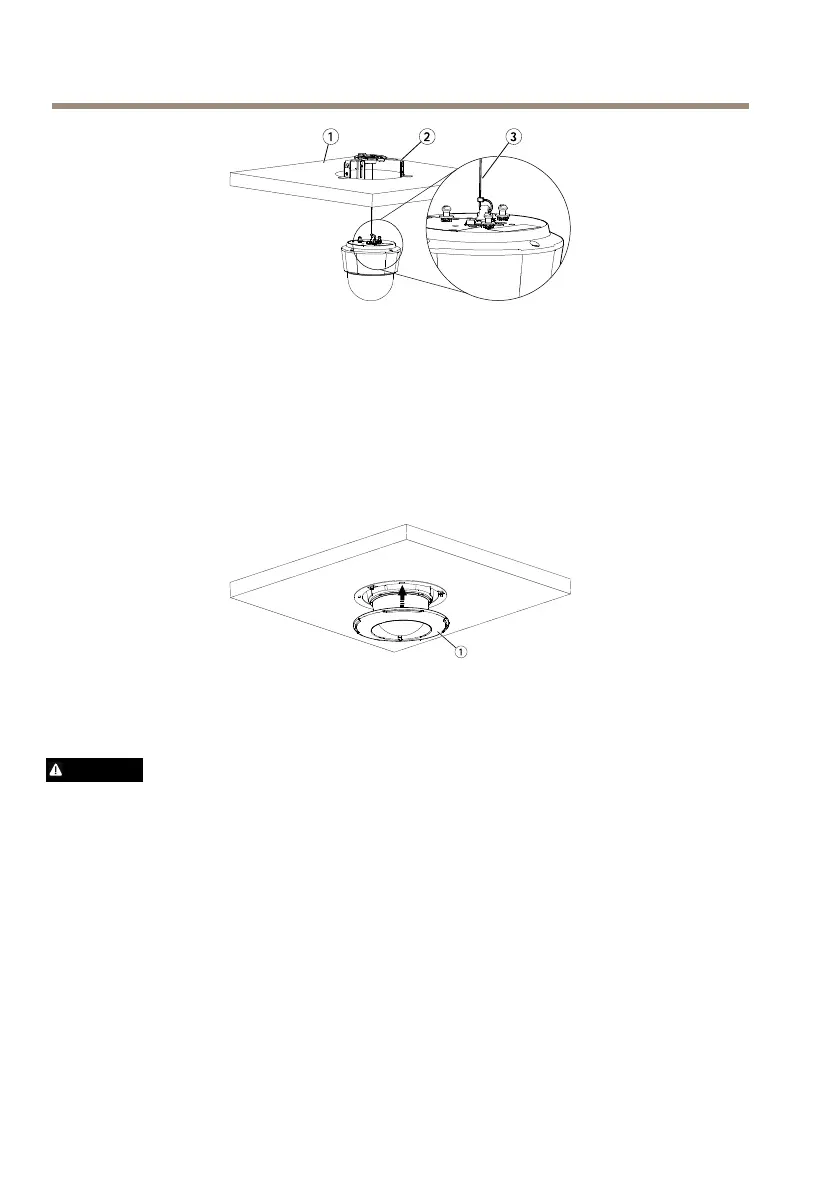
1.
Ceilingtile
2.
Ceilingbracket
3.
Safetywire
10.Slidetheunitholdersonthenetworkcameraintotheslotsonthemountingplateand
rotatethecameraunit
11.Installtheceilingtile,withthecameramounted,intotheceiling.
12.Placethetrimringovertheceilingbracketandsnapitintoplace.
1.
Trimring
InstalltheCameraonaBracketMount(soldseparately)
WARNING
•Riskofelectricshock.Theproductshallbegroundedusingagroundingwire.Makesure
bothendsofthegroundingwireareincontactwiththeirrespectivegroundingsurfaces.
1.Installthebracket(notincluded)accordingtotheinstructionssuppliedwiththebracket.
Ifdrillingisrequired,makesuretousedrillbits,screwsandplugsthatareappropriate
forthematerial.Seewww.axis.comforinformationonavailablemountingaccessories.
2.Securethecamerausingthesuppliedsafetywire.
3.Loosenthecamerabaselidscrewsandremovethecamerabaselid.
20



 To Next Page