AXISP55NetworkCameraSeries
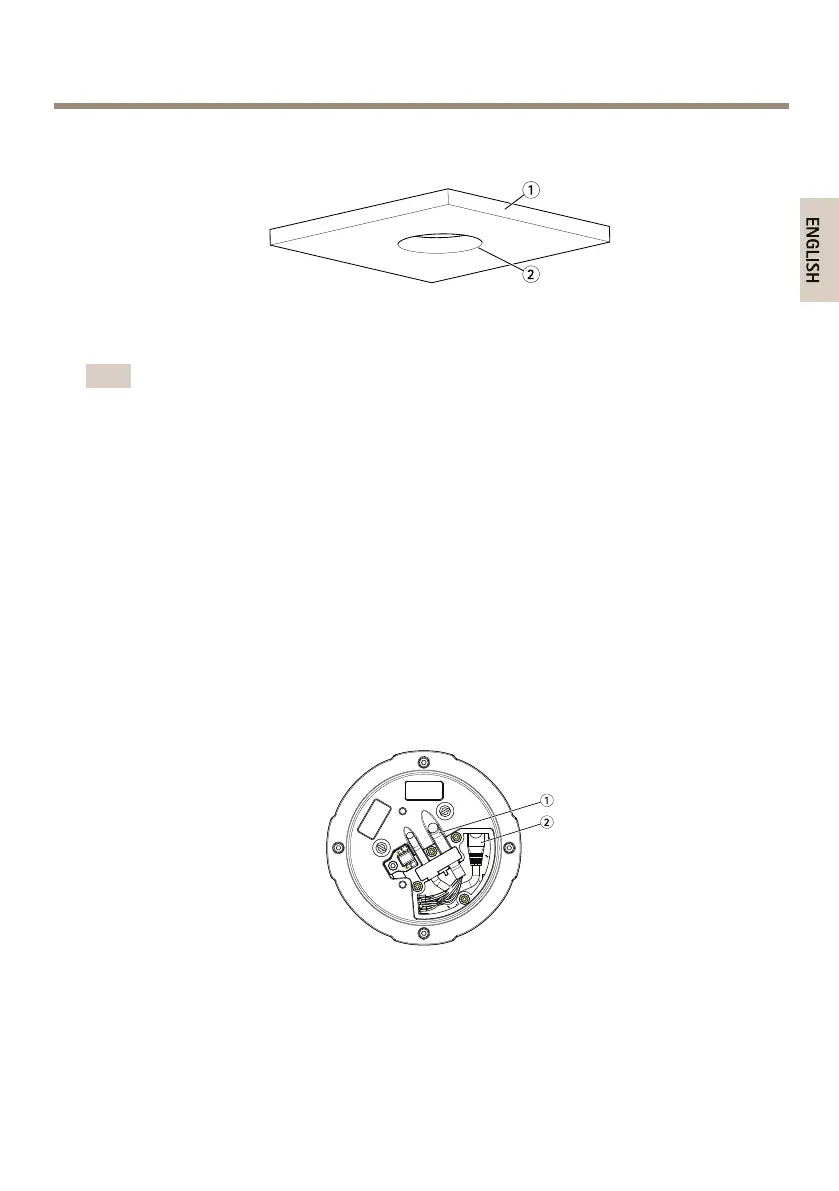
DropCeilingMount
1.
Ceilingtile
2.
Diameterofhole190mm(7.5in)
Note
•Thecombinedweightofthecameraandceilingmountisapproximately2.3kg(5.1lb.).
Checkthattheceilingmaterialisstrongenoughtosupportthisweight.
•Theceilingtileshouldbe5-60mm(0.2-2.4in)thick.
1.Removetheceilingtileinwhichthedropceilingmountistobetted.
2.Usethesuppliedtemplatetomarkthepositionforthe189.5mm(7.5in)holeinthe
ceilingtile.Cutaroundthetemplate.
3.Assembletheceilingbracket.
4.Placetheceilingbracketontheceilingtile.Seeillustrationfurtherdown.
5.Tightenthebracketarmscrewsusingatorx20screwdriverhead.
6.Loosenthe4camerabaselidscrewsandremovethecamerabaselid.(seeHardware
Overviewonpage11).
7.Removetherubbergasketandroutethenetworkcableandthemulti-connectorcableif
required.Becarefulnottodamagethecableswhenconnectingtothenetworkcamera.
1.
Multi-connectorcable
2.
Networkcable
8.Putthecamerabaselidbackinitsoriginalpositionandfastenthescrews.
9.Securethecamerausingthesuppliedsafetywire.
19



 To Next Page