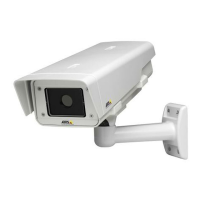
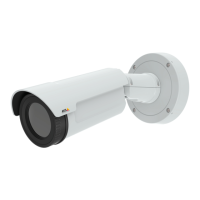
AXISQ1932–EThermalNetworkCamera
Technicalspecifications
Technicalspecifications
Youcanndthelatestversionofthedatasheetatwww.axis.com
LEDIndicators
StatusLED
Indication
Unlit
Connectionandnormaloperation.
GreenConnectionandnormaloperation.
Amber
Steadyduringstartup.Flashesduringrmwareupgradeorresettofactorydefault.
Amber/RedFlashesamber/redifnetworkconnectionisunavailableorlost.
RedFirmwareupgradefailure.
ConnectorsandButtons
Networkconnector
RJ45EthernetconnectorwithPoweroverEthernet(PoE).
NO NO
NO
TICE TICE
TICE
Theproductshallbeconnectedusingashieldednetworkcable(STP).Allcablesconnectingtheproducttothenetworkshall
beintendedfortheirspecicuse.Makesurethatthenetworkdevicesareinstalledinaccordancewiththemanufacturer’s
instructions.Forinformationaboutregulatoryrequirements,seeElectromagneticcompatibility(EMC)onpage2.
I/Oandaudioconnector
Terminalconnectorforconnectingexternalequipment:
•Audioequipment
•Input/Output(I/O)devices
Whenconnectingexternalequipment,anAxismulticableisrequiredinordertomaintaintheproduct’sIPrating.Formore
information,seeMulticableconnectorsonpage55.
Powerconnector
TerminalconnectorforconnectingAC/DCpowersupply.
SDcardslot
NO NO
NO
TICE TICE
TICE
•RiskofdamagetoSDcard.Donotusesharptools,metalobjectsorexcessiveforcewheninsertingorremovingthe
SDcard.Useyourngerstoinsertandremovethecard.
•Riskofdatalossandcorruptedrecordings.DonotremovetheSDcardwhiletheproductisrunning.Disconnectpoweror
unmounttheSDcardfromtheAxisproduct’swebpagesbeforeremoval.
ThisproductsupportsmicroSD/microSDHC/microSDXCcards(notincluded).
ForSDcardrecommendations,seewww.axis.com
54



 To Next Page