AXISQ60Series
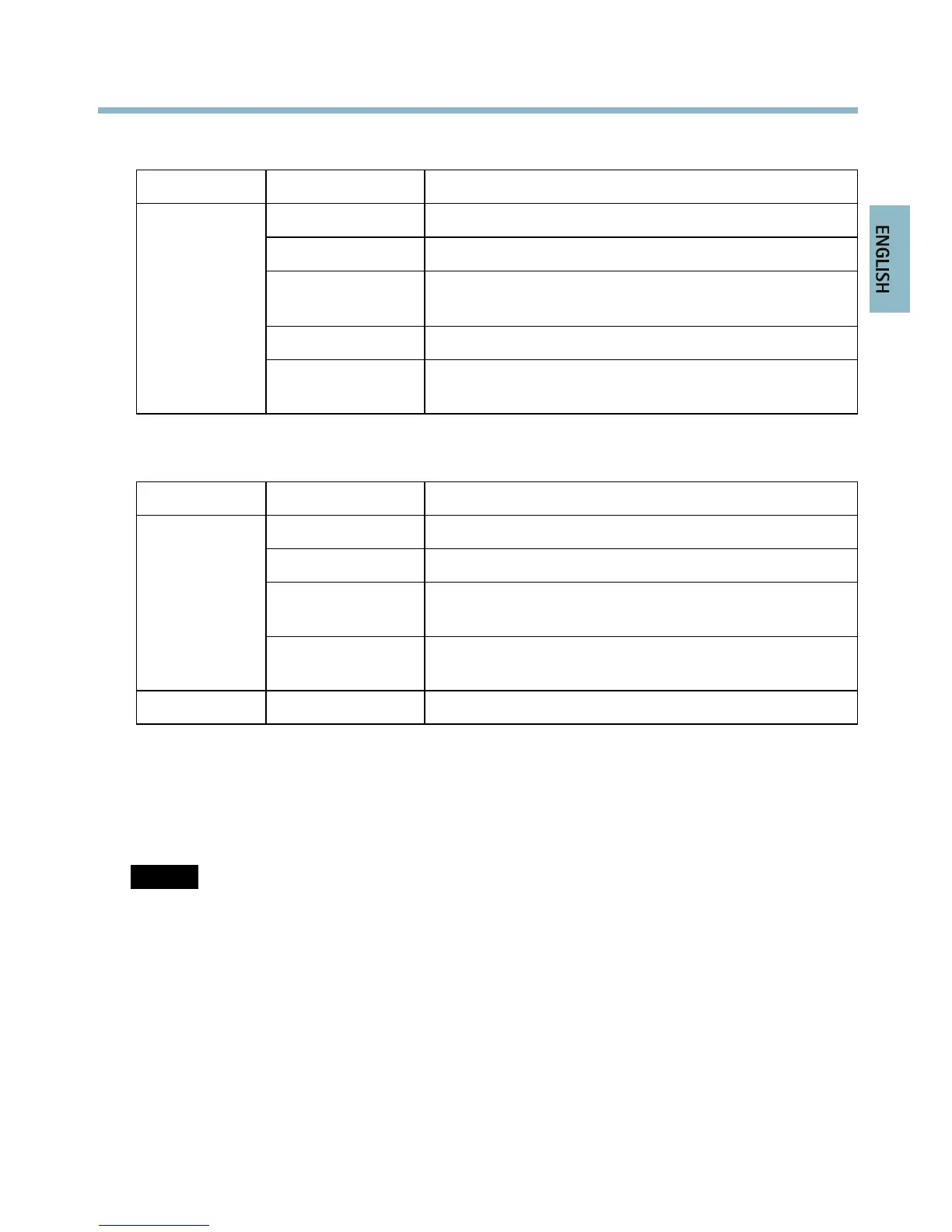
LEDIndicators
LED
Color
Indication
Unlit
Connectionandnormaloperation
Amber
Steadyduringstartup.Flashesduringrmwareupgrade.
Amber/redFlashesamber/redifnetworkconnectionisunavailable
orlost.
RedFlashesredforrmwareupgradefailure.
Status
GreenShowssteadygreenfor10secondsfornormaloperation
afterrestart.
MidspanLEDIndicators
LED
Color
Indication
UnlitNocameraconnected.
GreenSteadywhencameraconnected,normaloperation.
Green,ashingSlowashwhenovercurrentorshortcircuitcondition
ontheport.
Port
Green,ashing
Fastashwheninputvoltageisoutofrangeorother
internalerror.
ACGreenSteadywhenACpowerinputconnected.
Connectors
Networkconnector-RJ45Ethernetconnector.SupportsPoweroverEthernetPlus(PoE+)IEEE
802.3at.Usethesuppliedmidspan.
NOTICE NOTICE
NOTICE
Theproductshallbeconnectedusingashieldednetworkcable(STP).Allcablesconnecting
theproducttothemidspanshallbeshielded(STP)andintendedfortheirspecicuse.Make
surethatthemidspanisproperlygrounded.Forinformationaboutregulatoryrequirements,
seeRegulatoryInformation,onpage2.
SDcardslot-Astandardorhigh-capacitySDcard(notincluded)canbeusedforlocalrecording
withremovablestorage.
13



 To Next Page