18 AB-6650
The settings on this page are available for Models R7010WX01 and R7010WX02..
Continued from “Temperature PV” on P.16.
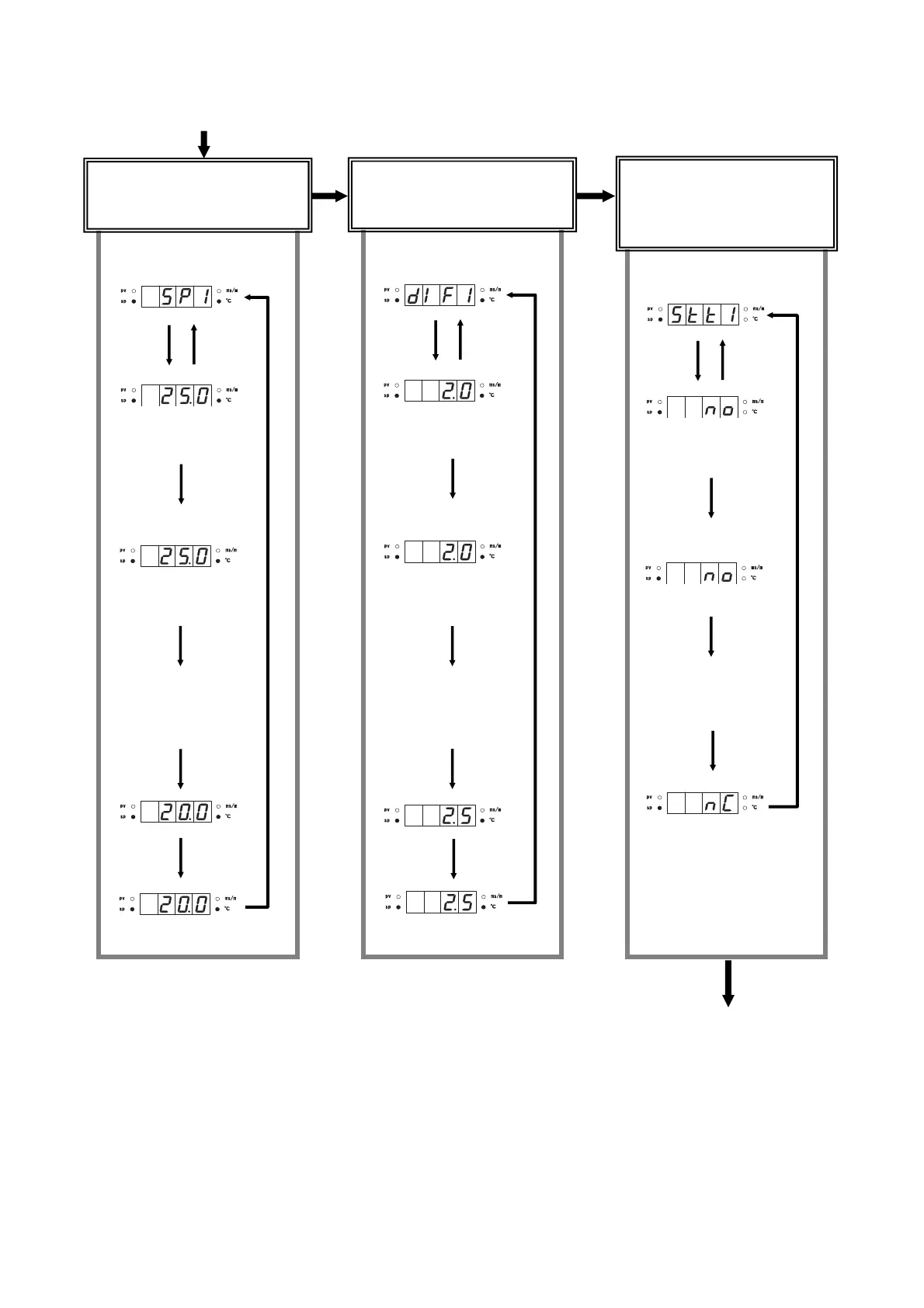
Temperature SP1
setting menu
The SP1 currently set
is displayed.
SP1 setting mode
The first digit (‘2’ in this
case) flashes.
Select the digit to change
with [→] key, and change
the value with [↑] and [↓]
keys.
The SP1 newly set is displayed.
Press
[mode]
key.
Temperature DIF1
setting menu.
The DIF1 currently set is
displayed.
DIF1 setting mode
The first digit (’2’ in this
case) flashes.
Select the digit to change
with [→] key, and change
the value with [↑] and [↓]
keys.
The DIF1 newly set is displayed.
Press
[mode]
key.
Conductivity STT1
setting menu
The STT1 currently set is
displayed.
STT1 setting mode
All the digits flash.
Change the output contact
type (N.O. or N.C.) with
[↑] and [↓] keys.
The STT1 newly set is displayed.
Press [mode] key.
Continued to the following page.
Setting of SP1 (output 1 SP)
: temperature
(To change 25 to 20 °C)
Setting of DIF1 (output 1 DIF)
: temperature
(To change 2 to 2.5 °C)
Changeover of STT1
(N.O. or N.C. for output 1)
: temperature
(To change N.O. to N.C.)
Press
[enter]
key.
Press
[enter]
key.
Press
[→]
key.
Press
[enter]
key.
Press [enter] key.
Press
[enter]
key.
Press
[enter]
key.
Press
[→]
key.
Press
[enter]
key.
Press [enter] key.
Press
[enter]
key.
Press
[enter]
key.
Press
[→]
key.
Press
[enter]
key.
Press [enter] key.



 To Next Page