EN-31 EN-32
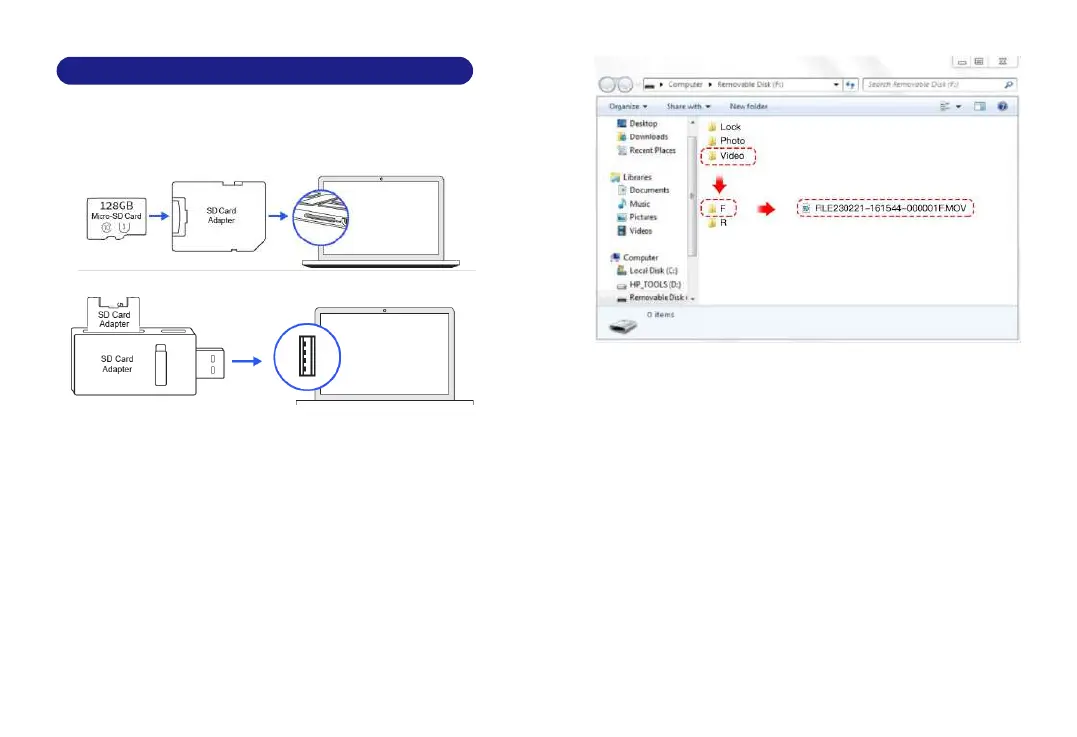
1. Remove the microSD card from the dashcam.
2. Insert the card into the microSD card reader and connect it to a
computer.
10. Playing Video Files Using Your Computer
3.You should be able to see drive "D" or "E" or other name
depending on the pre-installed hard drives.Once you find the
added flash drive, double click it, then you will see the file
folders- Video / Lock / Photo
Video:The loop recording video files that can be overwritten.
Lock:The video file will be locked so it will NOT be deleted by
loop recording function.
Photo:The photos
Then simply double click on the video to play them.
We recommend VLC Media player. You can get it free at
.www.videolan.org
File named **************_*******F = Front camerea video file
File named **************_*******R = Rear camerea video file



 To Next Page