4ª 10103 (GB) 6 - 2008
14
A = 0.10 EURO
B = 0.50 EURO
C = 0.05 EURO
R
SAVE - ACCOUNT
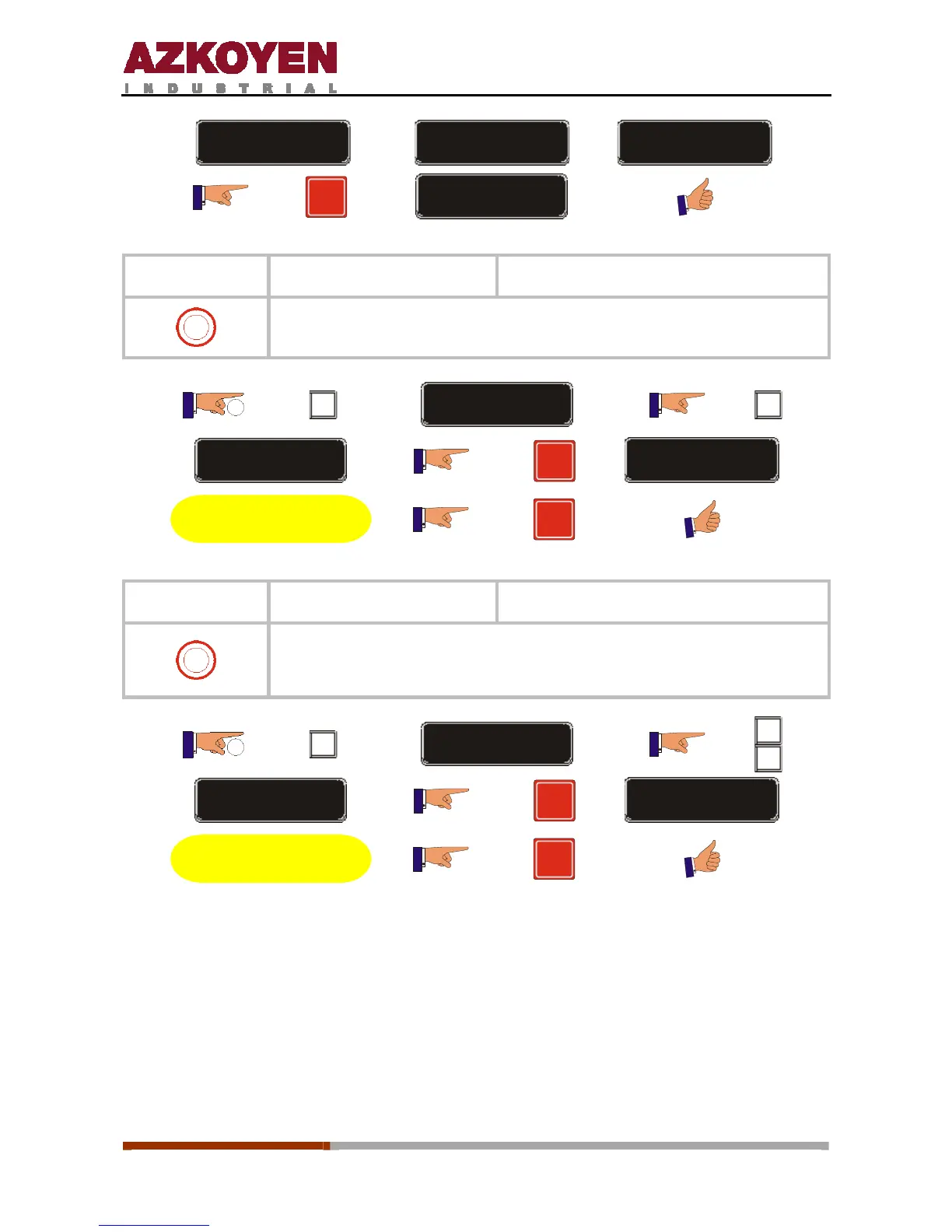
Function 010
<<SEND DATA PRINT>>
Send data to the printer
0
This option allows you to send the accounting data to an external printer
for a hard copy of the accounting.
2”
C
FUNCTION = 000
B
FUNCTION = 010
R
ASCII -> RS232
Execute the operation
R
Function 013
<<SEND DATA PRINT>> Send data to a MODEM
0
This option makes a call to the Data Collection Centre using the
telephone number established in the programming via the modem
installed in the machine, it transmits the corresponding data.
2”
C
FUNCTION = 000
A
B
FUNCTION = 013
R
MODEM
Execute the operation
R



 To Next Page