4ª 10103 (GB) 6 - 2008
86
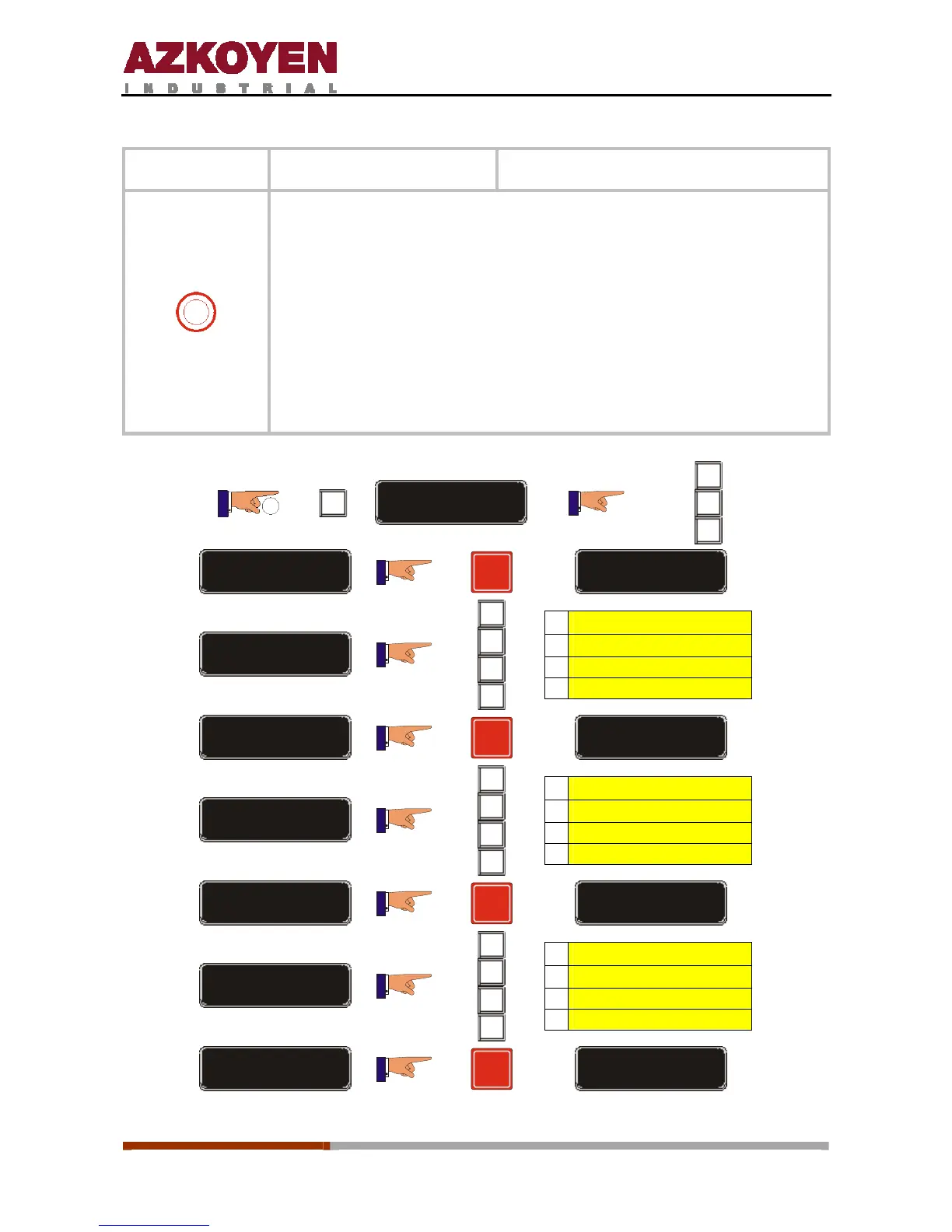
Function 560
<<SHIFTS>>
Establish work shift times
1
This function allows you to establish three work shifts for a day,
programming their starting times.
The shifts should be programmed in ascending order and the last can be
programmed to finish at 00:00 (12:00AM).
If the shifts do not cover the 24 hours, the sales made outside the shifts
will be accounted to shift 1.
To deactivate a shift, programme 00:00 as the start and finish time for
the shift.
2”
C
FUNCTION = 000
A
B
C
FUNCTION = 560
R
START SHIFT 1
TIME = 00-00
A
B
C
D
A
Ï
B
Ð
C Delete
D Enter Î
TIME = 08-00
R
START SHIFT 2
TIME = 00-00
A
B
C
D
A
Ï
B
Ð
C Delete
D Enter Î
TIME = 16-00
R
START SHIFT 3
TIME = 00-00
A
B
C
D
A
Ï
B
Ð
C Delete
D Enter Î
TIME = 00-00
R
STOP SHIFT 3



 To Next Page