4ª 10103 (GB) 6 - 2008
43
Function 229
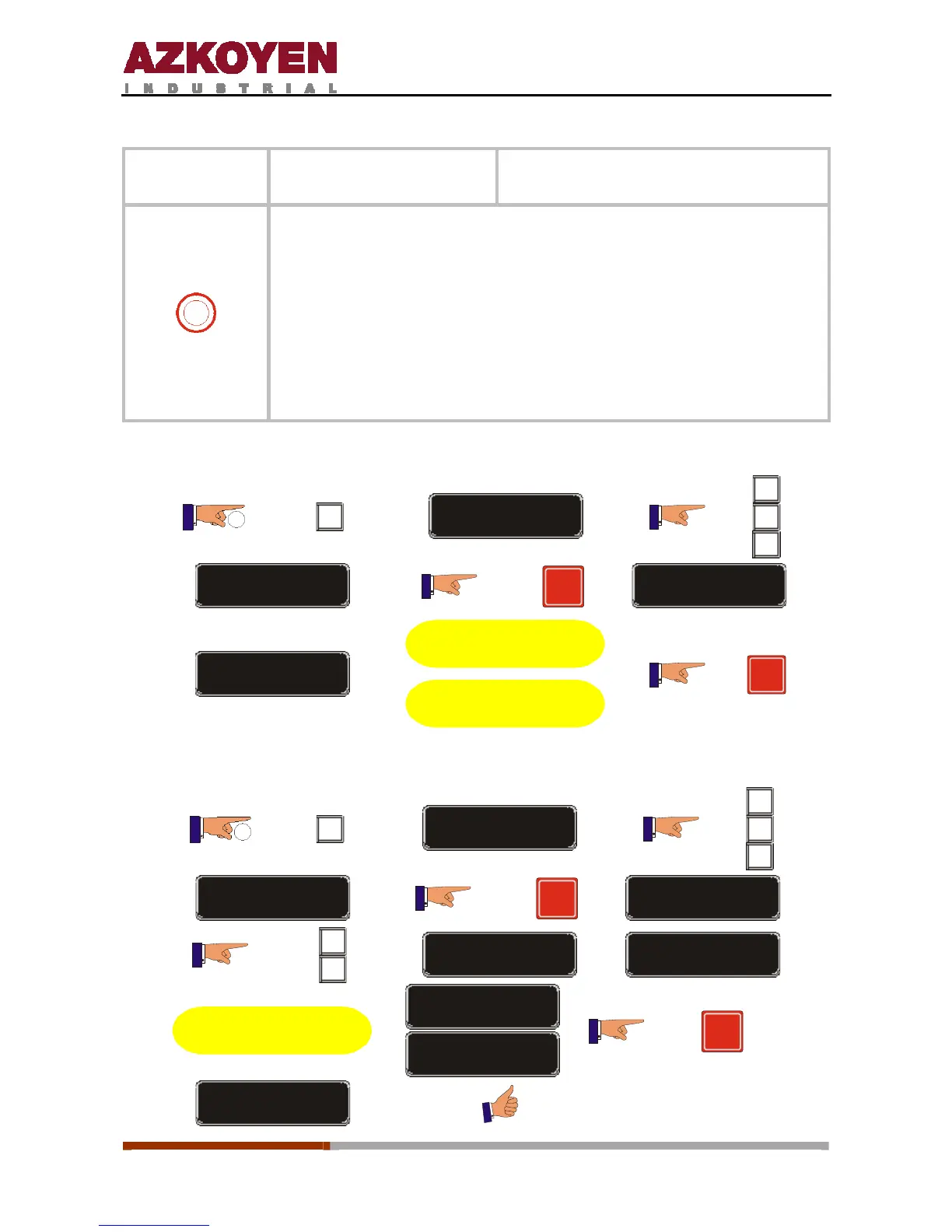
<<CARD TEST>>
Test the smartcard that has been
inserted into the machine
0
This function is only activated when function F454 has this option
programmed on the smartcard.
The machine recognises the types of smartcards that are activated for
the card reader – magnetic strip, chip, etc. – and will function in the
following way:
- If it is a smartcard, the machine will sell the product without
charging the card.
- If it is an Italian card, the display will show: VALID CARD or CARD
NOT VALID.
For a SMARTCARD:
2”
C
FUNCTION = 000
A
B
C
FUNCTION = 229
R
INSERT CARD
CREDIT=00,00
Make a sale pushing
any button
T he sale will no t
discount credit from the
card
R
For ITALIAN cards:
2”
C
FUNCTION = 000
A
B
C
FUNCTION = 229
R
CARD TEST? NO
A
B
CARD TEST? SI
INSERT CARD
Now inse rt the card in
the card reader
CARD VALID
CARD NO VALID
R
SAVE CONFIG



 To Next Page