4ª 10103 (GB) 6 - 2008
48
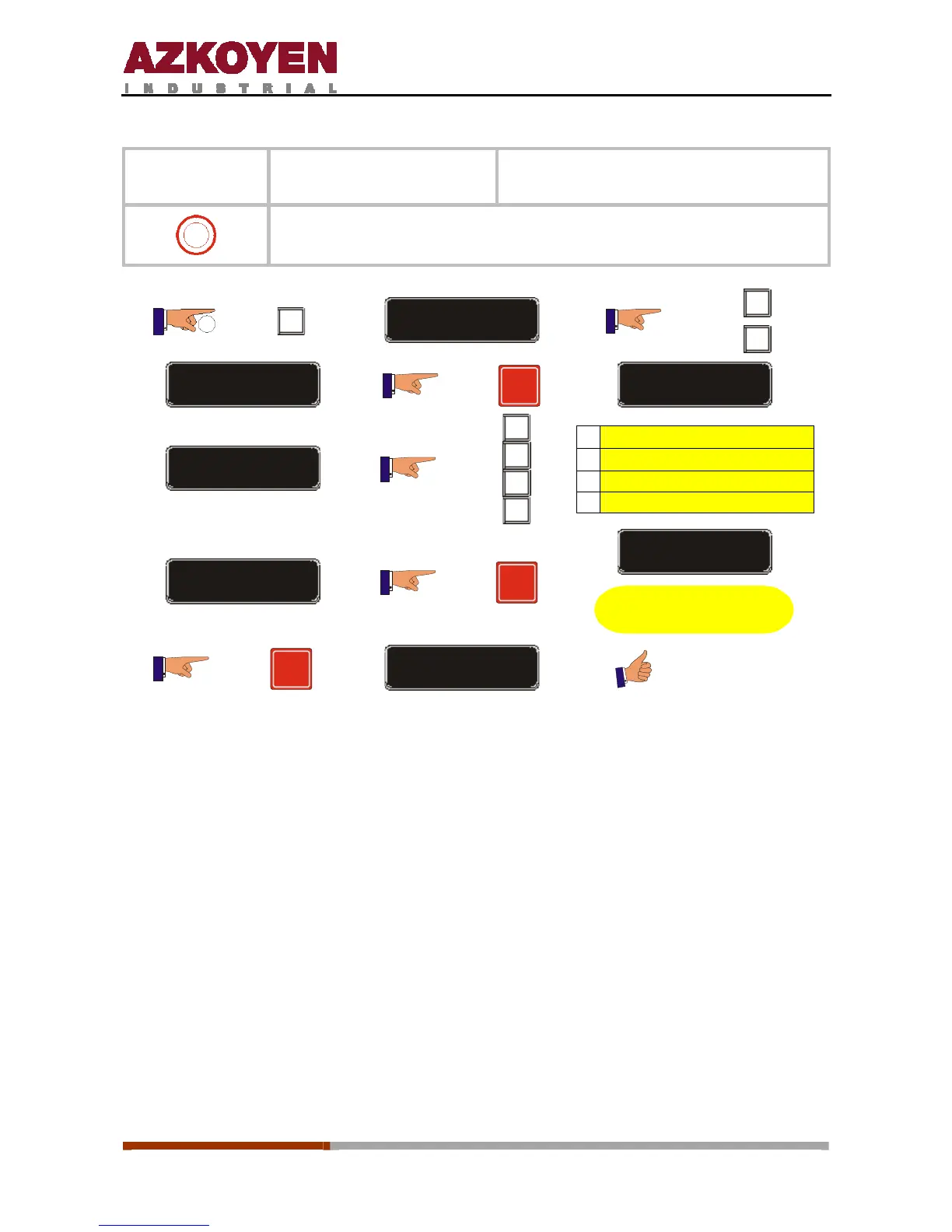
Function 307
<<SEL NAME >>
Programme a name for each product
selection.
0
This allows you to give a name to each product selection on the machine.
2”
C
FUNCTION = 000
A
C
FUNCTION = 307
R
PRESS SELECTION
A
A
B
C
D
A
Ï
B
Ð
C Del.
D Enter Î
MARLBORO LIGHT
R
PRESS SELECTION
Repeat the operation
as m any tim es as
necessary
R
SAVE CONFIG
CHARACTERS IN FUNCTION
A, B, C, D, E, F, G, H, I, J, K, L, M, N, O, P, Q, R, S, T, U, V, W, X, Y, Z,
0, 1, 2, 3, 4, 5, 6, 7, 8, 9,
*, -, /, \, +, =, !, ?, $, @, &, <, >, space.



 To Next Page