EasyManua.ls Logo

B. Braun Vista basic - Controller Board

B. Braun Vista basic
55 pages
Print Icon
To Next Page IconTo Next Page
To Previous Page IconTo Previous Page
Loading...
Unit
Elements
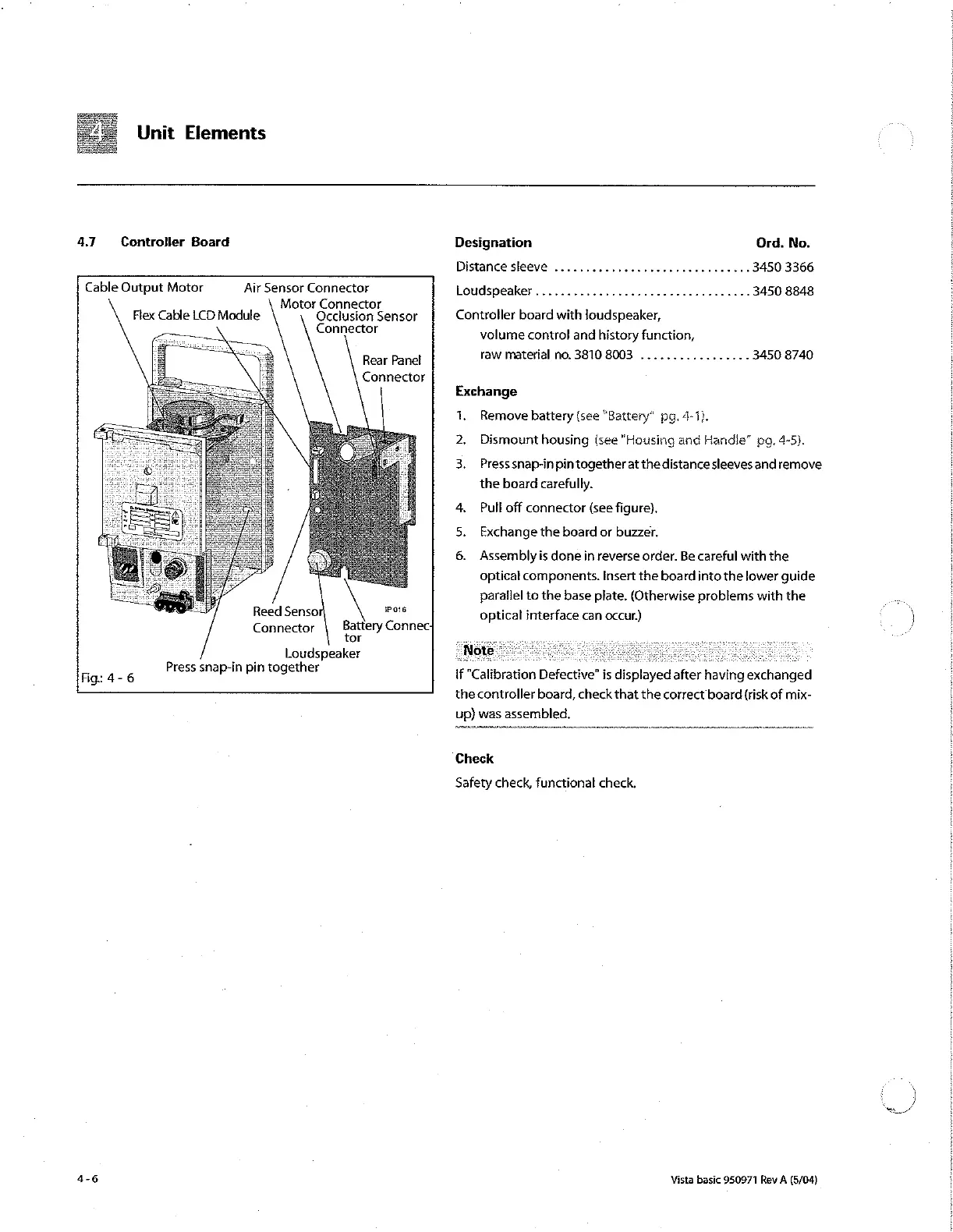
4.7
Controller
Board
Cable
Output
Motor
Air
Sensor
Connector
Motor
Connector
Occlusion
Sensor
Connector
Flex
Cable
LCD
Module
Rear
Panel
Connector
Reed
Sensoi
wate
Connector
Battery
Connec-
tor
Loudspeaker
Press
snap-in
pin
together
Fig:
4-
6
Prin
pin tog
4-6
Designation
Ord.
No.
Distancesleeve
...............................
3450
3366
loudspeaker..................................
3450 8848
Controller
board
with
loudspeaker,
volume
control
and
history
function,
raw
material
no.
3810 8003
...........,.....
3450 8740
Exchange
1.
Remove
battery
(see
“Battery”
pg.
4-1).
2.
Dismount
housing
(see
"Housing
and
Handia”
pg.
4-5).
3.
Press
snap-in
pin
together
at
the
distance
sleeves
and
remove
the
board
carefully.
4.
Pull
off
connector
(see
figure).
Exchange
the
board
or
buzzer.
6.
Assembly
is
done
in
reverse
order.
Be
careful
with
the
optical
components.
Insert
the
board
into
the
lower
guide
parallel
to
the
base
plate.
(Otherwise
problems
with
the
optical
interface
can
occur.)
if
"Calibration
Defective’
is
displayed
after
having
exchanged
the
controller
board,
check
that
the
correct
board
(risk
of
mix-
up)
was
assembled.
Check
Safety check,
functional
check.
Vista
basic
950971
Rev
A
(5/04)
À

Other manuals for B. Braun Vista basic

Related product manuals