EasyManua.ls Logo

B. Braun Vista basic - Front Panel

B. Braun Vista basic
55 pages
Print Icon
To Next Page IconTo Next Page
To Previous Page IconTo Previous Page
Loading...
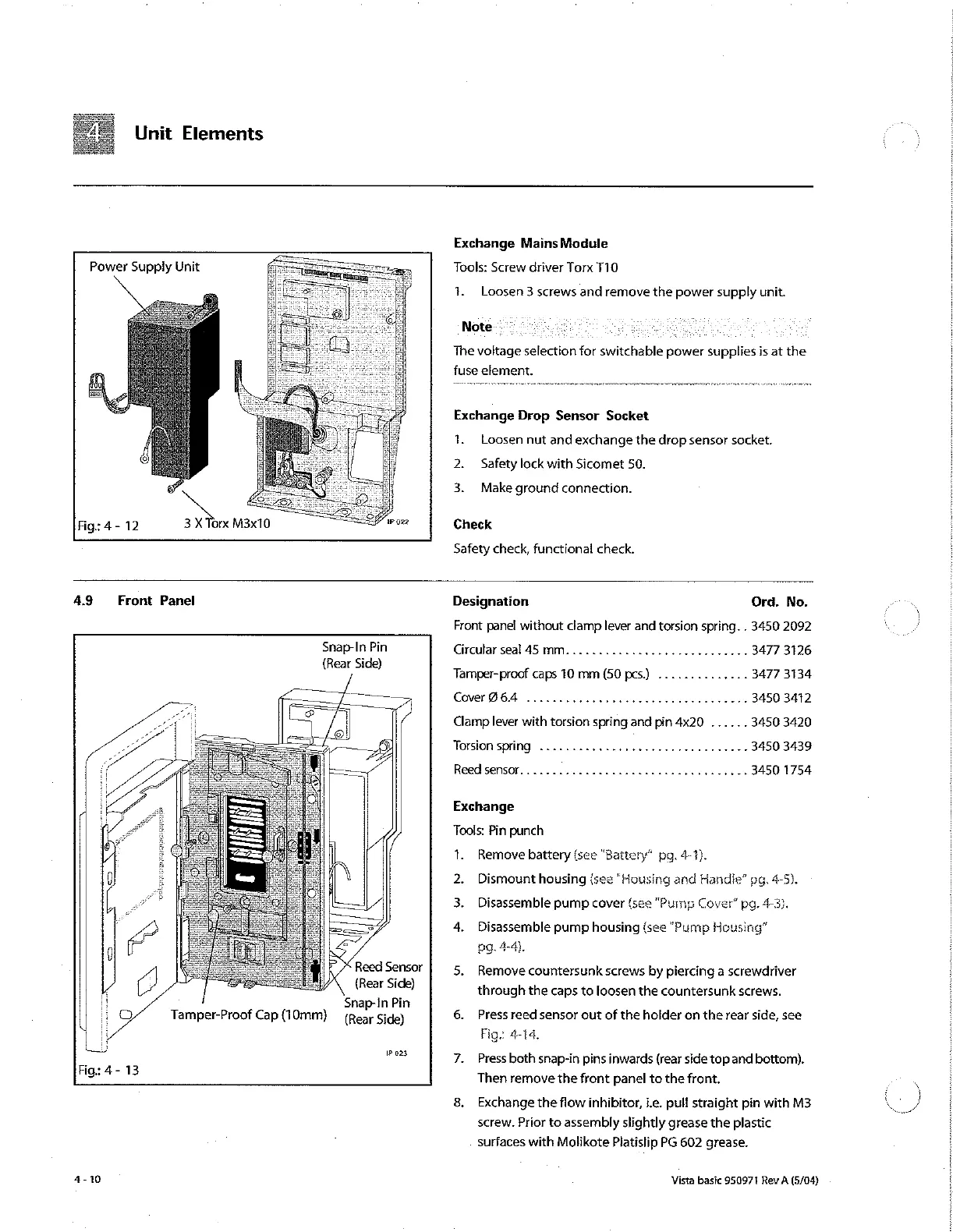
Unit
Elements
Exchange
Mains
Module
Power
Supply
Unit
Tools:
Screw
driver
Torx
T10
1.
Loosen
3
screws
and
remove
the
power
supply
unit.
Note.
È
The
voltage
selection
for
switchable
power
supplies
is
at
the
fuse
element.
Exchange
Drop
Sensor
Socket
1.
Loosen
nut
and
exchange
the
drop
sensor
socket.
2.
Safety
lock
with
Sicomet
50.
3.
Make
ground
connection.
Fig:
4
-
12
De
M3x10
Check
Safety check,
functional
check.
4.9
Front Panel
Designation
Ord.
No.
Front
panel
without
clamp
lever
and
torsion spring.
.
3450 2092
/
Snap-In
Pin
Circularseal45
mm............................
3477
3126
(Rear
Side)
Tamper-proof
caps
10
mm
(50
pcs.)
..
3477
3134
Cover
964
..
3450
3412
Clamp
lever
with
torsion
spring
and
pin
4x20
......
3450 3420
Torsion
spring
.............,..................
3450
3439
Reedsensor...................................
3450
1754
Exchange
Tools:
Pin
punch
1.
Remove
battery
(ses
“Battery”
pg.
4-1).
2.
Dismount
housing
{see
“Housing
and
Handle”
pg.
4-5).
3.
Disassemble
pump
cover
{see
"Pump
Cover”
pg.
4-3).
4.
Disassemble
pump
housing
(see
“Pump
Housing”
pg.
4-4).
Reed
Sensor
5.
Remove
countersunk
screws
by
piercing
a
screwdriver
(Rear
Side)
through
the
caps
to
foosen
the
countersunk
screws.
Snap-in
Pin
:
Tamper-Proof
Cap
(10mm)
(Rear
Side)
6.
Press
reed
sensor
out
of
the
holder
on
the
rear
side,
see
Fig:
4-14.
023
7.
Press
both
snap-in
pins
inwards
(rear
side
top
and
bottom).
ig:
4-
13
Then
remove
the
front
panel
to
the
front.
8.
Exchange
the
flow
inhibitor,
i.e,
pull
straight
pin
with
M3
screw.
Prior
to
assembly
slightly
grease
the
plastic
surfaces
with
Molikote
Platislip
PG
602
grease.
4-10
Vista
basic
950971
Rev
A
(5/04)

Other manuals for B. Braun Vista basic

Related product manuals