EasyManua.ls Logo

B. Braun Vista basic - Pump Unit

B. Braun Vista basic
55 pages
Print Icon
To Next Page IconTo Next Page
To Previous Page IconTo Previous Page
Loading...
==
Unit
Elements
=
410
Pump
Unit
Designation
Ord.
No.
Finger
pump
(without
motor)
including
pump,
.....
3452
0600
pump
cover,
seal
membrane
and
occlusion
sensor
board
Motor
with
pinion
for
finger
pump.
...............
3450
1924
Exchange
1.
Remove
battery
(see
“Battery”
pg.
4-1).
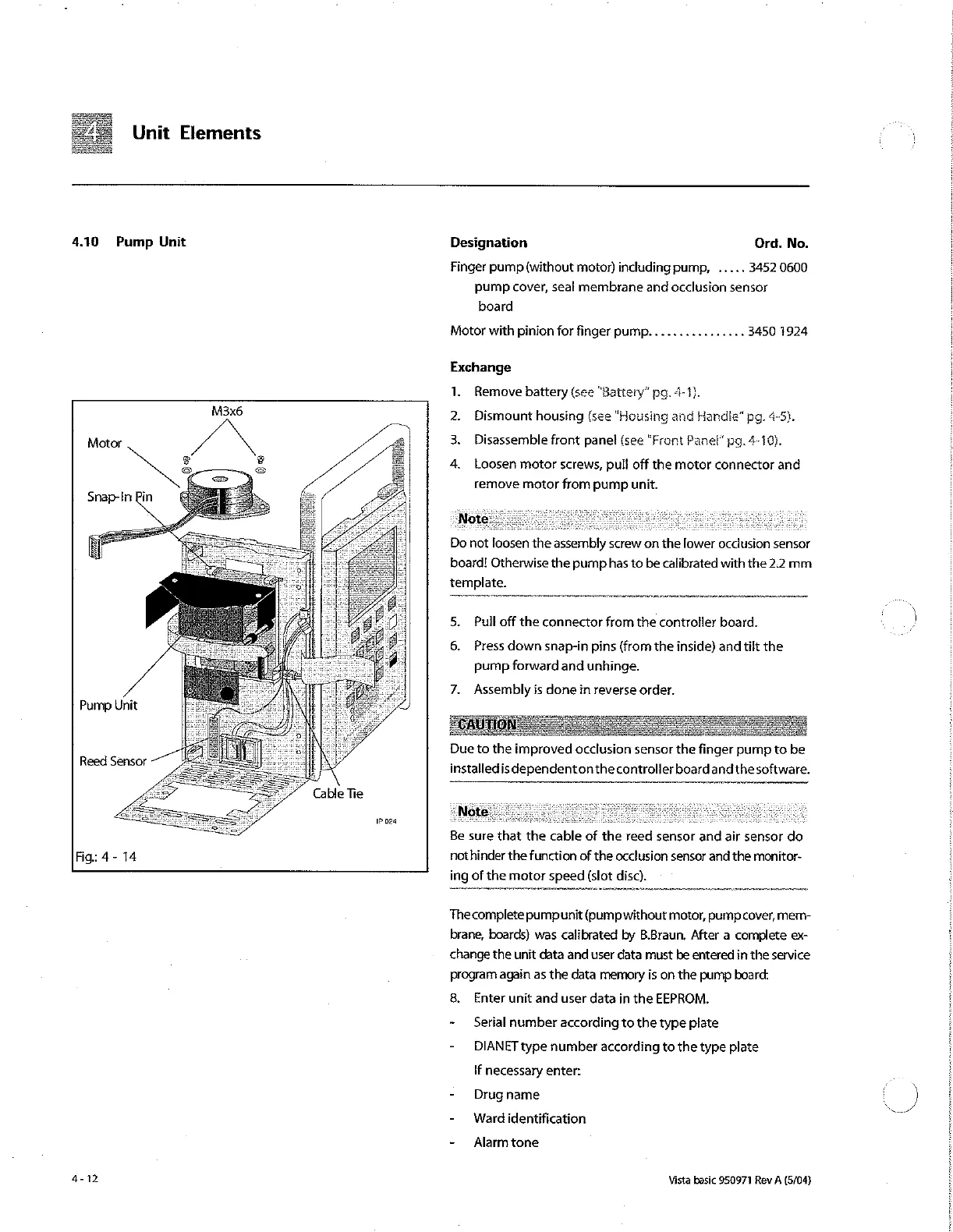
M3x6
Dismount
housing
(see
“Housing
and
Handle"
pg.
4-5}.
2
3.
Disassemble
front
panel
(see
“Front
Panel”
pg.
4-10}.
4.
Loosen
motor
screws,
pull
off
the
motor
connector
and
rernove
motor
from
pump
unit.
Do
not
loosen
the
assembly
screw
on
the
lower
occlusion
sensor
board!
Otherwise
the
pump
has
to
be
calibrated
with
the
2.2
mm
template.
5.
Pull
off
the
connector
from
the
controller
board.
6.
Press
down
snap-in
pins
(from
the
inside)
and
tilt
the
pump
forward
and
unhinge.
7.
Assembly
is
done
in
reverse
order.
Pump
Unit
Dueto
the
improved
occlusion
sensor
the
finger
pump
to
be
installedis
dependentonthe
controller
board
andthesoftware.
Reed
Sensor
Cable
Tie
1P
024
e
s
Я
Be
sure
that
the
cable
of
the
reed
sensor
and
air
sensor
do
Fig:
4-
14
nothinder
the
function
of
the
occlusion
sensor
and
the
monitor-
ing
of
the
motor
speed
(slot
disc).
The
complete
pumpunit
(pumpwithout
motor,
pump
cover,
mem-
brane,
boards)
was
calibrated
by
B.Braun.
After
a
complete
ex-
change
the
unit
data
and
user
data
must
be
entered
in
the
service
program
again
as
the
data
memory
is
on
the
pump
board:
8.
Enter
unit
and
user
data
in
the
EEPROM.
-
©
Serial
number
according
to
the
type
plate
-
DIANET
type
number
according
to
the
type
plate
If
necessary
enter:
-
Drug
name
2
)
-
Ward
identification
-
Alarmtone
4-12
Vista
basic
950971
Rev
A
(5/04)

Other manuals for B. Braun Vista basic

Related product manuals