EasyManua.ls Logo

B. Braun Vista basic - Air Sensor

B. Braun Vista basic
55 pages
Print Icon
To Previous Page IconTo Previous Page
Loading...
Unit
Elements
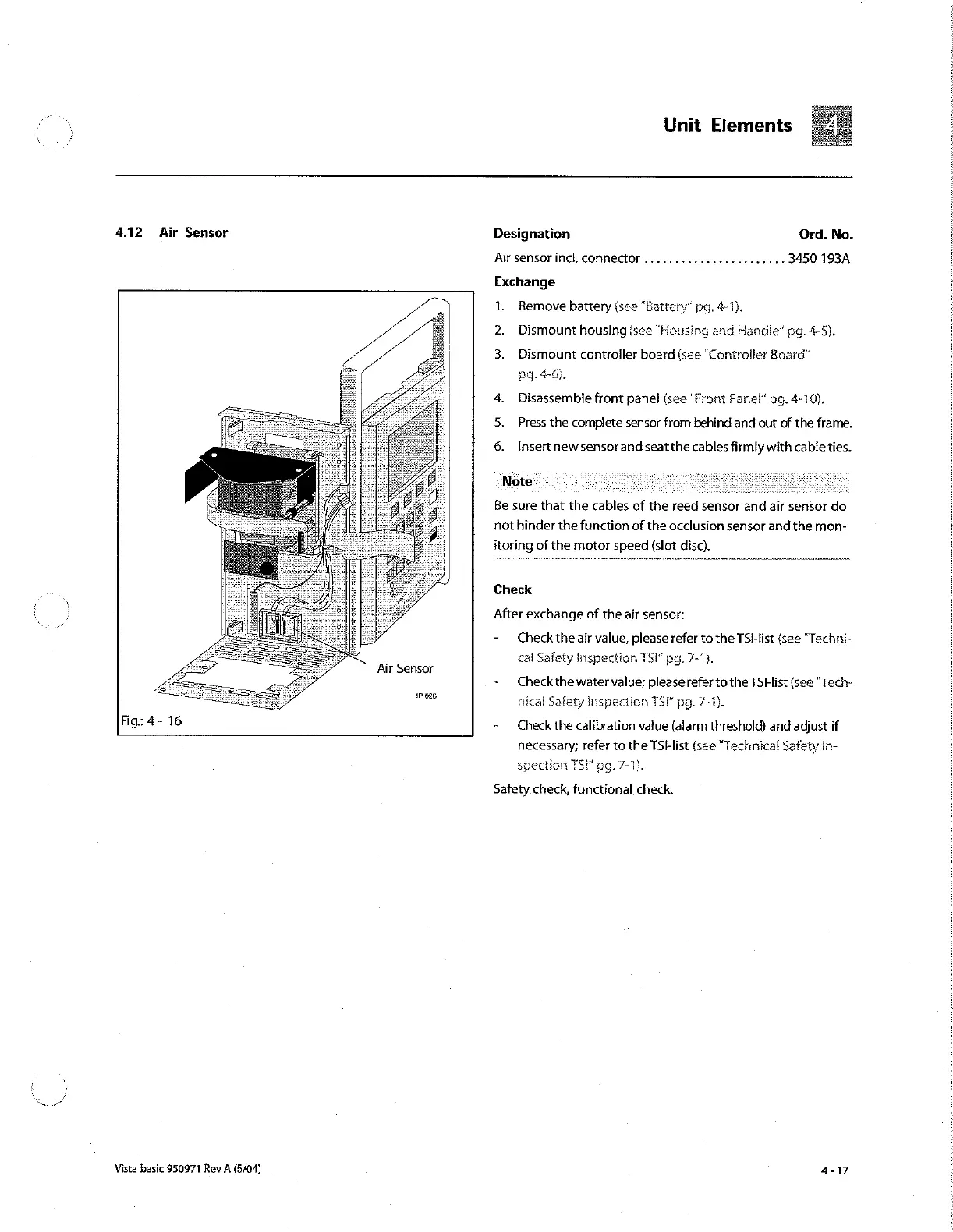
4.12
Air
Sensor
Air
Sensor
1P
025
Fig:
4-
16
Vista
basic
950971
Rev
A
(5/04)
Designation
Ord.
No.
Air
sensor
incl.
connector
.......................
3450
193A
Exchange
1.
Remove
battery
(see
“Battery”
pg.
4-1).
2.
Dismount
housing
(see
"Housing
and
Handle”
pg.
4-5).
3.
Dismount
controller
board
(see
“Controller
Board”
pg.
4-6).
4.
Disassemble
front
panel
(see
“Front
Panel”
pg.
4-10).
Press
the
complete
sensor
from
behind
and
out
of
the
frame.
6.
Insertnewsensor
and
seat
the
cables
firmly
with cable
ties.
Be
sure
that
the
cables
of
the
reed
sensor
and
air
sensor
do
not
hinder
the
function
of
the
occlusion
sensor
and
the
mon-
itoring
of
the
motor
speed
(slot
disc).
Check
After
exchange
of
the
air
sensor:
-
Check
the
air
value,
please
refer
to
the
TS!-list
(see
“Techni-
cal
Safety
Inspection
TSF
pg.
7-1).
~
Check
the
water
value;
please
refer
to
the
TSHlist
(see
"Tech-
nical
Safety
Inspection
TSI
pg.
7-1.
-
Check
the
calibration
value
(alarm
threshold)
and
adjust
if
necessary;
refer
to
the TSHlist
(see
"Technical
Safety
In-
spection
TS!”
pg.
7-1).
Safety
check,
functional
check.

Other manuals for B. Braun Vista basic

Related product manuals