122
UTILITY STITCHES — — — — — — — — — — — — — — — — — — — — — — — — — — — — — — — — — — — — — — — — — — —
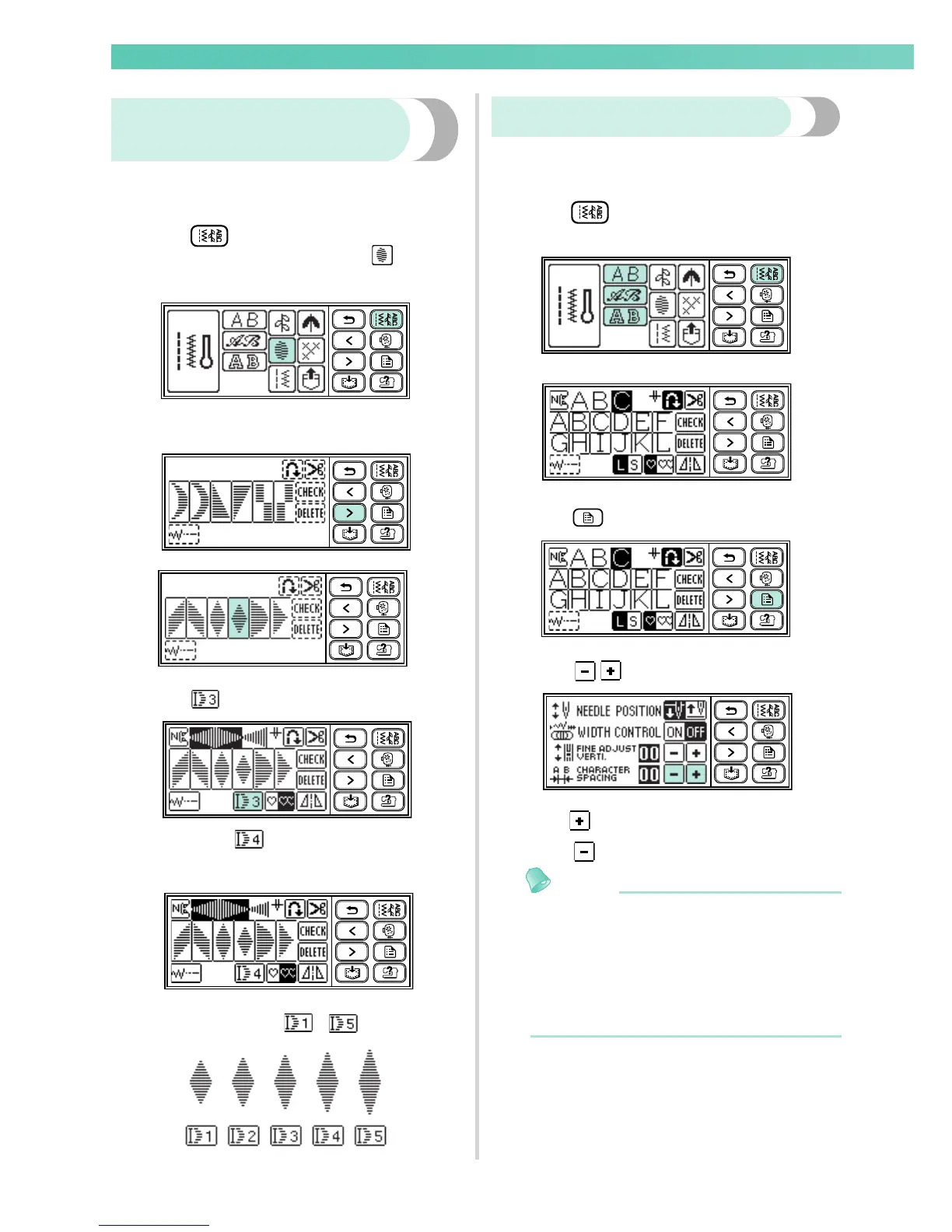
Changing the length for satin
stitches
The length for one satin stitch can be changed in five
gradations.
Press (Utility stitch key) on the
operation panel, and then select (Satin
stitch).
Select a satin stitch pattern.
Press .
X It turns to and the pattern becomes
longer.
Each time you press it, the number changes.
You can select from - .
Adjusting the character spacing
The space between alphanumeric characters can be
adjusted.
Press (Utility stitch key) on the
operation panel, and then select characters.
Press for character spacing.
Press to increase the character spacing.
Press to decrease the character spacing.
Memo
z The default setting is "00". The number less
than "00" cannot be set.
You can select from 00 to 10.
z The result of adjusting the character spacing
is valid for all characters. The result is valid
not only while entering characters, but also
before and after entering characters.










 To Next Page