Using the Memory Function 165
4
— — — — — — — — — — — — — — — — — — — — — — — — — — — — — — — — — — — — — — — — — — — — — — — — — — — —
Transferring embroidery patterns from
the computer to USB media/Retrieving
embroidery pattern from USB media
Embroidery patterns can be transferred from a
computer to the machine by using a USB media.
Follow the procedure below.
Prepare embroidery data on the computer by
observing the precautions of "Embroidery data
precautions" (page 163 to 164).
Note
z Be sure to read the all precautions of
"Embroidery data precautions" (page 163 to
164) and observe them. Otherwise, the
pattern files may not be retrieved into the
machine correctly.
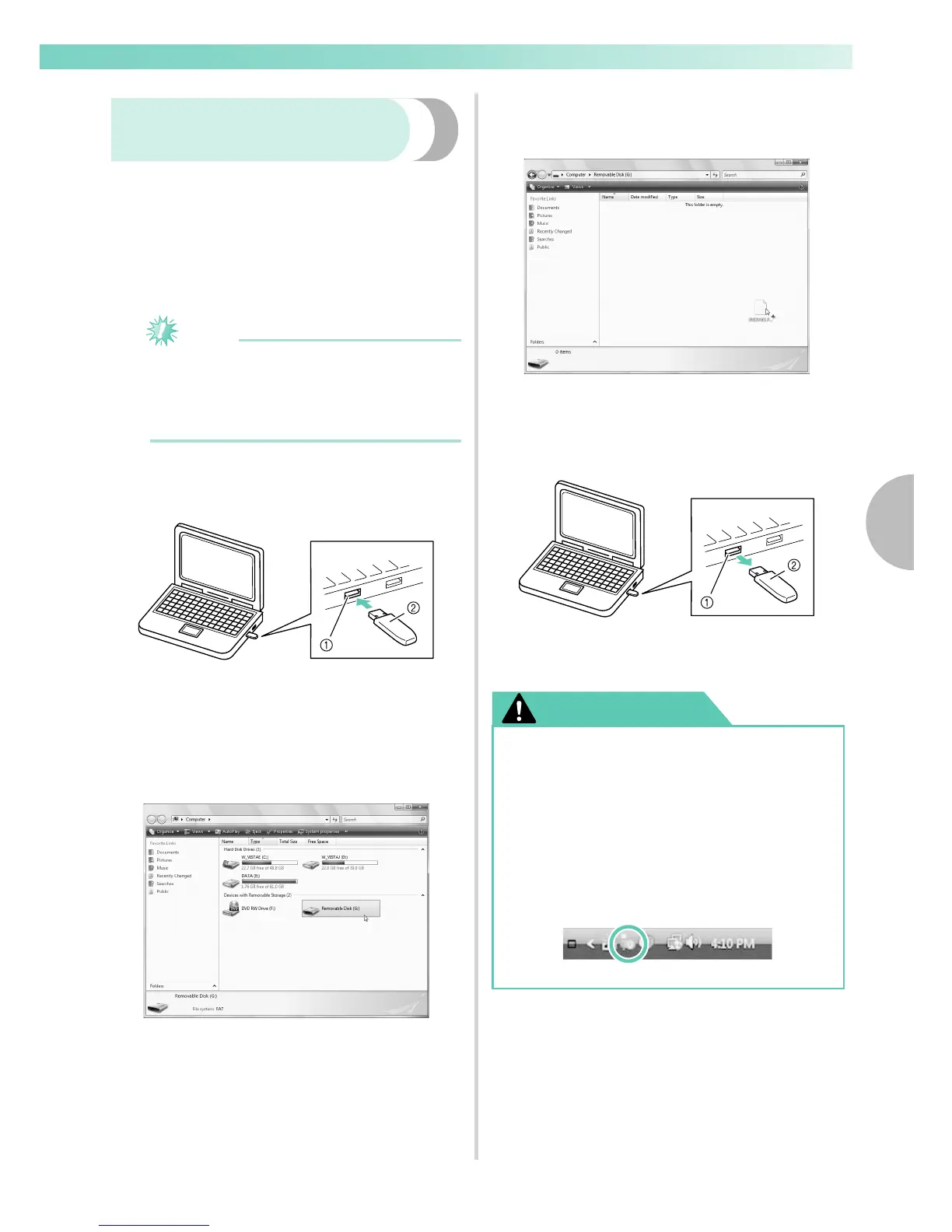
Insert the USB media into the USB port on the
computer.
a USB port on the computer
b USB media
The “Removable Disk” icon appears in
“Computer (My computer)” on the computer.
Copy the embroidery data (folders and/or
pattern files).
Safely remove the USB media from the USB
port on the computer. (Refer to “Caution”
below. )
a USB port on the computer
b USB media
CAUTION
● Before disconnecting the USB media,
click the “Safely Remove Hardware” icon
in the taskbar of Windows
®
XP/Windows
Vista
®
/Windows
®
7.
Then, when the removable disk can safely
be removed, disconnect the USB media
from the computer.
In case of Windows Vista
®










 To Next Page