Selecting Embroidery Patterns 149
4
— — — — — — — — — — — — — — — — — — — — — — — — — — — — — — — — — — — — — — — — — — — — — — — — — — — —
Selecting an embroidery
pattern
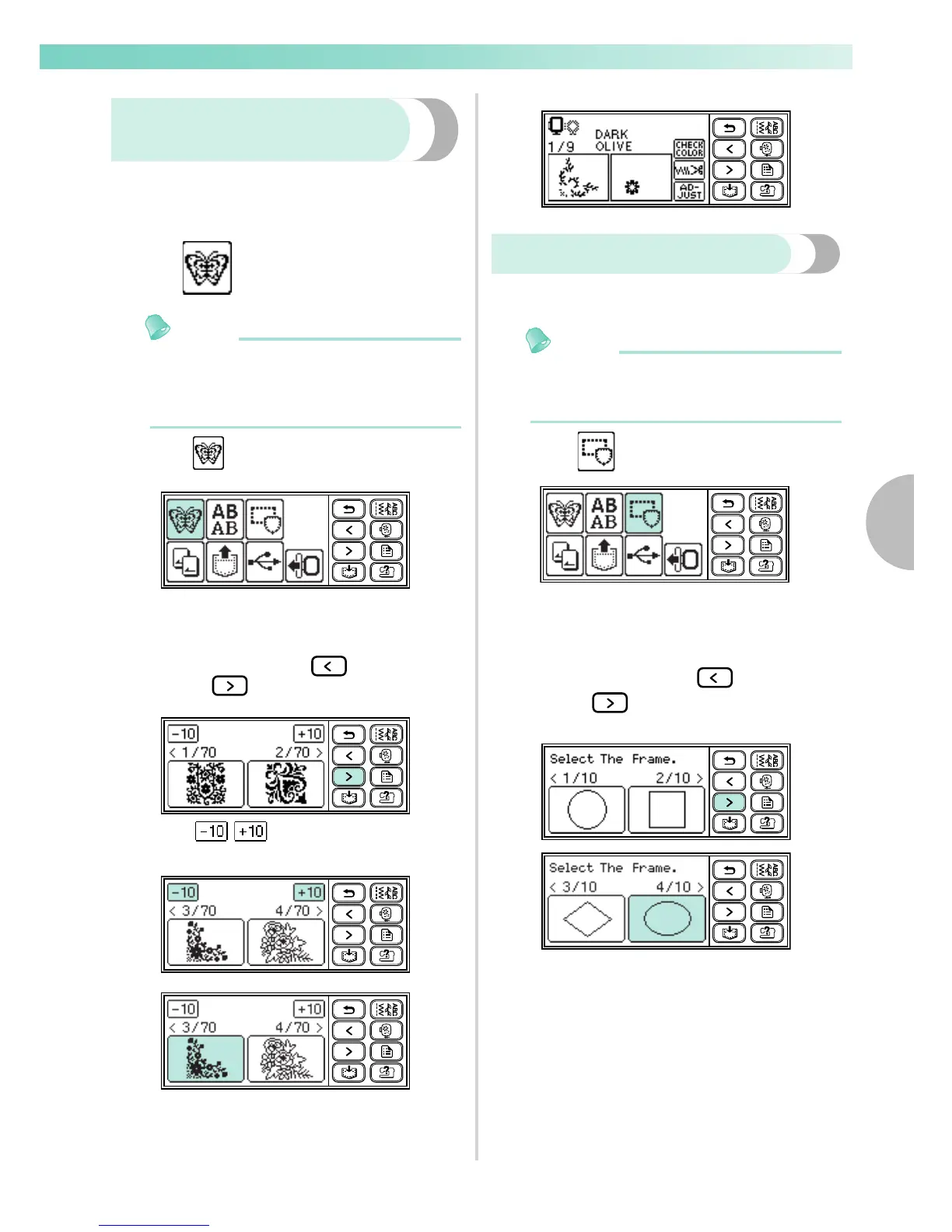
There are 70 embroidery patterns, such as flowers
and animals, saved in the machine's memory.
Memo
z Refer to "Embroidery Pattern Color Change
Table" in the Quick reference guide for
samples of completed patterns and the
thread used.
Press .
X The pattern selection screen is displayed.
Select the pattern.
Switch the screen using (Previous page
key) and (Next page key).
When / is pressed, the display of
patterns moves backward/forward 10 patterns.
X When a pattern is selected, it can be
embroidered.
Selecting a frame pattern
10 shapes, such as squares and circles, can be
combined with 12 stitch types.
Memo
z Refer to "Frame patterns" in the Quick
reference guide for frame pattern shapes and
stitches.
Press .
X The frame shape selection screen is
displayed.
Select the frame shape.
Switch the screen using (Previous page
key) and (Next page key), and select
from the 10 types.
X The stitch selection screen is displayed.
70 Embroidery patterns










 To Next Page