3
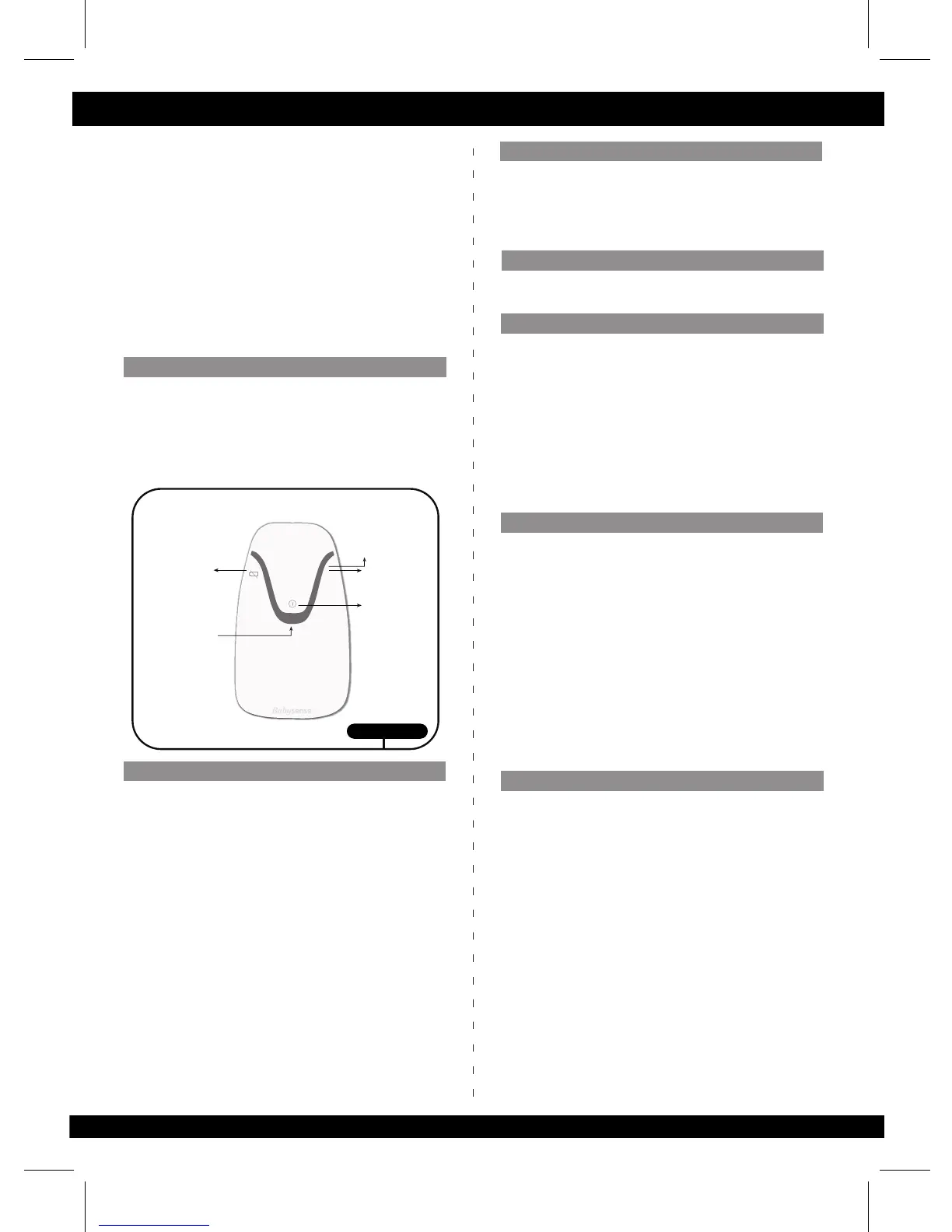
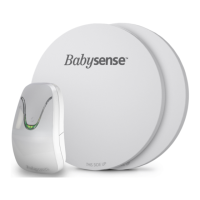
See illustraon 8 for layout of control unit featuring:
• On/Off buon.
• Green movement indicator light.
• Acousc and visual red alarm light.
• Low baery red warning light.
• Yellow shutdown indicator light
Babysense is ready for operaon and use once the
installaon is completed. To operate, follow the below
instrucons:
• Place your baby in crib/bed.
• Turn control unit on by pressing On / Off buon.
• Make sure red control lights switch on briefly and a
DOUBLE click sound is heard.
• When any movement is sensed, the green
light flashes.
• Acousc and visual red alarm light are acvated if
the baby's movement stops or slows significantly.
• If red low-baery warning light flashes, replace all
baeries as soon as possible. If in addion clicking is
heard, all baeries must be replaced immediately.
• Turn off by pressing On / Off buon before taking
your baby out of crib / bed. Make sure the Yellow
shutdown indicator light momentarily blinks and no
other lights are seen thereaer to indicate the device
is turned off.
Due to the high sensivity of Babysense, fans, wind, air
condioning, and so forth can influence it. Such
environmental effects could be picked up by the sensors
on a similar level to that of slight movements, thus
prevenng or delaying alarm acvaon.
If the Babysense is concurrently used with other devices,
it is required to conduct the daily performance test
(below) under an environment idencal to the actual
situaon and while all concurrently used devices are
"ON". Under such condions, it is required to verify that
the acousc and visual alarms of Babysense are acvated.
Do not conduct performance test by picking up baby
out of bed and waing for the alarm to sound
• The performance test should be conducted while baby
is not in bed.
• Turn device on and take two steps away from bed.
• Ensure that alarm goes off within 20 seconds (due to
absence of movement).
• The alarm may sound with or without preliminary cking.
• Check that alarm can be heard in all locaons
throughout the home or place of care.
• In case that alarm does not sound within 20 seconds
refer to troubleshoong on page 4-5.
• Performance test must be conducted daily and every
me you move the monitor, change bedding or
relocate crib/bed posion.
Isolated cases of false alarms are possible. Check if
caused by faulty connecon of the sensor pad(s) to the
control unit, connecon of only one sensor pad when
baby can move off the immediate area or failure of the
sensor pads to be directly against the maress.
In case of false alarms, kindly refer to troubleshoong
guide on page 4-5. If the problem cannot be solved,
please contact manufacturer’s service personnel.
Layout of control unit
Operaon
Environmentally caused malfuncon
Conduct this performance test daily
False alarms
Illustraon 8
Green movement
movement
indicator light
Red
alarm light
Red low baery
warning light
Hidden On/O
power buon
3
User Guide
Yellow shutdown
indicator light
8. Press control unit holder or hanging hook firmly into
slot in back of control unit (see illustraon 4 and 5).
9. Place maress firmly on top of sensor pads. If the
maress cannot be in contact with the sensor pads, or if
the bed base is so, padded or contains springs, place
extra plywood on the bed base, place the sensor pads on
the plywood and place the maress firmly on top.
IMPORTANT: To avoid possible danger from sensor
cords, ensure that excess cords are pulled back under
the maress, secured with the included cable e and
are not visible or reachable.
Tesng Operaon
Technical malfuncon
Babysense is a highly sensive device, which monitors a
baby's moon and movements through the maress
during sleep. There are two main causes of malfuncon -
technical malfuncons and malfuncons due to
environmental factors.
In order to minimize technical problems, follow
installaon and operaon instrucons carefully.


 To Next Page