Need help?
Do you have a question about the Baccara G75 and is the answer not in the manual?
Details the controller's key functionalities including cycle operation, battery power, and weather resistance.
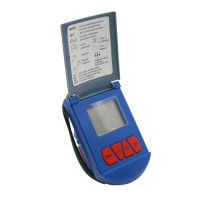
Lists and illustrates the various components of the G75 Irrigation Window Controller for user reference.
Explains the primary functions of the MODE and SET buttons for operating and navigating the controller.
Provides step-by-step instructions for installing the irrigation controller, including faucet and water flow setup.
Instructions on how to manually activate or deactivate the irrigation cycle using the controller's buttons.
Provides a table for recording irrigation settings and an example scenario for setting up the controller.
Explains the symbols displayed on the controller screen, aiding in understanding its status and functions.
Detailed steps for setting the current time and day of the week, a prerequisite for programming the controller.
Explains how to set the start and end times for the irrigation period, defining the overall window of operation.
Guides users on programming the ON (irrigation) time and OFF (interval) time between cycles.
Instructions for choosing specific days of the week on which the irrigation program should operate.
A practical example demonstrating how to program the controller for a specific scenario, like cooling a chicken coop.
Step-by-step guide for replacing the controller's battery, including removal of the cover and seal.
Guidance on how to set the controller to OFF mode during non-irrigation seasons to conserve battery life.
Lists common problems, their causes, and solutions for issues like blank display or non-operation.
Details the warranty terms, coverage limitations, and procedures for obtaining guarantee benefits.
Provides factory and head office contact details including phone, fax, email, and website for support.
 General
| Manufacturer | Baccara |
|---|---|
| Zones | 4 |
| Velocity Sensitivity | Yes |
| Faders | 9 |
| Transport Controls | Yes |
| Pitch Bend | Yes |
| Modulation Wheel | Yes |
| Type | MIDI Controller |
| Pedal Inputs | Sustain |
| MIDI I/O | USB, MIDI Out |

 To Next Page