6
BF-UM-C-DP C010.CN-EN June 2024
(Note: The headlight can be automatically
switched according to the ambient light,
but the auto light function fails once user
manually switches the headlight on/off.
After restarting the HMI, the function works
again.)
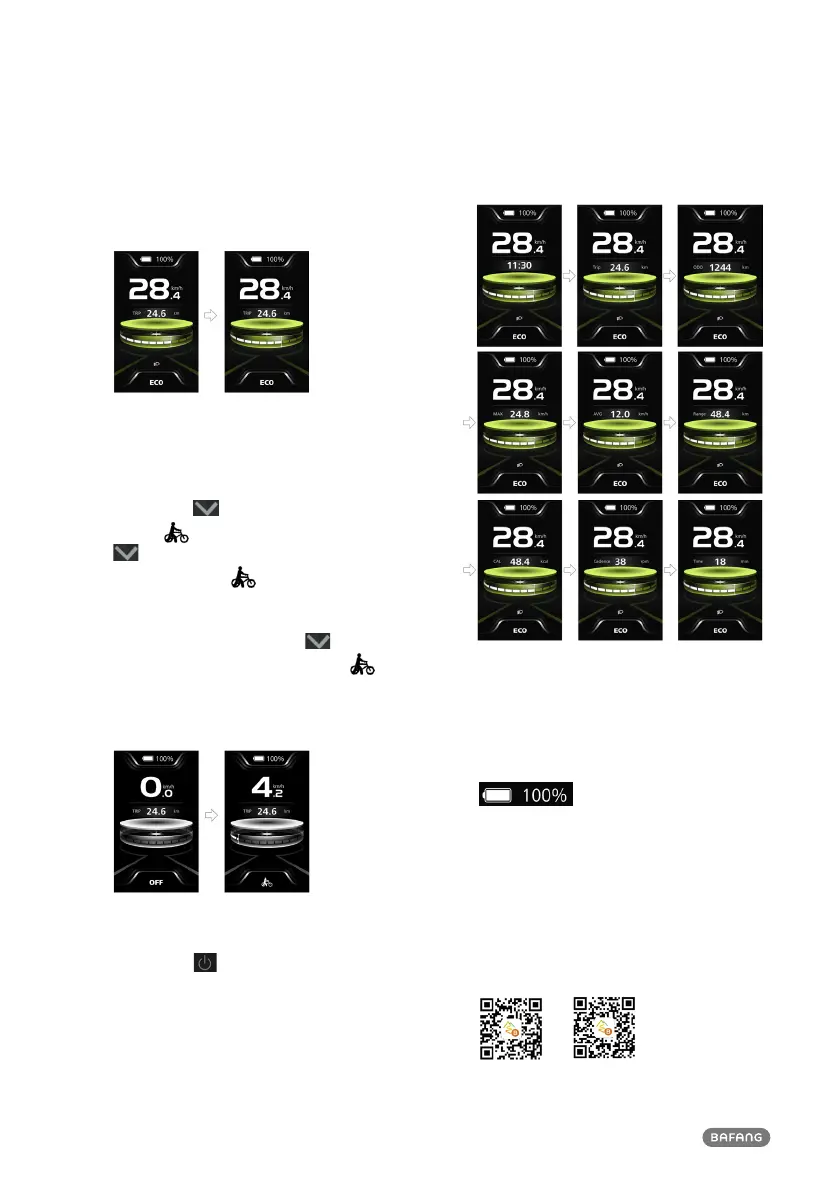
7.6.4 Walk Assistance
Note: The walk assistance can only be acti-
vated with a standing e-bike.
Briefly press button (<0.5S) until this
symbol appears. Next keep pressing the
button until the walk assistance is
activated and the symbol is flashing.
(When the real-time speed is less than
2.5km/h, the speed indication is shown as
2.5km/h.) Once releasing the button, it
will exit the walk assistance and the
symbol stops flashing. If no operation within
5s, the HMI will automatically return to
mode OFF.
7.6.5 Multifunction Selection
Briefly press button (<0.5S) to switch the
different function and information.
The position of multifunction indication
displays the real-time clock (Clock) → single
trip distance (TRIP, km) → total distance
(ODO, km) → maximum speed (MAX, km/h)
→ average speed (AVG, km/h) → remaining
distance (Range, km) → energy consumption
(CAL, kcal) → riding cadence (Cadence, rpm)
→ riding time (Time, min) → cycle.
7.6.6 Battery Indication
HMI displays the real-time battery capacity
from 100% to 0%. When the SOC is less
than 5%, the indicatior will blinks at a fre-
quency of 1 Hz to alert to recharge.
7.6.7 Bluetooth
This HMI is equipped with OTA function,
which can update the firmware of HMI,
controller, sensor and battery through the
Bluetooth.
This HMI can be connected to the Bafang
Go+ APP through Bluetooth.
(BAFANG GO+ for Android
TM
and iOS
TM
)



 To Next Page