9
BF-UM-C-DP C010.CN-EN June 2024
USER MANUAL FOR DISPLAY
7.7.1.5 “Modes” Set the power-assisted
modes
Briefly press the or button (<0.5S)
to enter the "Modes" setting, and briefly
press the button to select "4 Modes" or
"6 Modes".
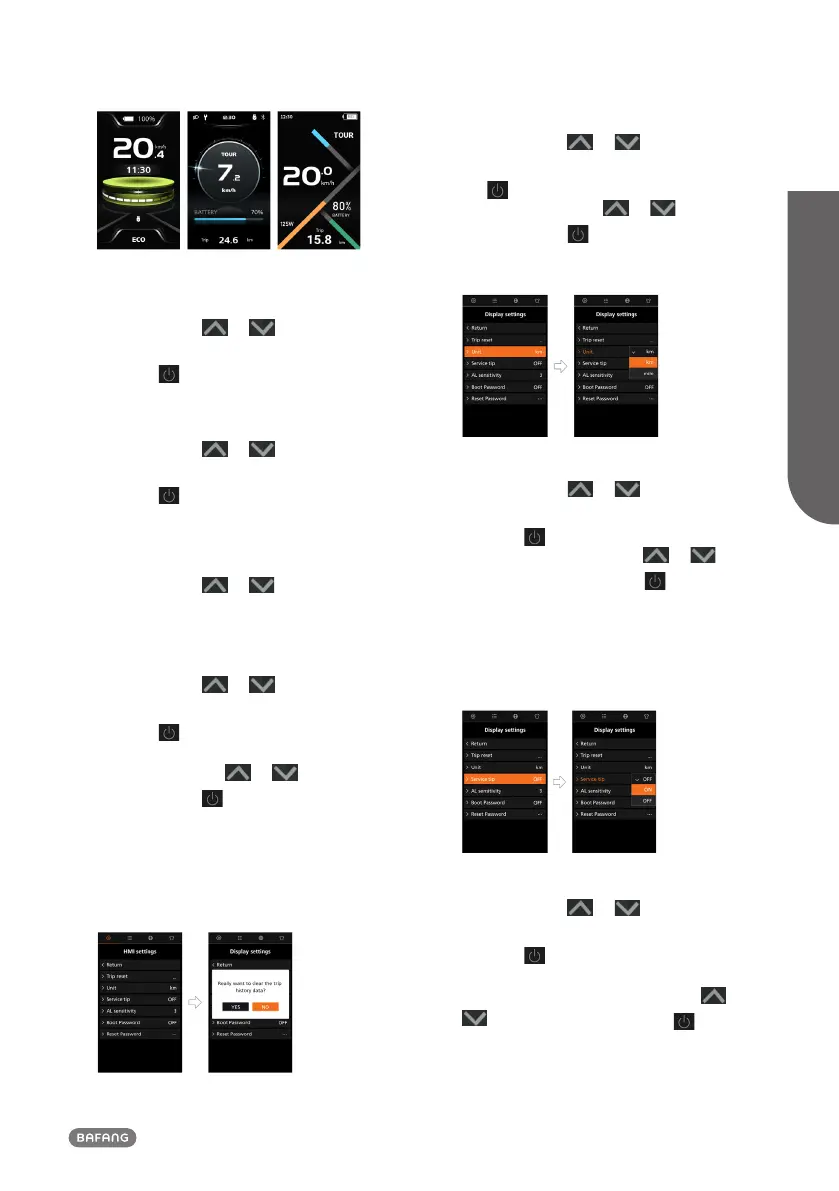
7.7.1.6 “Trip reset” Reset the single-trip
Briefly press the or button (<0.5S)
to enter the "Trip reset" setting, and briefly
press the button to select "YES" or "NO".
7.7.2 “Display settings” Interface
When you in the "Quick settings" interface,
briefly press the or button (<0.5S)
to select the "OTHERS" and enter the
"Display settings" interface.
7.7.2.1 “Trip reset” Reset the single-trip
Briefly press the or button (<0.5S)
to select the “Trip reset” item, and briefly
press the button to enter the item. Then
select “YES”/“NO” (“YES”- to clear, “NO”-no
operation) with the or button and
briefly press the button (<0.5S) to save
and exit back to the "Display settings"
interface.
Note: The riding time (Time), average speed
(AVG) and maximum speed (MAX) will be
reset simultaneously when you reset TRIP.
7.7.2.2 “Unit” Select the mileage unit
Briefly press the or button (<0.5S)
to select the “Unit” item, and briefly press
the button to enter the item. Then select
“km”/“mile” with the or button and
briefly press the button (<0.5S) to save
and exit back to the "Display settings"
interface.
7.7.2.3 “Service tip” Set the service tip
Briefly press the or button (<0.5S)
to select the “Service tip” item, and briefly
press the button to enter the item. Then
select “ON”/“OFF” with the or
button and briefly press the button
(<0.5S) to save and exit back to the "Display
settings" interface.
Note: The default setting is OFF. If the ODO
is more than 5000 km, the "Service tip"
indication will flash.
7.7.2.4 “AL Sensitivity” Set light sensitivity
Briefly press the or button (<0.5S)
to select the “AL sensitivity” item, and briefly
press the button to enter the item. Then
select the level of the light sensitivity as
“OFF”/“1”/ “2”/“3”/“4”/“5” with the or
button and briefly press the button
(<0.5S) to save and exit back to the "Display
settings" interface.



 To Next Page