11
DISPLAY MANUAL DP C171.UART
After this setting, briefly press (< 0.3
seconds) to enter the setting interface of
backlight brightness.
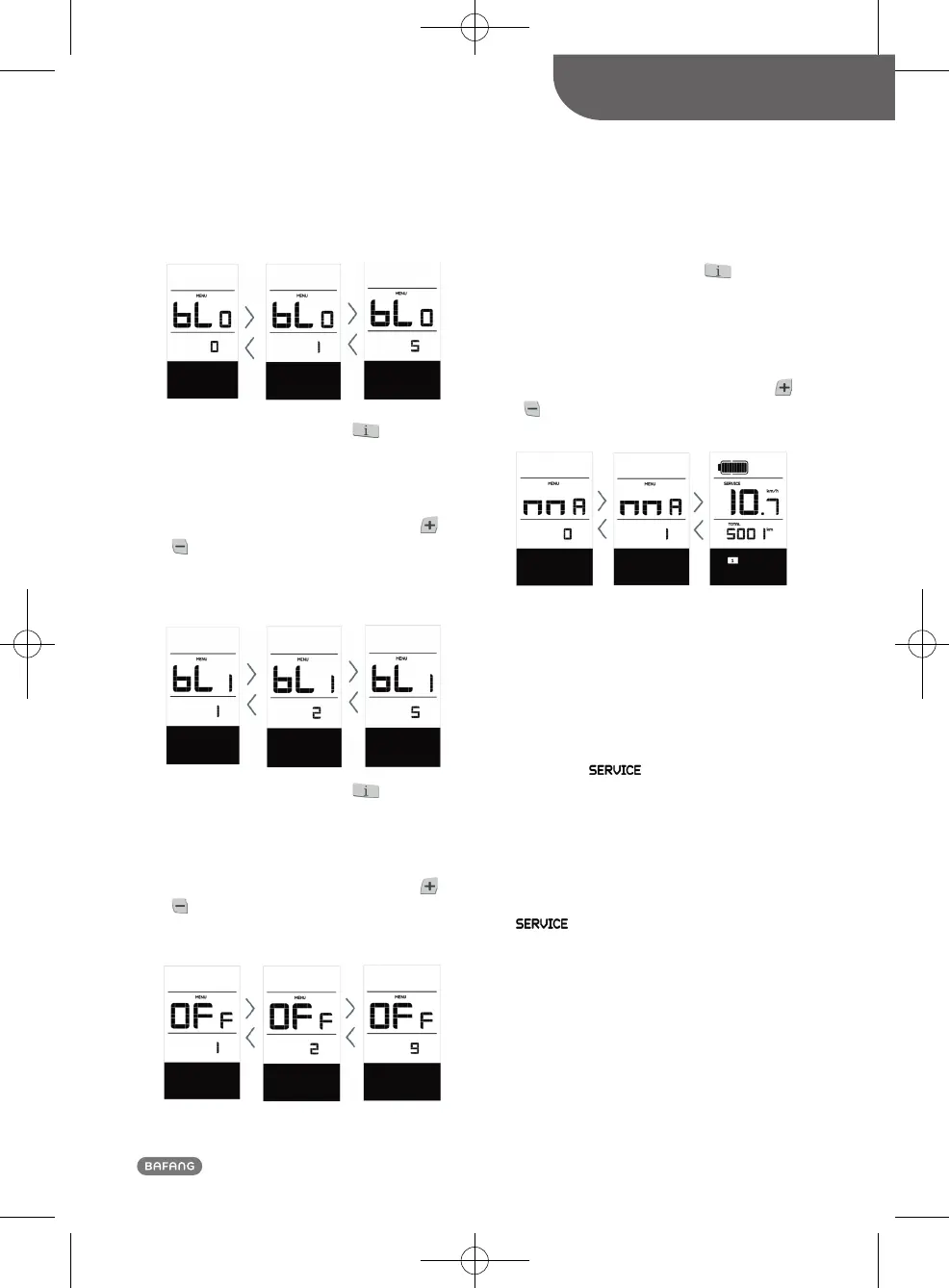
• Display Backlight Brightness
When the speed field displays bL1, press
/ to choose a figure between 1 and 5.
The figure 1 represents the lowest brightness
while 5 indicates the highest display back-
light brightness.
After this setting, briefly press (< 0.3
seconds) to enter the setting interface of
automatic off time.
• Automatic Off Time
When the speed field displays OFF, press
/ to choose a figure between 1 and 9.
The figures indicate the minutes that it takes
to automatically shut down the display.
After this setting, briefly press (< 0.3
seconds) to enter the setting interface of
maintenance warning.
• Maintenance Warning (can be deacti-
vated)
When the speed field displays nnA, press
/ to choose either 0 or 1. 0 disables the
function while 1 enables it.
1) The display will prompt maintenance
necessity based on such information as the
accumulated riding distance and the battery
charge cycles.
2) When the accumulated total riding dis-
tance exceeds 5,000 km (can be customized
by the manufacturer), the display will show
the symbol
. When the display is
started up, the sign for accumulated riding
distance will flash for 4 seconds, indicating
that maintenance is necessary.
3) When the number of battery charge cy-
cles exceeds 100 (can be customized by the
manufacturer), the display will the symbol
. When the display is started up,
the sign for battery will flash for 4 seconds,
indicating that maintenance is necessary.
4) The maintenance alert function can be
disabled: settings ->maintenance alert (MA)
-> 0. (Maintenance alert can also be set via
a computer. This requires a USB connection.
See also the parameter setting instructions).
PARAMETER SETTING












 To Next Page