35
BF-DM-C-DP E10-EN November 2019
DEALER MANUAL FOR DISPLAY
7.3 PRODUCT DESCRIPTION
7.3.1 Specifications
• Operating temperature: -20℃~45℃
• Storage temperature: -20℃~50℃
• Waterproof: IP65
• Storage room Humidity: 30%-70% RH
7.3.2 Functional Overview
• Battery capacity indicator
• Indication of performance support
• Walk assistance
• Automatic sensors explanation of the light-
ing system
• Indication for error messages
• USB port for charging
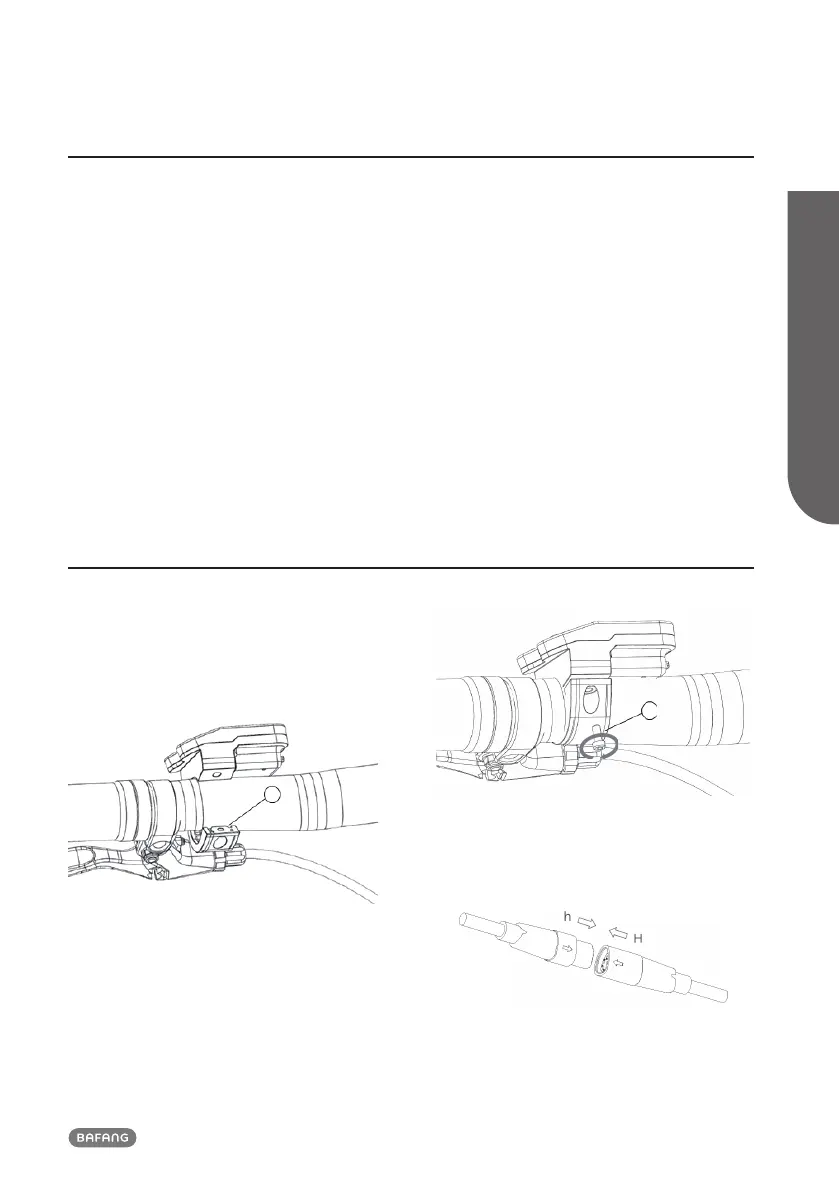
7.4 DISPLAY INSTALLATION
1. Open the clamp A on the display and
place the display on to the handlebar
in the correct position, where it is
suitable for operation (the applicable
handlebar are ∮22.2mm).
A
2. With the screw B (M1.5*6 hexagon socket
screw) tighten the display into position,
torque requirement: 1N.m.
B
3. Please link the display to the EB-BUS cable.
h: male connector at the display.
H: female connector at the EB-BUS.













 To Next Page