4
BF-DM-C-DP C10-EN November 2019
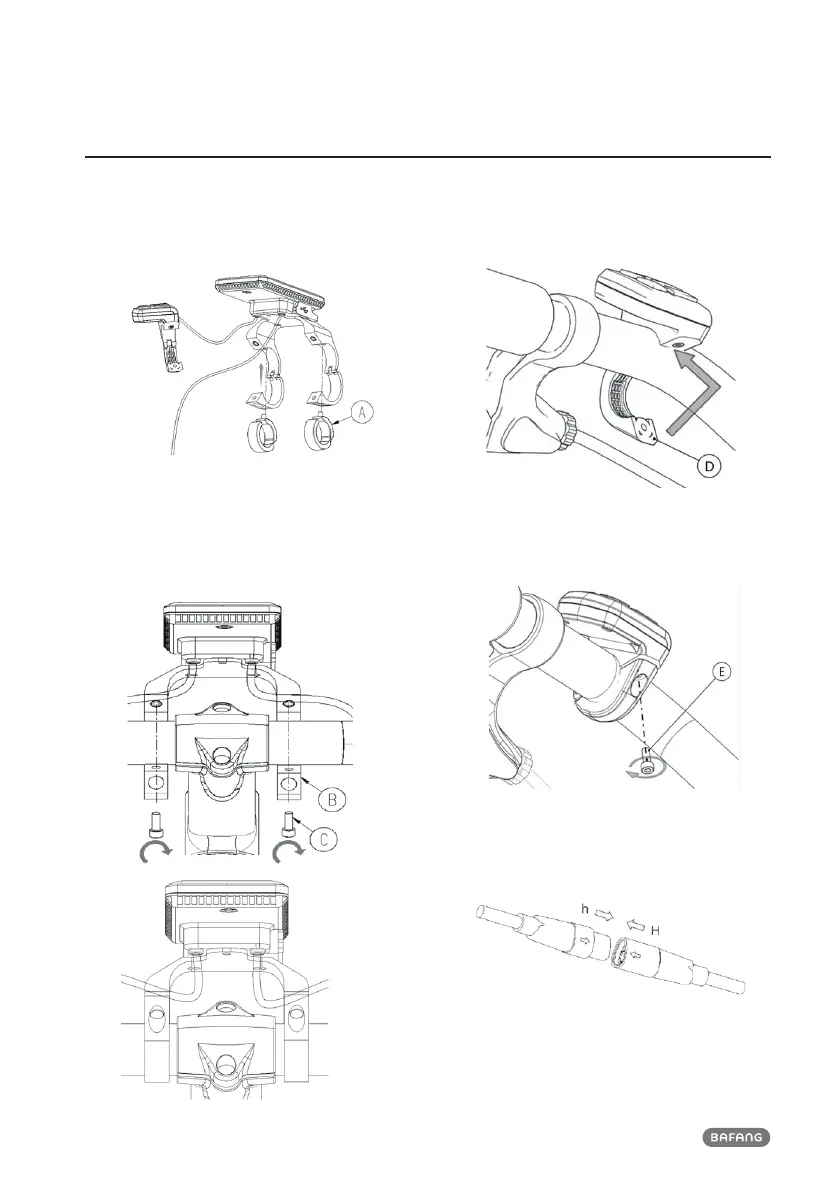
7.4 DISPLAY INSTALLATION
1. Open the clamps of display and insert
the rubber rings A on the handlebar.
(it is suitable for handlebar ∮22.2 or
∮31.8)
2. Now place the display on to the handlebar
in the correct position, with two M4*8
screws (C), tighten the display (B the
clamps) into position. Torque requirement:
1N.m.
3. Open the clamp (D) on the controller pad
and place it in the correct position (it is
suitable for handlebar: ∮22.2).
4. Using a M3*10 screw (E) tighten the
controller pad onto the handlebar. Torque
requirement: 1N.m.
5. Please link the d isplay to the EB-BUS cable.
h: The male connector from display.
H: The female connector from EB-BUS.













 To Next Page