7
BF-DM-C-DP C10-EN November 2019
DEALER MANUAL FOR DISPLAY
7.7.3 Selection mode
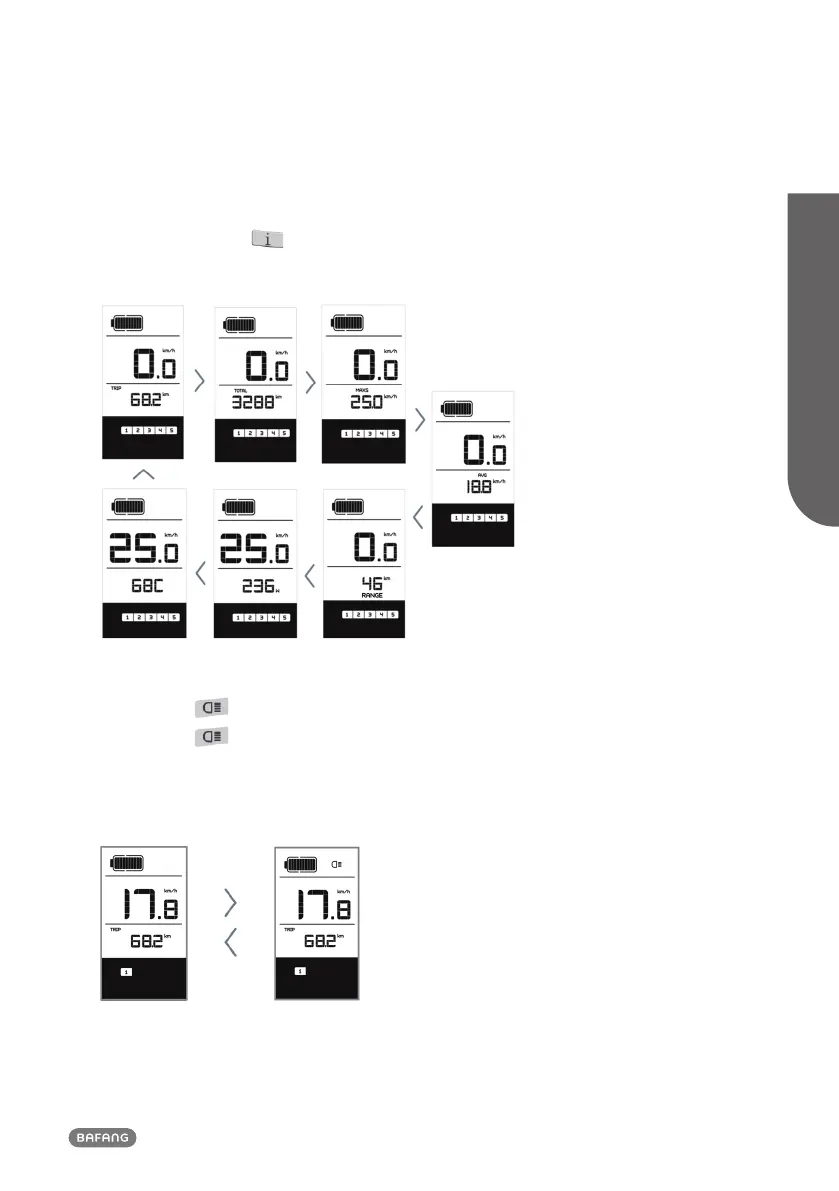
Briefly press (<0.5s) the button to see the different trip modes. Trip: daily kilometers (TRIP) - to-
tal kilometers (TOTAL) - Maximum speed (MAXS) - Average speed (AVG) - Remaining distance
(RANGE) - Output power (W) - Energy consumption (C (only with torque sensor fitted)).
7.7.4 Headlights / backlighting
Hold (>2S) the button to activate the headlight and taillights.
Hold (>2S) the
button again to turn off the headlight. The brightness of the backlight can be
set in the display settings "Brightness". (If the display /Pedelec is switched on in a dark environment,
the display backlight/headlight will automatically be switched on. If the display backlight/headlight
has been manually switched off, the automatic sensor function is deactivated. You can only turn on
the light manually after switching on the system again.)













 To Next Page