67
THE SOLAR PANEL
During the normal charging process, the device
divides the charging current between battery
1 and battery 2 as set. Once battery 1 is fully
charged, all the charging current is fed to
battery 2, regardless of the set value. If the
voltage of battery 1 drops, the charging process
starts again. If only battery 1 is connected,
the entire charging current is supplied to this
battery regardless of the set value.
PWM CHARGING FREQUENCY
The pulse frequency of the device can be set
here. This may be changed to reduce possible
interferences.
QUERY
• Press (T) until LED H5 illuminates; the
saved value is shown in display H6.
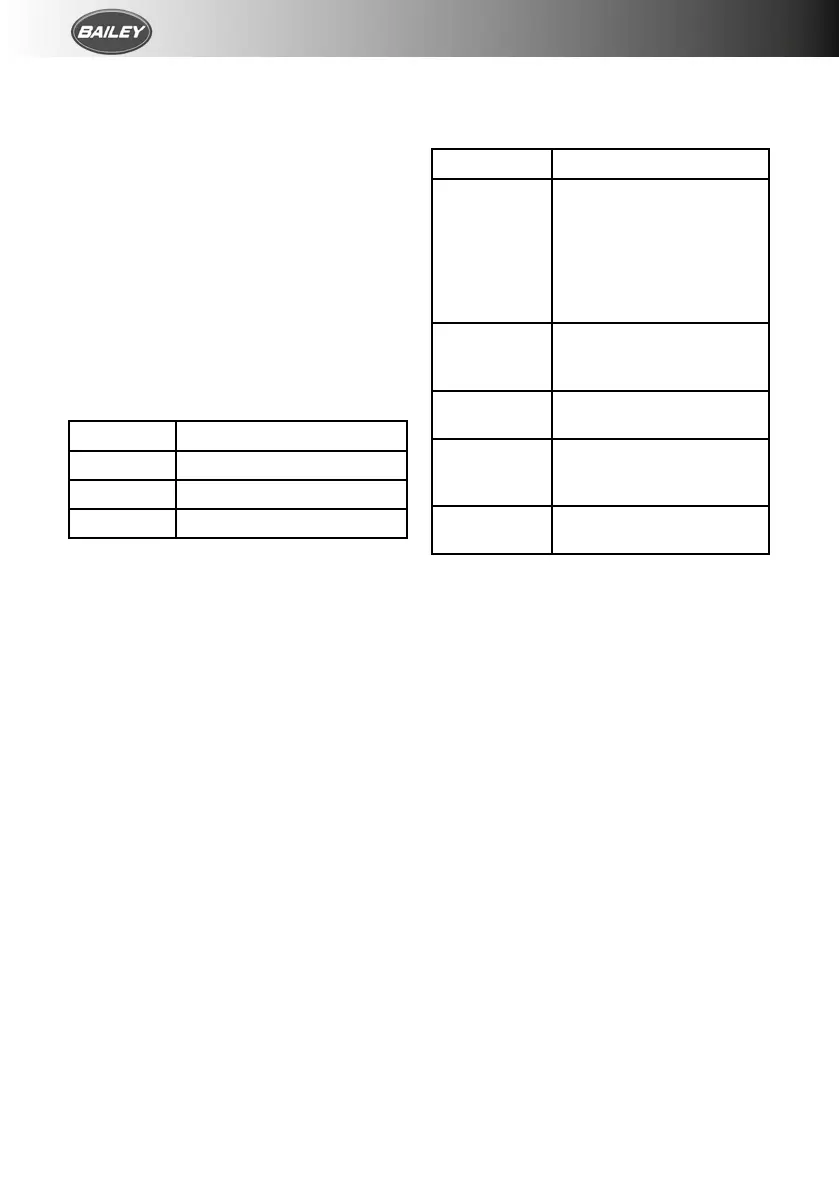
DISPLAY H6 PWM CHARGING FREQUENCY
0 25Hz (pre-setting)
1 50Hz
2 100Hz
Change
• Press key (T) for 5 seconds until the display
H6 flashes.
• Press the key (T) to set the required value.
• If the key is not pressed for 5 seconds, the
displayed value will be saved and flashing
stops.
FUNCTION DISPLAY / TROUBLESHOOTING
LED H2 shows the status of battery 1.
Battery 2 double the values of the 12v- to work
out the 24v values
DISPLAY CAUSE/RECTIFICATION
LED flashes Check connections from
the device to the battery
and solar module, ensure
that they are connected to
the right terminals. Test
the fuse, solar module and
battery
LED flashes
in longer
intervals
Battery is fully charged
LED shines The battery is being
charged
LED flashes in
short intervals
The battery is not being
charged. If necessary,
replace faulty battery
LED does not
shine
Battery not connected or
over-voltage
If this does not solve the problem, please
contact the Truma Service.
REPAIRS
Do not repair or modify the solar panel. Please
contact your retailer or the Truma Service.
CAUTIONS
• Liquid electrolyte batteries can create
explosive gases, so ensure there is
adequate ventilation.
• Check the liquid level at regular intervals.
Overcharging can damage your battery;
check the technical data for your battery.
• Equalisation charging increases the
charging voltage; this may damage the
consumer. Ensure that all consumers are
designed for these voltages.



 To Next Page