58
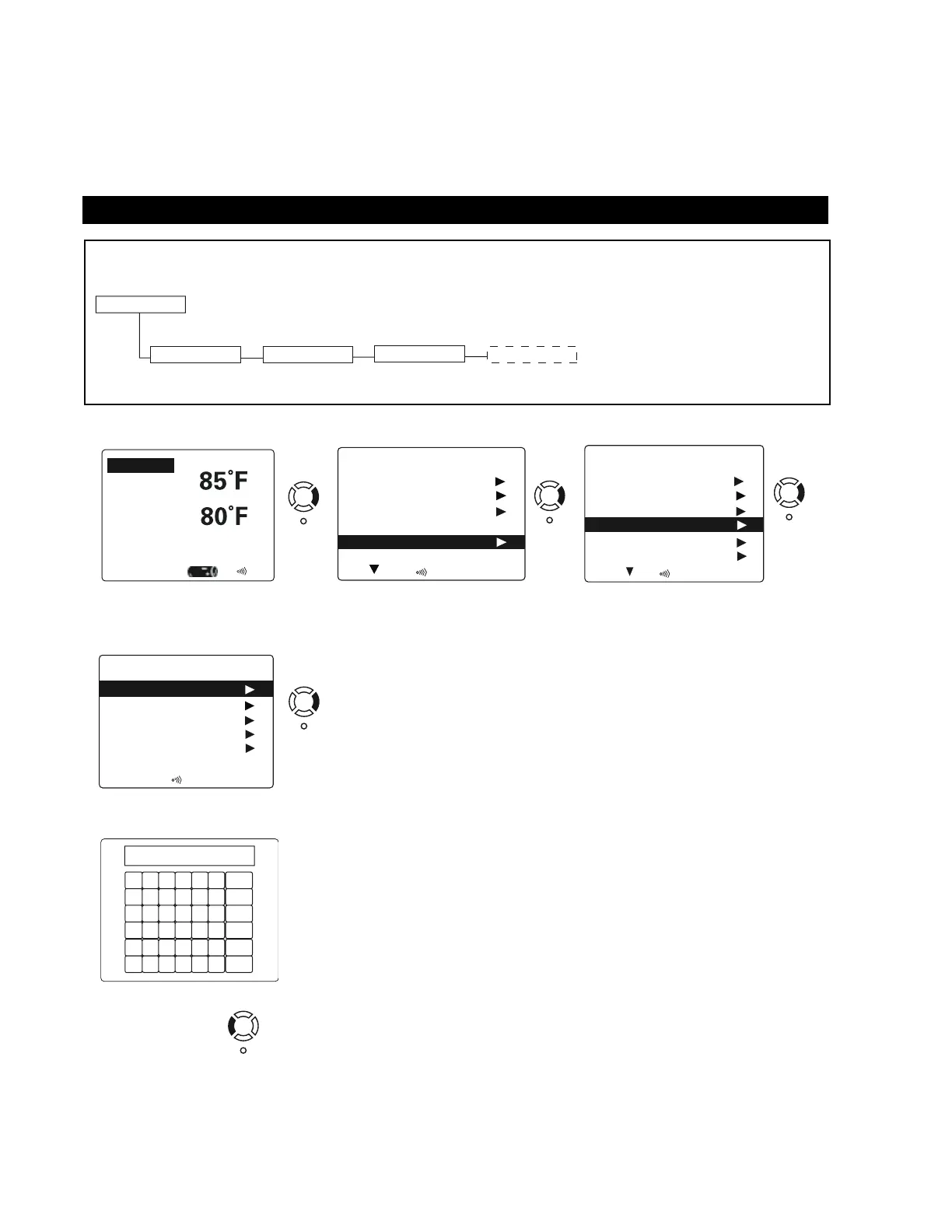
RENAMING DEVICES AT-A-GLANCE
Renaming Devices
Mode Pool
Pool Light
Spa Light
Filter Pump
Heater
Pool Temp
Air Temp
10/09/06 Pool Set 80F
Monday 12:42 PM
Alert / Error
(Display Screen)
1
5
Left Arrow to Exit.
A
G
M
S
Exit
ABC
Save
Clear
Back
B
H
N
T
C
I
O
U
D
J
P
V
E
K
Q
W
F
L
R
X
Y
5
Shift
Space
Z
6
1
7
2
8
3
9
4
0
Arrow to the chosen letter, then press
Select. Continue until the completed new
name for the Device is in the top window.
Arrow to “Save,” then press Select.
Display will revert to Device Control
screen with new name displayed.
2
Main Menu
Device Control
Scenes / Timers
Heater
ModeModeodessfgsfs Pool P
Setupode
Vacation Mode
Off
3
Right Arrow to Rename Device.
Setup
Filter Cycles
Panel LEDs
Wireless Setup
Reorder Devices
Day andTime
Rename Devices
4
Rename Devices
Pool Light
Spa Light
Heater
Aux Device 1
Filter Pump
In Rename Device, scroll to the
available device and Arrow Right.
Setup
Keyboard Screen
Main Menu
Rename Devices
(Choose Device)
RENAMING DEVICES
Devices can be renamed to personal preference. For instance, Aux Device 1 can easily be renamed “Waterfall” and will
then be shown that way on the control. Names are stored in the main control system.


 To Next Page